Convert all Objects to Curves Macro: It converts text or shape objects to curves from any layer, page or all pages. It can also convert objects into curve from Powerclips.
Download Convert Text and Objects to CurveHow to use Convert All Text and Objects into Curves Macro
- Download Macro from the above link.
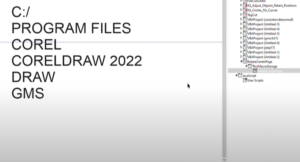
- Now Install it to CorelDraw. There are two ways to do so. Via CorelDraw inbuilt macro manager or direct pasting to GMS folder. If you don’t know how to install a macro.. visit this link to learn how to install a macro.
- Now from the macro manager expand AllObjectToCurve to find AllObjToCurve as shown below.
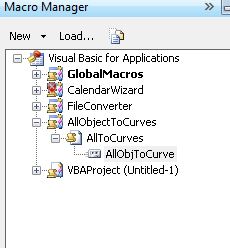
- Double click to run.
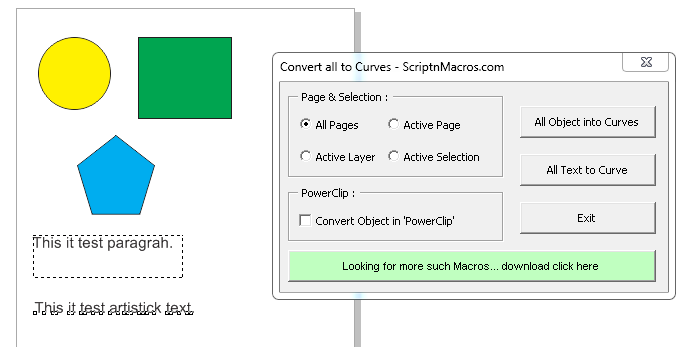
- Now select whatever option you want i.e. All pages <> Active page <>Active Layer <> Active Selection.
- If you want to convert all object (Text and shapes) to curve click on All Object into curves or for Text only click on All Text into Curve.
For visual steps watch this video below :
For any suggestion or any feature please use our forum section…
Hope this macro fullfills what you are looking for. Now, how about some more macros for CorelDraw, which will just not only enhance your productivity, but also makt things easier for you.
- Best Macro for Coreldraw Powerclip Editor – Crop and manage images easily
- QR Code Wizard Macro for CorelDraw
- Edit Bitmap Files from CorelDRAW 2024 to Photoshop Using VBA Macro
- Convert Text and Objects to Curve – CorelDraw Macro
- Guides and Crop Marks Maker – CorelDraw Macro
- Convert Text into Curves – CorelDraw Macro
Visited 1,190 times, 7 visit(s) today









Download option not working for Convert all Objects to Curves Macro
I need this macro but I click the download button and I wait 15 seconds but file not download pls send file in my mail ID – gunasekaranmca7@gmail.com