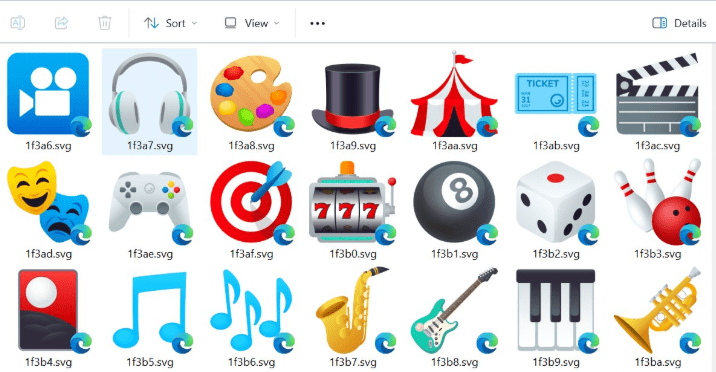
Anyone who works with graphics, icons, UI design, coding, or creative tasks eventually encounters SVG files. They’re lightweight, infinitely scalable, and perfect for modern design workflows. But Windows itself has always struggled with them — especially inside File Explorer.
Instead of showing a thumbnail preview, Explorer shows a blank icon.
To actually see the SVG, you must open it in a browser like Edge or Chrome.
Microsoft never added native SVG thumbnail support to Windows, and while third-party tools exist, they come with their own problems. Some rely on heavy libraries, some are outdated, and others — like the preview handler inside PowerToys — are simply too slow for real-world use.
That’s where a new solution enters the picture: a fast, lightweight SVG thumbnail handler built in Rust, using no third-party dependencies, relying only on Microsoft’s own APIs. It feels almost like the feature Windows should have included from the beginning.
Let’s walk through why it exists, why it’s better, and how you can install it with a single command.
Why Traditional SVG Thumbnail Extensions Are Slow
Before exploring the new solution, it’s important to understand why Explorer struggles with SVG thumbnails in the first place.
🌱 Intro to This Section
Thumbnail handlers must convert file data into a bitmap for Explorer to show. SVGs are vector-based, meaning they must be rendered into a pixel image every time you open a folder. The challenge is not the SVG itself — it’s how the handler processes it.
Tools like PowerToys technically work, but they take a long detour during rendering. That “roundabout” processing causes delays of up to a full second per thumbnail. One file is fine. But a folder with dozens of SVGs? It becomes nearly unusable.
This is why designers and developers have been searching for a cleaner, faster solution for years.
A Lightweight, Fast, Dependency-Free Solution
After exploring alternatives, one developer decided to take a different approach:
directly use the Windows Direct2D API to render SVGs — the same graphics engine Windows uses internally.
🌱 Why This Matters
Instead of relying on external libraries like Qt 5 or browser engines, this extension uses only:










- Microsoft’s own Direct2D API
- Windows’ native XML tools
- Rust crates published officially by Microsoft
This means:
- No outdated dependencies
- No extra DLLs
- No security concerns from third-party libraries
- High performance with minimal overhead
The entire handler is just a simple DLL — one for 64-bit environments and one for 32-bit. Nothing more.
Even better, during testing, thumbnail generation averaged about 5–7 milliseconds, even at the largest Explorer thumbnail sizes. For users who regularly browse folders full of icons or assets, this speed is transformative.
How to Install the SVG Thumbnail Extension (Two Simple Options)
The extension is available through WinGet, Microsoft’s official package manager — meaning installation is as easy and safe as installing a browser or codec pack.
🌱 Intro to This Section
Windows Explorer will immediately begin generating thumbnails for .svg and .svgz files once the extension is installed. No restart is typically needed.
Option 1 — Install Using WinGet (Recommended)
Open Command Prompt and run:
winget install ThioJoe.SvgThumbnailExtension
This automatically downloads the MSI installer and sets everything up.
Option 2 — Download Manually
Official GitHub releases:
https://github.com/ThioJoe/win-svg-thumbs-rust
Steps:
- Go to Releases.
- Download the
.msiinstaller under Assets. - Run it like a normal Windows installer.
Once installed, Explorer will automatically begin showing SVG and SVGZ thumbnails.
How It Works Behind the Scenes
Even if you never touch programming, the engineering behind this extension is fascinating. It shows how much can be achieved when you rely on Windows’ own APIs instead of heavy external libraries.
🌱 Intro to This Section
Direct2D has partial support for the SVG 1.1 specification, so the extension preprocesses the file before rendering.
The Rendering Process (Explained Simply)
- Windows Explorer asks the DLL for a thumbnail.
- The DLL reads the SVG data from the file stream.
- It looks for
<style>blocks, parses them, and converts them to inline styles. - Direct2D turns the processed SVG into a scalable SVG document.
- A GPU-accelerated bitmap is created at the requested thumbnail size.
- The SVG is drawn onto the bitmap using Direct2D.
- Transparency is fixed through an “unpremultiply” step.
- The bitmap is transferred to GDI (the format Explorer understands).
- Explorer displays the result instantly.
Because everything uses Microsoft’s own graphics stack, performance remains high and security remains tight.
Current Limitations You Should Know
Every solution has boundaries, and this one is no different — though the issues are minor.
🌱 When an SVG May Not Render Properly
- Black Square Thumbnail
- The SVG uses parts of the spec that Direct2D does not support.
- Some SVG fonts behave this way because they don’t describe a single image.
- Red X Thumbnail
- The file is empty, corrupted, or has invalid SVG syntax.
- No Text Rendering
- Direct2D does not support some text glyphs.
These limitations are rare and typically occur in highly complex or unusual SVG files.
Uninstalling the Extension (If You Ever Need To)
You can remove it like any normal application:
Settings → Apps → Installed Apps → Uninstall
If you manually installed the DLL, you can unregister it using:
regsvr32 /u win_svg_thumbs.dll
For Developers: Why This Was Built in Rust
Rust was selected because it allows creating native Windows DLLs without needing a runtime environment like .NET. It also provides memory safety, something that C++ cannot guarantee without extensive manual checks.
Rust’s strong safety guarantees prevent:
- memory leaks
- invalid pointer access
- crashes that could affect Explorer
The result is a stable, fast, and modern thumbnail handler that feels integrated into Windows itself.
Final Thoughts
For anyone who works with SVGs — whether you’re a developer, designer, illustrator, or UI creator — having thumbnails in Windows Explorer saves time and reduces friction. Instead of opening dozens of files blindly, you can visually browse your assets like any other image.
Most available solutions are either slow, outdated, or rely on bulky libraries. But this lightweight Rust-based extension brings speed, security, and simplicity together in a way that feels native to Windows.
With a single command, your entire design workflow becomes smoother.
⚠ Disclaimer
SVG thumbnail extensions modify how Explorer processes image previews. Only install extensions from trusted sources. The extension covered in this article is open-source and published using Microsoft-signed crates, but users should always review repository details before installing third-party software.
#WindowsTips #SVG #RustLang #WinGet #FileExplorer #ThumbnailHandler #dtptips