External SSDs are popular for their speed, portability, and durability. However, buying a pre-built external SSD isn’t always the best choice. In this article, we’ll explore whether you should purchase a ready-made external SSD or build your own for better performance and cost-efficiency.
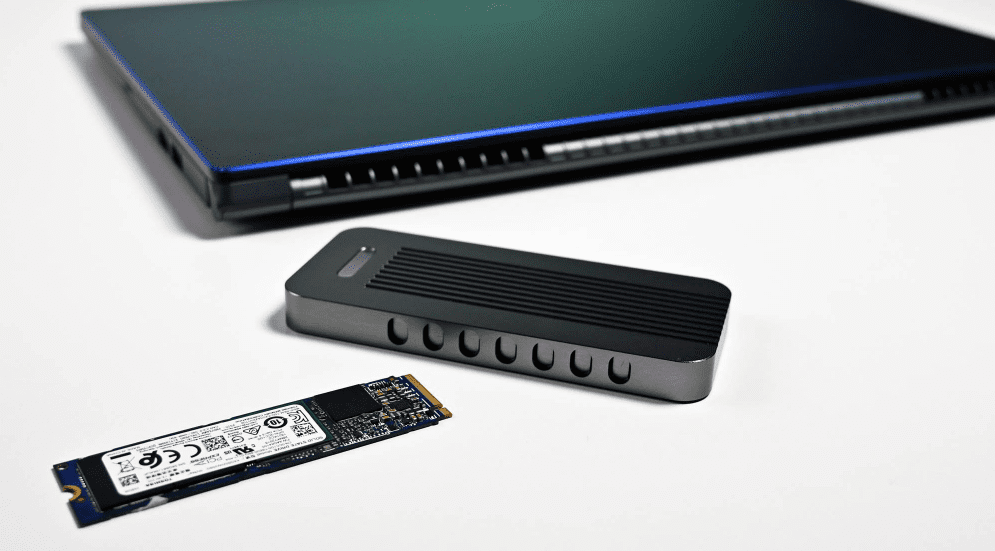
Pros of Ready-Made External SSDs
- Convenience – Ready-made SSDs come as an all-in-one solution, eliminating the need to purchase separate components.
- Encryption Support – Many pre-built SSDs offer built-in hardware encryption for data security.
- Durability – They are often water-resistant, dust-proof, and shock-proof, making them ideal for travel.
Cons of Ready-Made External SSDs
- High Cost – Pre-built SSDs are significantly more expensive than DIY alternatives.
- Limited Warranty – Most brands offer only a 3-year warranty, and cheaper models often use QLC NAND flash memory, which has a shorter lifespan.
- Lack of Transparency – Manufacturers rarely specify whether the SSD uses TLC or QLC NAND, making it difficult to assess durability.
- No Internal Use Option – You can’t remove the SSD from its enclosure to use it internally if needed.
Why Building Your Own External SSD is Better
By assembling your own external SSD, you can:
✔ Save Money – Get better performance at a lower price.
✔ Choose High-Quality Components – Select SSDs with TLC NAND for better endurance.
✔ Flexibility – Use the SSD externally or internally as needed.
Components You’ll Need
- An SSD Enclosure – Converts an internal SSD into an external drive.
- An NVMe SSD – Provides high-speed storage.
Best SSD Enclosures for DIY External SSDs
Here are some top recommendations:
1. ORICO M.2 NVMe SSD Enclosure (10Gbps)
- Price: ~₹1,000
- Features: Aluminum body (acts as a heat sink), USB 3.2 Gen 2 support.
2. Sabrent M.2 NVMe Enclosure
- Price: ~₹1,200
- Features: Includes both USB Type-A and Type-C cables.
3. ORICO RGB M.2 NVMe Enclosure
- Price: ~₹1,500
- Features: RGB lighting, better heat dissipation.
4. Fan-Cooled Enclosures (Active Cooling)
- Price: ~₹1,500
- Best for: Users who frequently transfer large files.
Best NVMe SSDs for External Use
Since external enclosures are limited by USB speeds (10Gbps = ~1GB/s), you don’t need the fastest Gen4/Gen5 SSDs. A budget Gen3 SSD with TLC NAND is ideal.
1. KIOXIA Exceria G2 (1TB)
- Price: ~₹5,000
- Key Specs: TLC NAND, 600TBW endurance, 5-year warranty.
2. WD Blue SN570 (1TB)
- Price: ~₹5,500
- Key Specs: TLC NAND, 600TBW, 5-year warranty.
3. Crucial P3 (1TB)
- Price: ~₹5,200
- Key Specs: QLC NAND (avoid for heavy writes), but budget-friendly.
Final Verdict: DIY vs. Ready-Made SSD
| Factor | Ready-Made SSD | DIY External SSD |
|---|---|---|
| Cost | ₹7,000+ (1TB) | ₹6,000 (1TB) |
| Warranty | 3-5 years | 5 years (SSD) + 1 year (enclosure) |
| Flexibility | Only external use | Can be used internally/externally |
| Performance | Limited by USB speeds | Same speed but better endurance |
Who Should Buy a Ready-Made SSD?
- Users who prioritize convenience.
- Those who need water/dust resistance.
- People who don’t want to deal with DIY setups.
Who Should Build Their Own SSD?
- Users who want better value for money.
- Those who need longer-lasting TLC NAND SSDs.
- Tech enthusiasts who want flexibility (internal/external use).
Conclusion
If you’re looking for the best performance and longevity, building your own external SSD is the smarter choice. You’ll save money, get better endurance, and have the flexibility to use the SSD internally if needed.
For those who prefer convenience, a Samsung T7 or WD My Passport SSD (with 5-year warranty) could be a good alternative.
🔗 Check out the SSD and enclosure links above to get started!
Tags:
External SSD, DIY SSD, NVMe Enclosure, SSD Guide, Tech Tips, Storage Solutions, Budget PC
Hashtags:
TechGuide #PCBuilding #DataStorage #SSDvsHDD #UpgradeYourStorage