If you’re encountering the error message:
“Sorry, we ran into a problem loading this app”
while trying to launch Microsoft Copilot on Windows 10, don’t worry — this is a common issue and can be easily resolved by disabling Copilot from startup and restarting your PC.
This article walks you through a quick and effective solution to fix this error.
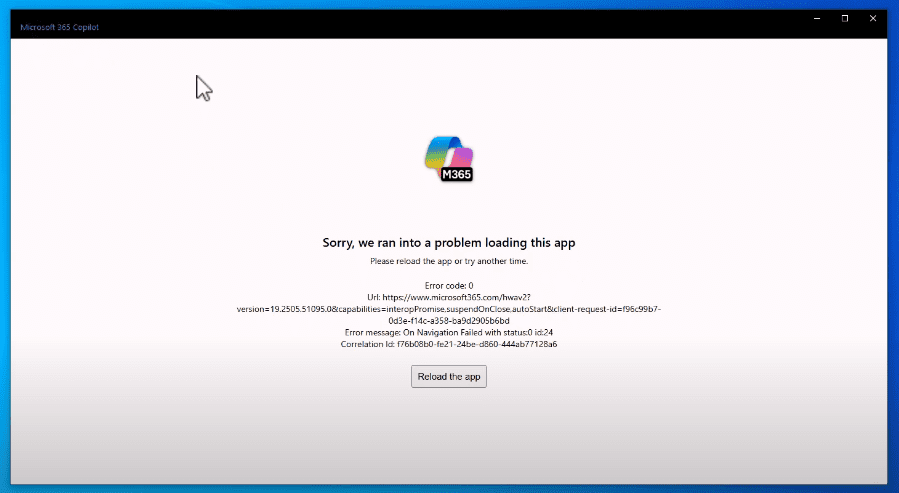
What Causes This Microsoft Copilot Error?
This error usually occurs when Microsoft Copilot fails to initialize properly during system startup. It can be due to system limitations, outdated components, or background conflicts. Disabling the app from the startup list often solves the issue.
Step-by-Step Guide to Fix the Copilot Loading Error
Step 1: Open Task Manager
- Right-click anywhere on the taskbar.
- Select Task Manager from the context menu.
Tip: You can also press Ctrl + Shift + Esc to open Task Manager directly.
Step 2: Disable Microsoft Copilot from Startup
- Inside Task Manager, click the Startup tab at the top.
- Locate Microsoft Copilot in the list of startup applications.
- Right-click on it and select Disable.
This will prevent Copilot from launching automatically every time Windows starts.
Step 3: Restart Your PC
- Close the Task Manager.
- Restart your computer by clicking Start > Power > Restart.
Once your system restarts, the error message should no longer appear when using Windows 10.
Additional Tip
If you still need to use Microsoft Copilot manually after fixing the startup error, you can always open it from the Start menu or by using a shortcut once your system is stable.
For more about Microsoft Copilot, you can visit the official Microsoft Copilot page.
Tags:
Microsoft Copilot error fix, disable Copilot startup, task manager guide, fix Windows 10 Copilot error, Microsoft Copilot not working, Windows startup app error, troubleshooting Copilot error





Hashtags:
#MicrosoftCopilot #Windows10Fix #TaskManager #StartupError #CopilotError #WindowsSupport #TechTips #FixWindowsErrors
Disclaimer
Disclaimer: This article is intended for informational purposes only. Disabling startup apps may impact certain features. Make sure you understand the implications of disabling services like Microsoft Copilot, especially in enterprise or work environments. Always restart your system after making changes for them to take full effect.








