This action is used to create a Passport Size Photo on a 4×6 inch Card Paper.
Download 8 Passport Photo Action on 4×6 Size SheetHow to use 8 Passport Photo Action in Photoshop
- Download this Photoshop action from the above given link and add into action panel.
- If you don’t know how to add an action in Photoshop, read this post.
How to install and use an action in Photoshop
- Open photograph which you want to convert in passport size and set in 4X6 size sheet.
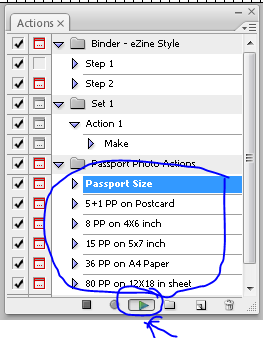
- From action panel in Photoshop select 8 PP on 4×6 inch sheet as shown below and click on play …
- In next step select area to be cropped by dragging or you can also expand or contract the selection.
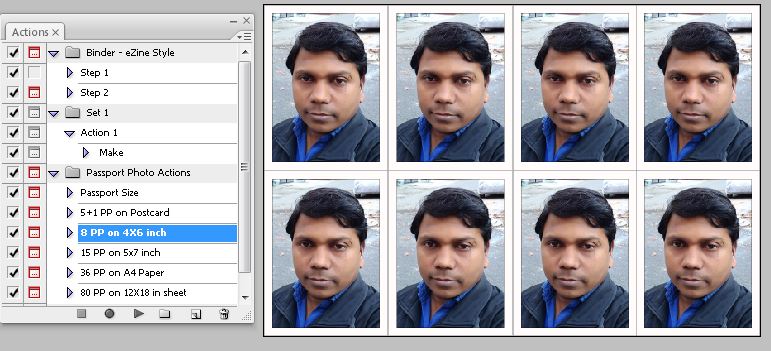
- Click Enter to create passport photo and then automatically set it on 4×6 inch size sheet as shown below.
I hope you have love reading this article and the action mentioned here, have also worked for you now how about reading a great tool called Id Card Maker in Coreldraw and many more such posts. With this id card maker you can add photo and details direct with in Coreldraw using this free marco.
- Coredraw Id Card Maker Macro with Barcode and Photograph
- How to Edit and Export layered PSD image from CorelDraw to Photoshop – CorelDraw Macro
- Convert Text into Curves – CorelDraw Macro
- Guides and Crop Marks Maker – CorelDraw Macro
- Arrange Visiting Card (Any Page Size) – CorelDraw Macro
- What is a Photoshop Action and How to Use It Efficiently
📝 Conclusion
Creating perfectly aligned passport photos on a 4×6 inch sheet doesn’t have to be a complex task anymore. With this efficient 8-passport photo Photoshop action, you can easily format and print multiple passport-sized photos in just a few clicks—ideal for personal, professional, or bulk requirements. Whether you’re preparing official documents, handling ID photo services, or just saving time and money by printing at home, this tool simplifies the process while maintaining high-quality output. Compatible with standard photo printing services, this setup ensures that your images are correctly sized and ready for immediate use. Make sure to follow the guidelines and customize your export settings for best results. Don’t forget to check out our other Photoshop actions and tutorials designed to streamline your workflow and enhance productivity.
📚 Discover More Helpful Resources
We work hard to bring you high-quality tutorials, how-to guides, software tips, tech solutions, and creative ideas. While you’re here, why not explore more of what we offer?
- 🔧 Top Troubleshooting Tips for Windows & Ubuntu
- 📥 Best Free Software & Tools Recommendations
- 📱 Gaming Tips & App Reviews
- 🧠 Indesign Graphic Designing Explained: Easy Guides for Everyone
- 💻 Boost Your PC Performance: Step-by-Step Guides
Tags: passport photo, 8 passport photo template, 4×6 photo sheet, passport photo printing, Photoshop passport photo action, passport photo size, passport photo layout, print passport photos, DIY passport photo, photo editing, 4×6 inch sheet, create passport photos, passport photo guide
Hashtags: PassportPhoto #PhotoEditing #PhotoshopAction #DIYPhotos #PrintAtHome #PhotographyTips #4x6Sheet #PassportPhotoTemplate #PhotoshopGuide #PhotoLayout




Do you provide corel draw macro training too. I am really interested to learn how to make these macros.
I am very sorry dear, due to timing issues I do not provide any training.
School is card maker men runtime error 424 object required araha hai is problem ko kaise thik kiya jayega