When the HTC Dream (also known as the T-Mobile G1) launched in 2008, few could have imagined that Android would one day dominate the global smartphone market. At the time, Android was just an experimental operating system from Google, competing against giants like Nokia’s Symbian, Microsoft’s Windows Mobile, and Apple’s iOS.
Fast forward to today, and Android powers billions of devices worldwide. Its journey has been nothing short of fascinating, marked by yearly updates, bold experiments, and groundbreaking features that redefined how we interact with our phones.
In this article, we’ll dive deep into the evolution of Android from version 1.0 to Android 15, highlighting the design shifts, key features, and how each version transformed the mobile experience.
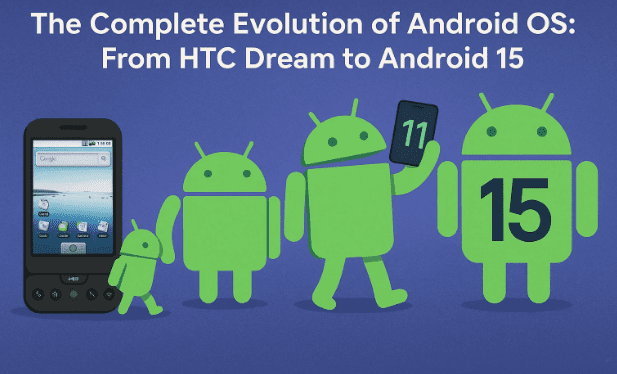
1) Android 1.0 & 1.1 – The Beginning (2008–2009)
Android 1.0 debuted on the HTC Dream, featuring:
- Google Maps integration.
- YouTube, Gmail, and basic messaging.
- The Android Market (early app store).
- An HTML browser.
It was basic but revolutionary, offering flexibility unmatched by rivals.
Android 1.1 soon followed, adding:
- Business reviews on Maps.
- Saving attachments.
- Longer in-call screen timeouts.
This laid the foundation for what would become the world’s largest mobile OS.
2) Android 1.5 Cupcake & 1.6 Donut – Small Steps Forward
With Cupcake (1.5) in 2009, Android introduced:
- The first on-screen keyboard.
- Video recording and YouTube uploads.
- Widgets and automatic screen rotation.
- Usage history and browser copy-paste.
Donut (1.6) extended compatibility:
- Support for multiple screen sizes and CDMA networks.
- Quick search box.
- Power Control widget (Wi-Fi, Bluetooth, GPS).
These features showed Google’s commitment to adaptability.
3) Android 2.0–2.3: Eclair, Froyo, Gingerbread
Eclair (2.0–2.1) was transformative:










- First with turn-by-turn GPS navigation.
- Multiple account support.
- Text-to-speech.
- Live wallpapers.
- Swipe-to-unlock screen.
Froyo (2.2):
- Wi-Fi hotspot functionality.
- Push notifications (via C2DM).
- PIN lock for added security.
Gingerbread (2.3):
- Updated UI for extra-large screens.
- NFC support.
- Front-facing camera for selfies and video calls.
- Multi-touch gestures.
This era was when Android became practical, versatile, and fun.
4) Android 3.0 Honeycomb – The Tablet Experiment
Launched in 2011, Honeycomb was tablet-exclusive:
- Virtual navigation buttons (no physical keys needed).
- Optimized UI for larger screens.
Though short-lived, Honeycomb influenced future Android versions, especially for foldables.
5) Android 4.0–4.4: Ice Cream Sandwich, Jelly Bean, KitKat
Ice Cream Sandwich (4.0):
- Face unlock using the camera.
- Data usage monitoring.
- Screenshots.
- Swipe-to-dismiss notifications.
Jelly Bean (4.1–4.3):
- Google Now voice assistant.
- Expandable notifications.
- Interactive widgets.
- Lock screen rotation.
KitKat (4.4):
- Lighter UI design.
- Optimized for devices with 512 MB RAM.
- Screen recording.
- “OK Google” voice activation.
This was Android’s maturity stage, blending power and accessibility.
6) Android 5.0–6.0: Lollipop & Marshmallow
Lollipop (5.0):
- Introduced Material Design for a cleaner look.
- Lock-screen notifications.
- Doze mode to conserve battery.
- Multiple SIM support.
Marshmallow (6.0):
- “Now on Tap” (contextual assistant).
- Fingerprint unlocking.
- USB-C support.
- Android Pay.
- Memory manager.
Google here focused on polish and practicality.
7) Android 7.0 Nougat – The Multitasking Revolution
Released in 2016, Nougat gave Android true multitasking:
- Split-screen mode.
- Quick app switching.
- Power button “Restart” option.
- Battery usage alerts.
- Google Assistant replaced Google Now.
Nougat made Android a workhorse for big-screen phones.
8) Android 8.0 Oreo – Smarter and More Refined
Oreo (2017):
- Picture-in-picture mode.
- Notification channels and snoozing.
- Autofill for passwords.
- Redesigned emoji set.
It was a blend of efficiency and personalization.
9) Android 9.0 Pie – Adaptive Intelligence
Pie (2018):
- Gesture navigation replacing 3-button layout.
- Adaptive Battery (AI-driven app hibernation).
- “Shush” for auto Do Not Disturb.
- Digital Wellbeing tools.
Google leaned heavily on AI for smarter usage patterns.
10) Android 10 – The New Identity
In 2019, Android dropped dessert names and went modern:
- New branding and logo.
- Dark mode system-wide.
- Foldable phone support.
- Gesture navigation fully adopted.
This marked the new branding era for Android.
11) Android 11 – Privacy and Conversations
Released in 2020:
- One-time app permissions for location, camera, mic.
- Chat Bubbles for conversations.
- Native screen recording.
- Notification history.
It was about trust and communication.
12) Android 12 & 12L – Material You and Bigger Screens
Android 12 (2021):
- Material You design: dynamic colors from wallpaper.
- Redesigned widgets and animations.
- One-handed mode.
- Extended screenshots.
Android 12L: Focused on foldables and tablets with optimized layouts.
This was Google’s push to make Android more personal and adaptive.
13) Android 13 – Refinement and More Control
Android 13 (2022):
- Per-app language settings.
- Expanded Material You customization.
- Bluetooth LE Audio support.
- Digital car keys.
- Smarter QR scanner.
It fine-tuned the user experience without drastic changes.
14) Android 14 – Comfort, Personalization, and Battery
Android 14 (2023):
- Font scaling for better accessibility.
- Emoji wallpapers and customizable lock screens.
- Improved notification control.
- Battery efficiency upgrades.
It was a quality-of-life update, making Android smoother and more personal.
15) Android 15 – AI Power and Next-Gen Features
Android 15 (2024):
- Partial screen sharing for privacy.
- Satellite connectivity.
- Improved NFC and in-app camera controls.
- Universal toggle for keyboard vibration.
- Sensitive notifications (protects OTPs).
- Better foldable continuity features.
- Privacy Sandbox on Android for safer ads.
- Screen recording detection for security.
- Android AICore: enables apps to run AI on-device without internet.
This makes Android 15 a giant leap toward AI-powered experiences.
16) FAQs on Android Evolution
Q1: Why did Google stop using dessert names?
Starting with Android 10, Google wanted a simpler, globally understood naming convention.
Q2: Which Android version was the most transformative?
Most would argue Android 5.0 Lollipop (Material Design) and Android 12 (Material You) were game-changers for visual identity.
Q3: How does Android compare to iOS in terms of updates?
iOS provides longer, consistent updates. Android focuses on diversity, customization, and device variety.
Q4: What’s the biggest leap in Android 15?
On-device AI via Android AICore, enabling faster and private AI features.
17) Final Thoughts
From the humble beginnings of Android 1.0 on the HTC Dream to the powerful AI-driven Android 15, the operating system has undergone one of the most fascinating transformations in tech history.
Each version tells a story: from early struggles with fragmentation, to revolutionary features like GPS navigation, to personalization breakthroughs with Material You, and now AI integration.
Seventeen years later, Android isn’t just an OS—it’s the heartbeat of billions of devices, shaping how the world communicates, works, and entertains itself.
The question now is: what’s next? Will Android 16 bring even deeper AI integration, or a completely new interface philosophy? Only time will tell.
⚠️ Disclaimer
This article is based on official Android release notes, historical device launches, and trusted technology sources. For the latest information, visit the official Android website.
Tags: Android OS evolution, Android history, Android versions, Material Design, Material You, Android 15 features, Android AICore, smartphone OS history
Hashtags: #Android #Android15 #MaterialYou #Google #MobileOS #AndroidHistory #AIIntegration








