Cybercriminals are constantly evolving their tactics, and in 2025, YouTube content creators have become prime targets. A dangerous new scam is circulating that cleverly impersonates official YouTube communications to hijack your account and steal your personal data. If you’re a YouTuber, you must be aware of this new scam before it’s too late.
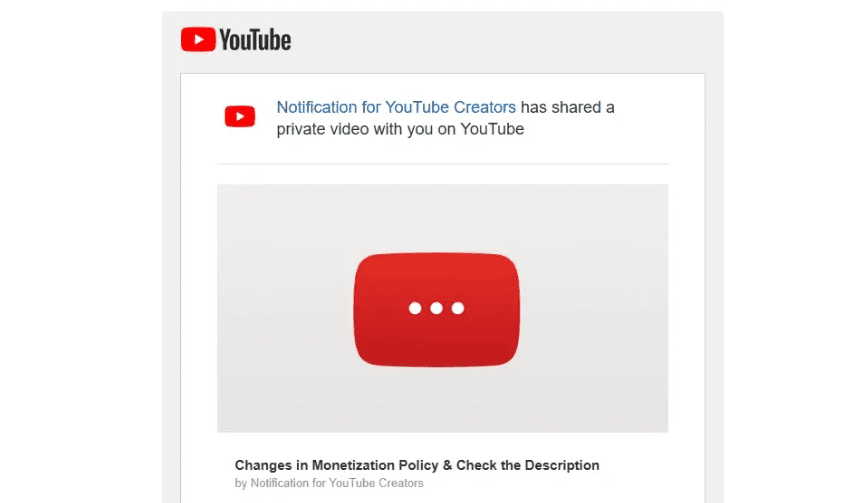
This article explains exactly how the scam works, what signs to look for, and what steps you can take to protect yourself.
🕵️♂️ The Scam: “Private Video Shared with You” Email
It starts with a convincing email that appears to come from YouTube. The subject line may read:
“Private Video Was Shared With You”
At first glance, the email looks legitimate:
- The sender appears to be
no-reply@youtube.com - The message includes a link to a “private video” intended for you
- The branding mimics YouTube’s real design elements
But this is not an official message from YouTube. It’s a cleverly disguised phishing email, and clicking any links inside it could lead to the compromise of your channel.
⚠️ Why This Scam Is So Dangerous
1. Spoofed Sender Address
The scammers use a forged sender address that looks like it’s from YouTube. When you hover over the email address, it may show no-reply@youtube.com, tricking even savvy users into trusting it.
2. Redirection to a Fake YouTube Channel
The email includes a link to what appears to be a “private video” hosted on a fake YouTube channel. These channels mimic the official YouTube Creators account but are actually imposters with minimal subscribers.
3. Prompt to Download a Malicious File
The video page may prompt you to:
- Download a document labeled something like
YPP_Policy_Update_March_2025.msi - Open the file under the pretext of updating your account or confirming new YouTube rules
However, this .msi file is not a document — it’s an executable Trojan file designed to:
- Steal your login credentials
- Record your keystrokes (keylogger)
- Hijack your YouTube account
- Spy on your system and send your data to attackers
🔬 What Happens If You Fall for It?
If you are signed into your YouTube account and click the malicious link:









- The file downloads and installs malware
- The malware extracts stored login data, session cookies, and more
- The attacker logs in, changes recovery info, and locks you out
- Your account could be deleted or used for scams or crypto fraud
This type of malware has affected even large creators like Linus Tech Tips in the past — though he was able to recover his account quickly thanks to direct access to YouTube’s support team. Smaller creators may not be so lucky.
🔍 Identifying the Fake vs. Real
Here’s how to tell if a video or account is fake:
| Feature | Fake Account | Real YouTube Creators Account |
|---|---|---|
| Subscribers | Few (e.g., under 10) | Millions (e.g., 8.7M+) |
| URL | Random username like YouTubeCre_2022 | https://www.youtube.com/@YouTubeCreators |
| Video Type | Unlisted/Private | Public official content |
| Content | Suspicious policy links or downloads | YouTube platform news or creator support tips |
Always verify the URL and check the account before engaging with any video or message.
🔐 How to Protect Yourself
Here’s a checklist to avoid falling victim:
- Never click links from suspicious emails — especially ones asking you to download files or view private videos.
- Verify sender addresses — hover to see the actual email origin.
- Use a separate browser or Incognito mode — avoid accessing unknown links while signed into your YouTube account.
- Enable 2-Step Verification (2SV) — on your YouTube/Google account for added security.
- Report fake emails and channels — using YouTube’s reporting system.
- Use VirusTotal to scan downloads — if unsure, check files at https://www.virustotal.com/.
🛡️ What the Malicious File Does (Technical Summary)
When analyzed using VirusTotal, the .msi file was flagged by multiple antivirus engines as:
Trojan:Win32/Loader.gen
According to Kaspersky, this type of malware:
- Logs keystrokes
- Takes screenshots
- Captures browser session data
- Sends information via email, FTP, or HTTP
- Can bypass Windows UAC and manipulate access tokens
In short: it hijacks your entire system and your identity.
❗Final Words of Caution
Scammers are getting smarter. They tailor their messages, use real-looking email addresses, and create near-identical clone channels to trick creators. YouTube will never ask you to download a file to confirm policy changes or threaten account suspension in this manner.
If you’re a content creator, share this article with others in your network. Spreading awareness is the best defense.
📌 Disclaimer
This article is intended for educational and awareness purposes only. Do not attempt to replicate any actions involving malware or phishing links. Always practice safe browsing and cybersecurity hygiene. We do not encourage downloading or executing unverified files under any circumstance.
Tags:
YouTube scam, phishing email, YouTube creators scam, cyberattack, account hijack, malware, virus infection, YouTube channel protection, keylogger, cybersecurity tips, scam awareness
Hashtags:
#YouTubeScam #CyberSecurity #PhishingAlert #YouTubeCreators #AccountProtection #OnlineSafety #MalwareWarning #ScamAwareness #InternetSecurity #TrojanAlert








