Mozilla has rolled out Firefox version 140, delivering performance optimizations, privacy-focused features, and a new Extended Support Release (ESR). Whether you’re a power user, enterprise administrator, or privacy-conscious browser, this update introduces improvements that you’ll want to check out.
In this article, we’ll break down what’s new in Firefox 140, how it compares to previous versions, how to update, and why the ESR version matters.
🚀 Firefox 140: What’s New?
🧠 1. Unload Tabs to Save RAM
If you’re a multi-tab user and notice system lag, Firefox 140 introduces a handy feature called “Unload Tab.”
- How it works: Right-click on any open tab and select Unload Tab.
- Result: The tab stays visible but is suspended, freeing up memory. Clicking it again will reload the page instantly.
💡 Early tests show up to 35% memory usage reduction when multiple tabs are unloaded—perfect for older or low-RAM systems.
🔍 2. Easier Search Engine Switching
Users can now switch between search engines more easily than ever. You can quickly toggle between Google, Bing, DuckDuckGo, Startpage, or your preferred engine without digging into deep settings.
🤖 3. Quick Access to ChatGPT
Firefox now integrates more smoothly with AI tools like ChatGPT, enabling users to easily launch or search with AI via extensions or the search bar.
🛡️ 4. 14 Security Fixes in This Update
Security is always a priority, and Firefox 140 addresses 14 vulnerabilities, including:
- ✅ 3–4 high-severity flaws
- ⚠️ Remainder marked moderate or low
🔐 Keeping your browser updated is the first line of defense against phishing, injection attacks, and memory exploits.
🏢 What Is Firefox ESR?
Firefox ESR (Extended Support Release) is designed for:
- Schools and businesses
- Users who want stability over frequent updates
- Admins who need longer support cycles
📌 Firefox ESR 140 replaces version 128
It delivers:






- Long-term security updates
- The same tab unload and search engine improvements
- Less frequent feature rollouts
⚙️ Firefox ESR 115 is still maintained for older operating systems that can’t support newer versions.
📊 Firefox 140 vs Previous Versions
| Feature | Firefox 139 | Firefox 140 | Firefox 140 ESR |
|---|---|---|---|
| Tab Unload Feature | ❌ | ✅ | ✅ |
| Simplified Search Engine Switch | ❌ | ✅ | ✅ |
| ChatGPT/AI Integration Support | ❌ | ✅ | ✅ |
| Security Fixes | Moderate | High | High |
🔧 How to Update to Firefox 140
Follow these steps to ensure you’re using the latest version:
- Open Firefox
- Click the ☰ hamburger menu (top right)
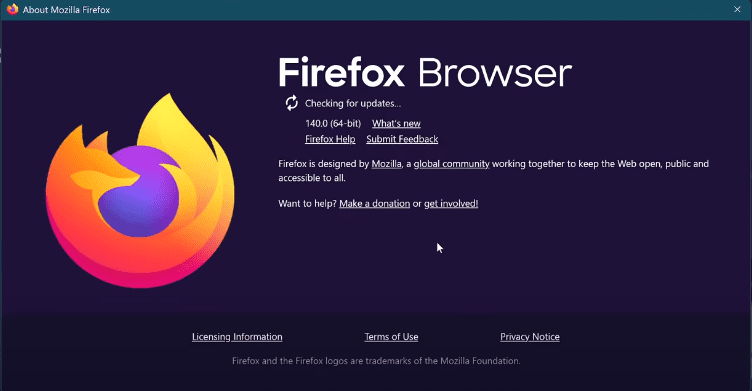
- Go to Help → About Firefox
- Firefox will check for updates automatically and begin downloading version 140
- Click Restart to update
If you’re using ESR, you can download it directly from Mozilla:
👉 Download Firefox ESR
🌐 Firefox vs Chrome, Brave & Others
If you’re choosing a browser for privacy or performance:
| Browser | Memory Control | Privacy Tools | Open Source | Built-in AI |
|---|---|---|---|---|
| Firefox 140 | ✅ Unload Tabs | ✅ Enhanced | ✅ Yes | ✅ Extensions |
| Chrome | ❌ Limited | ❌ Tracking | ❌ No | ✅ Gemini AI |
| Brave | ✅ Built-in | ✅ Strong | ✅ Yes | ✅ Leo AI |
| Edge | ❌ High RAM | ❌ Microsoft ID | ❌ Chromium | ✅ Copilot |
❓ Frequently Asked Questions
Q1: Is Firefox ESR 140 suitable for casual users?
Yes. It’s ideal if you prefer not to update often but still want security patches and essential features.
Q2: Does “Unload Tab” remove my data?
No. The tab just goes to sleep—no history, session, or data is lost.
Q3: Should I switch to Firefox from Chrome?
If you value privacy, open-source software, and memory optimization, Firefox is an excellent choice—especially with version 140.
✅ Final Thoughts
Firefox 140 isn’t just another version—it’s a meaningful update that blends usability, performance, and security. Whether you’re browsing casually or deploying it across a company network, the new Extended Support Release (ESR) and added features make this update worth installing.
Stay up-to-date, stay secure, and take control of your browsing with Firefox 140.
🎮 Looking for VPN Controller check this out [ Affiliate Link ]
https://amzn.to/4kbFIjh [US] | https://amzn.to/4leY7MM [IN]
🏷️ Tags:
firefox update, firefox 140, firefox esr 140, mozilla browser update, firefox unload tab, browser memory optimization, firefox vs chrome, secure browsing, browser comparison
#Hashtags:
#Firefox140 #MozillaFirefox #BrowserUpdate #UnloadTab #FirefoxESR #TechNews #WebSecurity #ChatGPT #MemorySaver #BrowserPerformance