Since its debut in 2007, the iPhone has been both a technological breakthrough and a cultural phenomenon. At the core of this transformation lies iOS—formerly known as iPhone OS. Every new version has not only introduced groundbreaking features but also reshaped how we interact with our devices and how we live day to day.
From the arrival of the App Store to the latest era of artificial intelligence, iOS reflects Apple’s relentless pursuit of innovation, personalization, and user experience. Let’s take a journey through the different stages of iOS, from its humble beginnings to its AI-driven future.
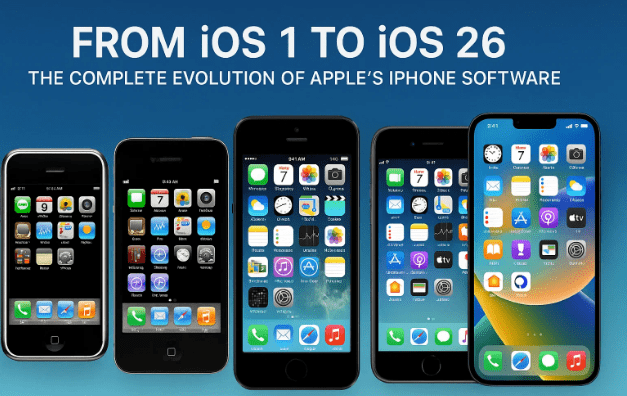
🌱 The Early Years: From iPhone OS to iOS 5
The early releases of iOS laid the foundation for the modern smartphone. They introduced the core experiences—multi-touch, apps, and cloud services—that we now consider essential.
- iPhone OS (2007): The very first version was revolutionary. A fully touch-based interface with multi-touch gestures changed screen interaction forever. Essential apps such as Safari, Mail, and Calendar established the iPhone as more than just a phone—it was a pocket computer.
- iOS 2 (2008): This update brought the App Store, one of Apple’s greatest innovations. At launch, it had just 500 apps; today, it hosts millions of apps and games, fueling a new global digital economy.
- iOS 3 (2009): Introduced long-awaited Copy and Paste, MMS support, and Spotlight search. It also added video recording to the iPhone camera and became the first version to support the iPad.
- iOS 4 (2010): Apple officially rebranded the software as iOS. Major features included multitasking, home screen folders, and the launch of FaceTime video calling on the iPhone 4. AirPlay and AirPrint also made their debut.
- iOS 5 (2011): This update delivered pivotal services: iCloud for syncing data, iMessage for Apple-to-Apple messaging, and the Notification Center. Most importantly, it introduced Siri, the voice assistant that changed how we interact with technology.
🚀 The Maturation of iOS: Expanding the Ecosystem
After the groundwork was laid, iOS entered a stage of refinement, ecosystem expansion, and visual transformation. Apple started building a more interconnected digital lifestyle around its software.
- iOS 6 (2012): Introduced Apple Maps (initially criticized for inaccuracy), Passbook (now Wallet), and Do Not Disturb. The camera app gained panorama mode and filters.
- iOS 7 (2013): A historic update that completely redesigned the interface with a flat, minimalistic look. It added Control Center, AirDrop, and Touch ID, transforming both usability and security.
- iOS 8 (2014): Expanded the ecosystem with Apple Pay, the Health app, iCloud Drive, and Family Sharing. This release pushed the iPhone deeper into health and finance.
- iOS 9 (2015): Focused on productivity and efficiency. Introduced Low Power Mode, Night Shift, and advanced iPad multitasking like Split View and Picture-in-Picture. Siri became more proactive.
- iOS 10 (2016): Delivered a new lock screen with interactive notifications and widgets. iMessage became more expressive with stickers and apps. For the first time, users could delete stock apps, and Siri opened to third-party developers.
- iOS 11 (2017): Signaled the iPad’s rise as a productivity device with the Files app and drag-and-drop support. Apple entered augmented reality with ARKit, while Control Center and Siri both received upgrades. Apple Pay Cash allowed peer-to-peer payments.
🤖 The Modern Era: Personalization, Privacy, and Intelligence
In recent years, Apple shifted focus toward user control, privacy, personalization, and intelligence. These updates brought the iPhone closer to being a deeply personal assistant and digital hub.
- iOS 12 (2018): Introduced Screen Time for monitoring usage, grouped notifications, animated Memoji, and Siri Shortcuts for custom automation.
- iOS 13 (2019): Delivered Dark Mode, Sign in with Apple, stronger privacy tools, and a redesigned Photos app. It also marked the split between iOS and iPadOS.
- iOS 14 (2020): Introduced home screen widgets for customization, the App Library, Picture-in-Picture video, pinned conversations in Messages, and compact call notifications.
- iOS 15 (2021): Emphasized productivity and communication with Focus Mode, major FaceTime upgrades (spatial audio, portrait mode), Live Text, and Visual Look Up in Photos.
- iOS 16 (2022): Brought customizable lock screens, editable and unsendable iMessages, Apple Pay Later, and richer Maps features.
- iOS 17 (2023): Added StandBy Mode (turning iPhone into a smart display), the Journal app for mental health, NameDrop for easier contact sharing, and interactive widgets.
- iOS 18 (2024): Marked the dawn of Apple Intelligence, embedding AI into the system. Users gained free widget placement, color-tinted icons, a redesigned Control Center, a smarter Photos app, and a dedicated Passwords app.
- iOS 26 (Future): Conceptually, Apple envisions Liquid Glass, a new design language with translucent, curved, and dynamic visuals. AI would reach new heights with live translation, call screening, and adaptive energy modes, while apps like Camera, Messages, and CarPlay would be deeply reimagined.
🔮 Conclusion
From the multi-touch revolution of 2007 to the AI-powered intelligence of today and beyond, iOS has continuously evolved to redefine what a smartphone can be.
Each milestone—from the App Store to Siri, from Dark Mode to StandBy Mode, and now Apple Intelligence—represents Apple’s commitment to merging design, security, and innovation into a seamless user experience.
The journey of iOS is not just the story of software updates—it’s the story of how technology has become an integral part of modern life.
Tags
ios history, apple ios, iphone os, apple intelligence, iphone features, ios evolution
Hashtags
#Apple #iOS #iPhone #Technology #Innovation