Almost every home today has Wi-Fi — but not every corner of the house enjoys the same signal strength. Maybe your bedroom has blazing fast internet, but the garage feels like a dead zone. That’s where Wi-Fi extenders come in. They are marketed as simple plug-in solutions that magically spread your Wi-Fi signal everywhere. But do they actually work as advertised? And what are their limitations?
In this article, we’ll cover everything you need to know about Wi-Fi extenders:
- What they are and how they work.
- Their benefits and limitations.
- When you should consider buying one.
- Alternatives such as mesh systems and access points.
- Real-world scenarios where extenders make sense.
Let’s dive in.
🏠 What Is a Wi-Fi Extender?
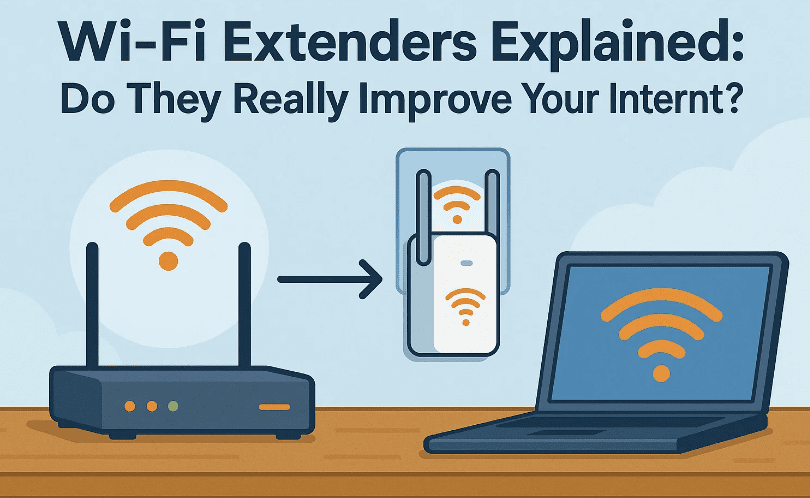
Before discussing pros and cons, we need to understand the basics. A Wi-Fi extender is a small device designed to extend your router’s coverage.
Imagine your router is in the living room. The signal is strong nearby but drops significantly in the upstairs bedroom. If you plug in a Wi-Fi extender halfway between the router and bedroom, it can capture the existing Wi-Fi signal and rebroadcast it into that dead zone.
Important points to note:
- A Wi-Fi extender does not replace your router or modem. It only works alongside them.
- It is most effective when placed within range of a strong signal. Putting it too far from the router means it has nothing solid to rebroadcast.
- Most extenders are affordable and easy to install — usually just plug them into a wall outlet.
🔎 How Does a Wi-Fi Extender Work?
Now that we know the basic purpose, let’s break down how it actually functions.
When connected, the extender acts as a middleman:
- Your device (say, a laptop) sends a request for a webpage.
- That request goes first to the Wi-Fi extender.
- The extender forwards it to the router, which sends it to the modem and out to the internet.
- The response returns the same way: modem → router → extender → laptop.
This extra “hop” creates two major consequences:
- Reduced speed (since the extender has to handle twice the communication).
- Possible delays in high-demand situations (like gaming or video conferencing).
Most extenders also broadcast a separate Wi-Fi network (SSID). You can name it the same as your router’s network for simplicity, or give it a different name to switch manually.
📦 What Do Wi-Fi Extenders Look Like?
Extenders come in different designs, but most are small plug-in devices with antennas. A popular example is the TP-Link AX3000 Wi-Fi Extender.




- It plugs directly into a wall outlet.
- It has antennas to receive and rebroadcast signals.
- Some models include an Ethernet port, which unlocks powerful additional features (more on that later).
They’re usually simple enough to set up with a quick configuration app or web interface.
⚠️ Limitations of Wi-Fi Extenders
At this point, you might be thinking: “Great! So extenders solve all my Wi-Fi problems?” Not so fast. Extenders come with serious limitations you must understand before buying.
1. Reduced Internet Speeds
Because an extender has to receive and retransmit data on the same channel, speeds often drop by 50% or more. If your router delivers 200 Mbps, the extender might only deliver 100 Mbps or less.
2. Congestion Issues
Extenders essentially behave like another Wi-Fi device constantly talking to your router. If you already have many devices, adding an extender can create congestion.
3. Poor Seamless Transition
If you’re moving around the house, your phone or laptop doesn’t automatically switch smoothly between the router and extender. It often clings to the weaker signal until it disconnects, creating frustration.
4. Manual Network Switching
If you give the extender a different Wi-Fi name, you’ll need to manually switch networks when moving between rooms. That can quickly get annoying.
🔧 How to Overcome These Limitations
The good news is that newer Wi-Fi extenders include features to reduce or eliminate these problems.
1. Ethernet Backhaul (Access Point Mode)
Some extenders have an Ethernet port that lets you connect them directly to your router. In this mode:
- The extender no longer struggles with bandwidth limits.
- It works almost like a second router in your home.
- It rebroadcasts the same Wi-Fi network with full speeds.
This is sometimes called Access Point Mode.
2. Mesh Networking Support
If your router and extender are from the same brand and support mesh Wi-Fi, they can work together seamlessly. In mesh mode:
- Your devices automatically connect to the strongest signal (router or extender).
- You get a single Wi-Fi network across your entire house.
- No manual switching is required.
Mesh Wi-Fi is often the preferred modern solution, but it requires compatible hardware. Always check the manufacturer’s website (for example, TP-Link, Netgear, Asus, etc.) to confirm mesh compatibility.
🎯 When Should You Use a Wi-Fi Extender?
Now let’s answer the most important question: who actually benefits from buying an extender?
Good Scenarios for Extenders
- Low-demand areas: e.g., a garage, backyard, or guest room where you only need basic browsing or music streaming.
- Few devices connected: if only one or two devices use the extender at a time, the speed drop is less noticeable.
- Budget constraints: extenders are cheaper than buying a whole new mesh system.
Bad Scenarios for Extenders
- Competitive gaming: latency and bandwidth issues make extenders unsuitable.
- Ultra HD video streaming: buffering is common if multiple devices use the extender simultaneously.
- Large families with many devices: congestion becomes a big problem.
🆚 Wi-Fi Extender vs Mesh Wi-Fi vs Access Point
To help you quickly compare, here’s a table showing the key differences:
| Feature | Wi-Fi Extender | Mesh Wi-Fi System | Access Point (Ethernet) |
|---|---|---|---|
| Setup Cost | Low 💲 | Medium to High 💲💲💲 | Medium 💲💲 |
| Speed Retention | ~50% of router speed | ~100% (seamless) | ~100% (wired) |
| Seamless Roaming | ❌ No | ✅ Yes | ✅ Yes |
| Best For | Occasional browsing | Whole-home coverage | High-performance zones |
| Number of Networks | 1–2 (manual switch) | 1 unified network | 1 unified network |
| Ease of Setup | Easy | Easy–Moderate | Moderate (needs cable) |
🙋 Frequently Asked Questions
Q1. Do Wi-Fi extenders work with any router?
Yes, most extenders are designed to work with any brand of router. However, advanced features like mesh require brand compatibility.
Q2. Will a Wi-Fi extender increase my internet speed?
No. It doesn’t make your internet faster. It simply extends coverage. In fact, in extender mode, speeds usually drop.
Q3. Where should I place my Wi-Fi extender?
Halfway between the router and the dead zone. It must be within a strong signal area to rebroadcast effectively.
Q4. What’s better: Wi-Fi extender or mesh Wi-Fi?
For large homes and seamless roaming, mesh Wi-Fi is superior. Extenders are only good for small fixes in limited areas.
Q5. Can I use more than one Wi-Fi extender?
Yes, but performance issues multiply. It’s usually better to invest in a mesh system if you need multiple extenders.
⚠️ Disclaimer
Performance results depend on your home layout, walls, distance, and interference from other devices. While Wi-Fi extenders can solve coverage issues, they are not a substitute for a high-quality router or mesh network. Always check the specifications and compatibility before buying.
✅ Conclusion
Wi-Fi extenders are useful tools for fixing dead zones, but they are not perfect solutions. They work best for low-demand areas with minimal devices. If you expect high-speed performance everywhere or have multiple users, consider alternatives like mesh systems or wired access points.
Think of extenders as a budget-friendly patch, not a permanent fix. For many households, especially those with modern needs like 4K streaming and gaming, mesh Wi-Fi is a better long-term investment.
Tags
wifi extender guide, wifi extender pros and cons, mesh wifi vs extender, access point setup, fix wifi dead zones, improve wifi coverage, tp link wifi extender
Hashtags
#WiFi #WiFiExtender #MeshWiFi #Networking #InternetTips #HomeNetwork #TechGuide








