When it comes to buying a new computer in 2025, the choices are more confusing than ever. On one side, Apple has released its Mac Mini M4 and MacBook Air M4, bringing powerful performance in compact packages. On the other, custom Windows PC builds around ₹60,000 still dominate when it comes to gaming and software compatibility.
But which one should you buy? If you’re a student, creator, or professional looking for value, this comparison will help you make the right decision.
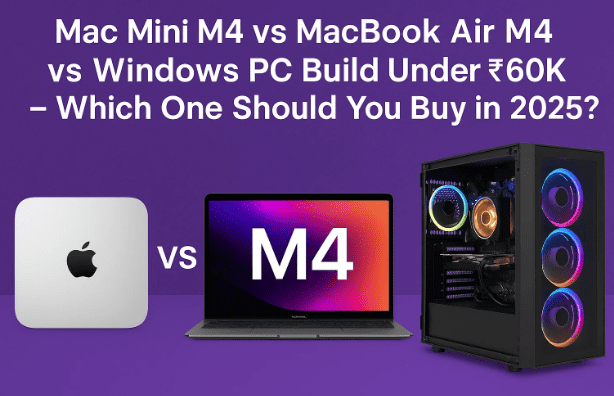
🍏 Apple Mac Mini M4 Full Review After Months of Use – Powerful Compact Machine or Just Overhyped?
📦 1. Pricing Overview
Before jumping into performance, let’s look at what you get for your money.
- Mac Mini M4 (Base Model):
- Price: ₹49,900 (student discount) / ₹60,000 (regular).
- 16GB RAM, 256GB SSD, M4 chip (10-core CPU + 10-core GPU).
- Monitor, keyboard, and mouse required separately.
- MacBook Air M4 (Base Model):
- Price: Around ₹95,000 in India (no discount, except education pricing).
- 16GB RAM, 256GB SSD, same M4 chip.
- Built-in display, keyboard, and trackpad.
- Windows PC Build (Under ₹60K):
- Price: Around ₹55,000–₹65,000 depending on parts.
- Typically includes Ryzen 5/i5 CPU + mid-range GPU (RTX 3060 or RX 6600).
- 16GB RAM, 512GB SSD.
- Requires monitor, keyboard, and mouse.
👉 At a glance, the Mac Mini M4 is the cheapest way into Apple’s ecosystem, while a Windows PC offers best hardware value for raw performance. The MacBook Air is priced higher, but you’re also paying for portability.
⚡ 2. Performance & Productivity
Now, let’s compare them in real-world tasks like browsing, multitasking, and everyday productivity.
- Mac Mini M4:
- Handles 20+ browser tabs, office apps, and light multitasking effortlessly.
- Runs silently with excellent thermal management.
- Best suited for home/office desk setups.
- MacBook Air M4:
- Similar raw performance to the Mac Mini, since both use the same chip.
- Can throttle under very heavy loads due to fanless design.
- Best for those who work on the move (students, business users).
- Windows PC Build:
- Productivity performance depends on the chosen CPU.
- Mid-range Ryzen/i5 processors are strong, but less power-efficient than Apple silicon.
- Slightly noisier due to multiple fans.
👉 Winner for Productivity: Tie between Mac Mini M4 and MacBook Air M4, depending on portability needs.
🎬 3. Video Editing & Creative Work
This is where Apple’s ecosystem shines.
- Mac Mini M4:
- Excellent for 4K video editing, even with 2–3 layers in Premiere Pro.
- Final Cut Pro is highly optimized → handles multiple 4K layers with ease.
- Photoshop, Lightroom, and Logic Pro also run smoothly.
- MacBook Air M4:
- Performs well for editing, but heavy workloads may heat up the device.
- Great for light-to-medium editing, but less ideal for long 4K projects.
- Windows PC Build:
- A strong GPU (RTX 3060/RX 6600) makes DaVinci Resolve and Premiere Pro run faster with GPU acceleration.
- Plugins are easier to find (many free ones online).
- Heavy editing with animations and VFX is smoother on Windows with a dedicated GPU.
👉 Winner for Video Editing:
- For YouTubers, vloggers, and casual editors → Mac Mini M4.
- For professional VFX or animation-heavy editing → Windows PC Build.
🎮 4. Gaming
This category is simple:
- Mac Mini M4: Limited gaming support. Some titles run fine, but macOS lacks optimization for AAA games.
- MacBook Air M4: Same as Mac Mini, but worse due to thermal throttling.
- Windows PC Build: Clear winner. Almost every game runs well, especially with a mid-range GPU. 1080p Ultra or 1440p Medium settings are easily achievable.
👉 Winner for Gaming: Windows PC Build (no contest).





🛠️ 5. Ports & Expandability
- Mac Mini M4:
- 5x Type-C ports (Thunderbolt + USB4).
- HDMI, Ethernet, audio jack.
- ❌ No USB Type-A ports → requires dongle/hub.
- MacBook Air M4:
- Only 2x Type-C ports.
- Requires dongles for external displays or storage.
- Windows PC Build:
- Full expandability.
- Multiple USB-A, HDMI, DisplayPort, storage slots.
- Can be upgraded in the future (GPU, RAM, SSD).
👉 Winner: Windows PC Build (for flexibility).
🔋 6. Power Efficiency
- Mac Mini M4: Uses very little power, can even run for hours on inverter backup.
- MacBook Air M4: Extremely battery efficient; 18+ hours of usage on one charge.
- Windows PC Build: Power-hungry; requires UPS for power cuts.
👉 Winner: Apple devices.
📝 7. Longevity & Ecosystem
- Mac Mini M4: Will get macOS updates for at least 6–7 years. Perfect for those planning long-term usage.
- MacBook Air M4: Same as Mac Mini, plus portability. Retains resale value better.
- Windows PC Build: Longevity depends on parts; easy to upgrade, but OS support (Windows 11/12) may vary.
📊 Quick Comparison Table
Here’s a side-by-side look at the Mac Mini M4, MacBook Air M4, and a Windows PC build under ₹60K:
| Feature / Device | 🖥️ Mac Mini M4 | 💻 MacBook Air M4 | 🖱️ Windows PC Build (₹60K) |
|---|---|---|---|
| Price (Base) | ₹49,900 (student) / ₹60,000 regular | ₹95,000+ | ₹55,000–65,000 |
| Processor | Apple M4 (10-core CPU) | Apple M4 (10-core CPU) | AMD Ryzen 5 / Intel i5 |
| Graphics | 10-core integrated GPU | 10-core integrated GPU | Dedicated GPU (RTX 3060 / RX 6600) |
| RAM | 16GB (base) | 16GB (base) | 16GB (expandable) |
| Storage | 256GB SSD (expandable via external) | 256GB SSD | 512GB SSD (expandable) |
| Display | External monitor required | Built-in Retina display | External monitor required |
| Portability | Semi-portable, needs monitor | Ultra-portable | Bulky, not portable |
| Ports | 5× Type-C, HDMI, Ethernet, Audio | 2× Type-C only | Multiple USB-A, USB-C, HDMI, DP |
| Upgradability | ❌ Not upgradable | ❌ Not upgradable | ✅ RAM, GPU, SSD upgradable |
| Gaming | ❌ Limited | ❌ Limited | ✅ Best choice |
| Video Editing | ✅ Excellent (esp. FCPX) | ✅ Good but may throttle | ✅ Strong with GPU acceleration |
| Battery / Power Use | Very low consumption | 18+ hrs battery life | High power draw, UPS required |
| Longevity | 6–7 yrs macOS updates | 6–7 yrs macOS updates | Depends on hardware, but upgradeable |
- Mac Mini M4 → Best for creators, editors, and coders who want Apple’s power at the lowest entry price.
- MacBook Air M4 → Best for students and professionals who need true portability with decent editing capabilities.
- Windows PC Build → Best for gamers and professionals needing GPU-heavy tasks (VFX, 3D, advanced editing).
⚖️ Final Verdict – Which Should You Buy?
- Choose Mac Mini M4 if:
- You want the cheapest entry into Apple’s ecosystem.
- Your focus is video editing, coding, or productivity.
- You want a small, silent desktop that fits anywhere.
- Choose MacBook Air M4 if:
- You need true portability.
- You’re a student or professional who works across multiple locations.
- Editing is light-to-medium, not extreme.
- Choose Windows PC Build if:
- Gaming is a priority.
- You want maximum compatibility with free plugins/software.
- You prefer upgradability and flexibility over compact size.
👉 To summarize:
- Best for Content Creators (YouTubers, Designers): Mac Mini M4.
- Best for Students & Travelers: MacBook Air M4.
- Best for Gamers & Power Users: Windows PC Build.
Tags
mac mini m4 vs macbook air, windows pc build vs mac mini, apple m4 comparison 2025, mac mini for editing vs gaming, best pc under 60k india, mac vs windows for students
Hashtags
#MacMiniM4 #MacBookAirM4 #WindowsPC #VideoEditing #GamingPC #AppleVsWindows
⚠️ Disclaimer: Performance results are based on real-world tests and typical configurations. Actual experience may vary depending on RAM, storage, GPU, and software versions. Always choose based on your specific workflow and requirements.








