Debian has always been a distribution that values stability, reliability, and long-term support over being bleeding-edge. That’s why many new users who want to try Debian often ask a simple but tricky question:
👉 Should I install the current stable release (Debian 12, Bookworm), or go straight to the testing branch (Debian 13, Trixie) which will soon become stable?
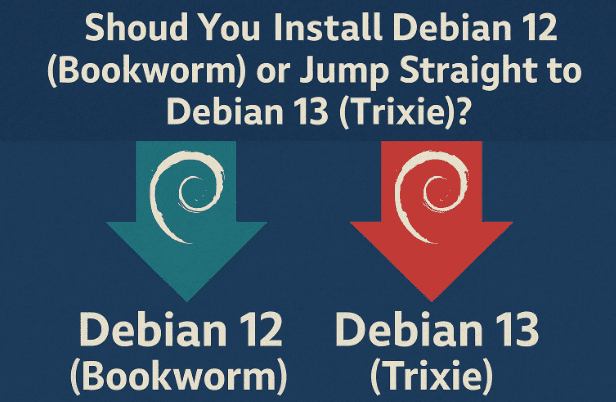
This is not a silly question at all. It’s actually one of the most common dilemmas when adopting Debian, especially if you are new to Linux or planning to run Debian on your primary laptop or work machine. In this post, we’ll go through:
- How the Debian release cycle works
- The key differences between stable and testing
- Pros and cons of Debian 12 (Bookworm) vs Debian 13 (Trixie testing)
- What real users have shared about their experiences
- Practical scenarios: which one is right for you
- FAQs and best practices for upgrading later
So let’s get started.
🔄 Understanding Debian’s Release Cycle
Before deciding between Bookworm (12) and Trixie (13), it’s important to understand how Debian versions are structured. Debian typically has three main branches:
- Stable: This is the official release (currently Debian 12 Bookworm). It is rock-solid, receives only security updates and critical bug fixes, and is supported for about 5 years.
- Testing: This is where the next release is prepared (currently Debian 13 Trixie). It gets newer software faster, but may occasionally have bugs or temporary breakages. Once it’s polished, testing becomes the next stable release.
- Unstable (Sid): This is where all new packages land first. It’s constantly changing and not recommended for beginners.
The release cadence of Debian is roughly every 2 years. Since Debian 12 was released in mid-2023, Debian 13 (Trixie) is expected to go stable around mid to late 2025.
🏗 Debian 12 (Bookworm) – Why It’s a Safe Choice
Debian 12 is the current stable release, and by default, it is what most users are encouraged to install. Here’s why:
- Maximum stability: All packages have been heavily tested and vetted. This makes it ideal for production, school, or work environments where you can’t afford random issues.
- Long-term support: Bookworm will be supported until at least 2028 with security updates and LTS (Long-Term Support).
- Backports available: If you need newer software (like a newer kernel for hardware support), Debian provides the backports repository, which allows you to selectively install newer versions without leaving the stability of Bookworm.
- Proven upgrade path: When Debian 13 becomes stable, upgrading from 12 to 13 using
apt dist-upgradeis usually seamless. Long-time users describe it as “magical” because Debian handles upgrades very gracefully.
👉 If you’re new to Linux, using your laptop for university or work, or simply want a system that doesn’t break, Bookworm is the best option.
🚀 Debian 13 (Trixie Testing) – Why Some Users Choose It
On the other hand, Debian 13 is currently in testing. Many advanced users run it on their daily machines already, and here’s why you might consider it:
- Newer software and kernel: Trixie includes more up-to-date packages, drivers, and kernels, which is especially useful if you have very new hardware (new CPUs, GPUs, Wi-Fi cards, etc.).
- Early access: By installing Debian 13 now, you avoid doing a big upgrade later when it becomes stable.
- Generally stable in practice: While it’s called “testing,” many report that Debian testing is already very stable for daily use, especially compared to rolling-release distros like Arch.
👉 However, there are caveats:
- Security updates are not as fast in testing. The security team focuses on stable first. This can leave testing vulnerable for short periods.
- Occasionally, you may run into dependency issues or broken packages that require some manual intervention.
- It’s not recommended for mission-critical systems.
📊 Community Opinions: What Other Users Said
Here’s a summary of what real Debian users had to say when asked about Debian 12 vs Debian 13:









- “Go with stable unless you have a specific reason to go for testing.”
Stable is safe, and unless you absolutely need newer software, Bookworm is the logical choice. - “Trixie isn’t getting security updates yet.”
This is a real concern. Bookworm gets quick fixes, while testing sometimes lags behind. - “If you have brand-new hardware, testing might work better.”
New laptops sometimes need kernels and drivers that are only in testing. - “Debian upgrades are magical.”
Many long-time users recommend installing Bookworm now, then experiencing the smooth upgrade to Trixie when it goes stable. - “Debian 13 is already daily-driver ready.”
A few users report running Debian 13 on their laptops and even servers with no major issues.
⚖️ Pros and Cons Comparison
Here’s a side-by-side breakdown:
| Feature | Debian 12 (Bookworm – Stable) | Debian 13 (Trixie – Testing) |
|---|---|---|
| Stability | Rock-solid, heavily tested | Mostly stable, but occasional breakages possible |
| Security updates | Fast and reliable | Slower, sometimes delayed |
| Software versions | Older but proven | Newer, closer to upstream |
| Hardware support | May require backports for new hardware | Better out-of-the-box support for new devices |
| Upgrade path | Easy upgrade to Debian 13 later | Already on track for Debian 13 |
| Best for | Students, professionals, servers, anyone new to Linux | Enthusiasts, new hardware owners, users comfortable with minor bugs |
💡 Practical Scenarios – Which One Should You Pick?
- For University/Work Laptop → Go with Debian 12 (Bookworm). Stability is more important than bleeding-edge features.
- For New Gaming Laptop (with latest GPU/CPU) → Consider Debian 13 testing or install Bookworm with a backports kernel.
- For Servers → Always stick with stable unless you’re testing a future deployment.
- For Hobby Laptop / Experimenting → Debian 13 is fun to try and usually safe enough for daily use if you’re comfortable fixing occasional issues.
🔧 What About Backports?
Many people forget that Debian backports exist. Backports allow you to stay on the stability of Debian 12 while still getting newer versions of certain packages (like kernel, drivers, or applications).
To enable backports:
- Edit your sources list:
sudo nano /etc/apt/sources.list
- Add this line:
deb http://deb.debian.org/debian bookworm-backports main contrib non-free-firmware
- Update package list:
sudo apt update
- Install from backports (example for kernel):
sudo apt -t bookworm-backports install linux-image-amd64
This way, you don’t need to switch to testing just to get newer drivers.
❓ FAQs
Q1: Will Debian 12 feel “outdated” soon?
Not really. Debian stable is always behind in versions compared to Arch or Fedora, but that doesn’t make it obsolete. Security patches keep it safe, and backports cover most newer needs.
Q2: How hard is it to upgrade from Debian 12 to 13 later?
Surprisingly easy. A single apt dist-upgrade usually works flawlessly. Long-time users say they’ve upgraded across multiple versions without reinstalling.
Q3: Can I dual-boot Bookworm and Trixie?
Yes, if you’re curious, you can install both on separate partitions. Use Bookworm as your safe environment and Trixie for experimentation.
Q4: What about Debian Sid (unstable)?
Sid is bleeding-edge and not for beginners. If testing breaks, Sid is where the fix first appears. Unless you’re a developer, you don’t need Sid.
🏁 Final Thoughts
So, should you install Debian 12 Bookworm or go with Debian 13 testing (Trixie) right now?
- If you value stability, reliability, and minimal headaches → Choose Debian 12. You’ll learn Debian the way it’s meant to be used, and upgrading later is painless.
- If you have very new hardware or love experimenting → Debian 13 testing is already usable and gives you access to the latest packages.
For most new users, the safe bet is Bookworm, with the option to enable backports for newer features. When Trixie goes stable, upgrading is smooth, and you’ll already have the confidence to do it.
👉 In other words: Stable for now, testing later. That’s the classic Debian way.
Tags & Hashtags
Tags: Debian 12, Debian 13, Bookworm vs Trixie, Linux beginners, Debian testing, Debian stable, Linux laptop setup, backports Debian
Hashtags: #Debian #Linux #Bookworm #Trixie #LinuxTips #OpenSource #DebianTesting








