When it comes to gaming, especially on emulators, PCs, and cloud platforms, one thing that can make or break your experience is the controller. Playing with on-screen controls is fine for a quick session, but let’s be honest—it never feels right. A dedicated gamepad not only improves accuracy but also makes long gaming sessions much more enjoyable.
Today, we’ll dive deep into one of the most talked-about controllers in the premium range—the GameSir G7 Pro. This isn’t just another accessory; it’s an officially Xbox-certified controller that brings a blend of durability, low latency, and customizable features that set it apart from the crowd.
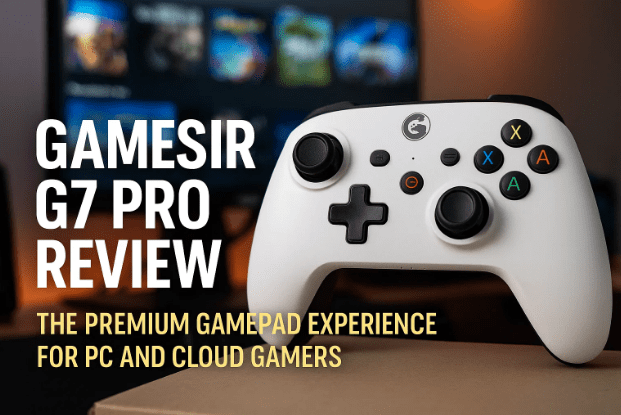
If you’ve been considering buying a gamepad, this detailed review and step-by-step guide will help you understand why the G7 Pro might just be the right choice. And even if you’re not planning to buy one right now, keep reading—you might end up adding it to your wishlist for the future.
👉 Buy the GameSir G7 Pro here: https://amzn.to/3Vp5Hdb
📦 Unboxing Experience
Unboxing a premium gadget always feels exciting, and the GameSir G7 Pro doesn’t disappoint. Inside the box, here’s what you’ll find:
- Charging Dock / Station – A stylish and practical stand for charging your controller.
- Extra D-pad buttons – Swappable buttons to customize your play style.
- Wireless dongle – A rather large USB dongle that ensures a stable wireless connection.
- USB Type-C braided cable – Strong, durable, and perfect for wired gaming sessions.
- Thank You letter, stickers, and a massive user manual – The manual is important because pairing methods differ between PC, Xbox, and mobile.
- 1-month Xbox Game Pass Ultimate – A great bonus for first-time buyers.
- The star of the show: the GameSir G7 Pro controller itself.
Before we move further, let’s pause and admire one little detail: the packaging even considers branding on small accessories like cable straps. These little touches are what make a premium product feel worth its price.
🎨 First Impressions and Build Quality
Now, let’s talk about looks and feel. The GameSir G7 Pro comes in a grey and white color combination that immediately stands out. It doesn’t just look premium—it feels premium.
- In-hand comfort: Compact yet comfortable, the grip is designed for long sessions.
- Anti-slip rubberized texture: Ideal if your hands sweat a lot while gaming.
- Weight distribution: Balanced perfectly to avoid fatigue.
The faceplate can be detached and swapped thanks to its magnetic design. This means if you ever get bored of the default design, you can switch to a fresh look. The process of removing and re-attaching is smooth and oddly satisfying.
⚙️ Connectivity Options
One of the biggest advantages of the GameSir G7 Pro is its Tri-Mode connectivity. Unlike many controllers limited to one or two methods, this one gives you all three:
- Wired – Using the included braided USB-C cable.
- Wireless dongle – For lag-free connection on PC and laptop.
- Bluetooth – Perfect for connecting to mobile devices and some other platforms.
Switching between these modes is easy thanks to a sliding switch at the back. This makes the G7 Pro versatile—whether you’re gaming on PC, Xbox, or even on your phone.
🕹️ Next-Gen Analog Stick Technology
Let’s dig deeper into what makes the sticks so special.








- Old tech (Potentiometer sticks): These rely on friction between components, which causes wear and tear over time, often leading to the dreaded stick drift.
- Hall Effect tech: A magnetic-based approach with no physical contact. This makes sticks more durable and drift-resistant.
- TMR technology (used in G7 Pro): A step beyond Hall Effect. It’s more accurate, more power-efficient, and offers even greater sensitivity.
The result? Your movements are captured with razor-sharp precision, and your controller lasts much longer without degrading.
⌨️ Buttons and Feedback
No controller is complete without great buttons. GameSir G7 Pro shines here too.
- ABXY and D-pad buttons: Built with optical microswitches that provide a tactile, clicky sound. It’s satisfying and responsive.
- Customizable macro buttons: Two at the back and two on top. They can be locked when not in use.
- Triggers: Dual modes. You can keep them as full-press triggers for racing games or switch them to click-like rapid triggers for FPS games.
- Gyroscope: Built-in, but works only on PC/laptops.
This versatility means the same controller adapts to different game genres effortlessly.
🔊 Extra Features for Gamers
Before we head into gaming performance, let’s highlight some thoughtful add-ons:
- 3.5mm headphone jack for wired audio.
- Dedicated mic mute/unmute button.
- Built-in microphone for quick communication.
- Charging dock integration: The dongle can be stored inside the dock, making your setup clutter-free.
- Customizable software (GameSir Nexus) – Lets you remap buttons, adjust vibration strength, and fine-tune analog sensitivity.
👉 Download GameSir Nexus: https://www.gamesir.hk/pages/gamesir-nexus-software
🎮 Gaming Performance
So far, everything looks premium. But what about actual gameplay? Here’s where the G7 Pro proves its worth.
- Polling rate: A blazing 1000Hz ensures just 1ms latency. To put this into perspective, many monitors have 5ms input lag, so the controller is faster than your display.
- Battery life: A 1200mAh battery ensures hours of gameplay without constantly charging.
- Vibration feedback: Four motors instead of two, offering balanced, immersive feedback.
- Progressive triggers: Ideal for racing games where acceleration depends on pressure applied.
Overall, the gameplay feels smooth, responsive, and immersive—exactly what you’d expect from a premium Xbox-certified controller.
📱 Connecting to Mobile Devices
For those who want to play mobile games or cloud platforms like Xbox Cloud Gaming, here’s how you connect:
- Slide the switch to Bluetooth mode.
- Press and hold the Home button to turn on the controller.
- The light ring will start spinning, indicating pairing mode.
- Enable Bluetooth on your phone and look for GameSir G7 Pro.
- Tap to pair. Once paired, the light will stay steady.
If pairing fails, press and hold the pairing button at the bottom for a few seconds to force a fresh connection.
🏆 Comparison with Older GameSir Controllers
Many gamers might already own the GameSir Cyclone 2 or similar models. Compared to those, the G7 Pro feels like a major leap:
- Better build quality
- More connection options
- Improved battery backup
- Superior analog stick technology
- Premium charging dock design
Once you use the G7 Pro, older models instantly feel outdated.
🙋 Frequently Asked Questions (FAQs)
Q1. Is the GameSir G7 Pro compatible with Xbox consoles?
Yes, it’s an Xbox-certified controller, fully compatible with Xbox consoles and PC.
Q2. Does it work with Android or iOS devices?
Yes, via Bluetooth. However, not all games will recognize advanced features like gyroscope.
Q3. How long does the battery last?
With its 1200mAh battery, you can expect long gaming sessions—typically several hours without interruption.
Q4. Can the faceplate really be changed easily?
Yes, it’s magnetic. Swapping takes seconds and adds a personalized touch to your controller.
Q5. How does it compare to Xbox’s official controllers?
While Xbox controllers are excellent, the G7 Pro adds customization, tri-mode connectivity, and TMR sticks—features you won’t find in standard controllers.
⚠️ Disclaimer
This article contains an Amazon affiliate link. If you purchase through the provided link, I may earn a small commission at no extra cost to you. This helps support the creation of more detailed guides and reviews like this one.
🎯 Final Verdict
The GameSir G7 Pro is not just another gamepad; it’s a premium investment for serious gamers. From cutting-edge TMR sticks and tri-mode connectivity to its satisfying button feedback and customizable software, it offers everything a gamer could ask for.
If you have the budget and want a future-proof, Xbox-certified controller that enhances your PC, console, and mobile gaming, this is absolutely worth considering.
👉 Grab yours here: https://amzn.to/3Vp5Hdb
Tags
GameSir G7 Pro, premium gamepad, Xbox certified controller, wireless controller, PC gaming accessories, cloud gaming controller, Bluetooth gamepad, GameSir Nexus software
Hashtags
#GameSirG7Pro #Gamepad #XboxCertified #CloudGaming #PCGaming #ControllerReview #WirelessGaming