If you’re building your first website, chances are you’ve typed “best WordPress hosting” into Google and immediately fallen down a rabbit hole of confusing terms — shared, managed, VPS, dedicated, and cloud hosting.
And let’s be honest — most beginners don’t know where to start. You might have read endless recommendations, compared prices, and still wondered:
“What’s the difference between shared hosting and VPS?”
“Is managed hosting really worth paying extra for?”
This article is designed to end that confusion. Together, we’ll explore what each type of hosting really means, how it works behind the scenes, what pros and cons you should expect, and when to choose each one.
Let’s begin our journey from the most basic and affordable option — shared hosting — and gradually climb our way up to VPS and dedicated servers.
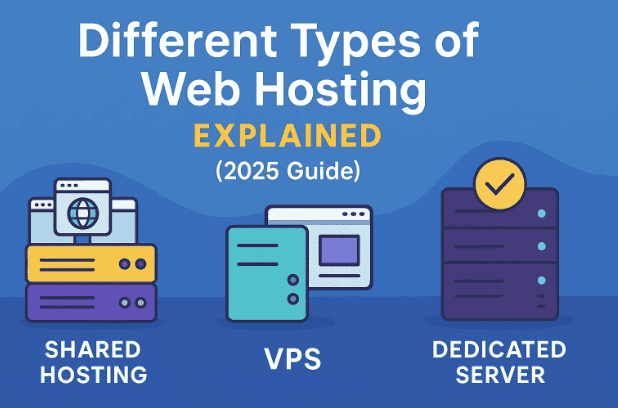
💻 Shared Hosting — The Starting Point for Beginners
Let’s start with the foundation: shared hosting.
As the name suggests, shared hosting means you’re sharing one physical server — a large computer that stores websites — with hundreds or even thousands of other users.
When someone types your website address into their browser, their device connects to this server, retrieves your files, and displays your site. Because many websites use the same server, the cost gets split, making shared hosting the most affordable option out there.
⚙️ How Shared Hosting Works
Imagine a massive office building filled with small cubicles. Each cubicle represents a different website. Everyone has their own space, but they all share the same electricity, internet, and air conditioning.
That’s how shared hosting works — you get your own website directory, but you’re sharing system resources like RAM, CPU, and bandwidth.
✅ Pros of Shared Hosting
Before moving to the downsides, let’s talk about why so many beginners choose shared hosting:









- Low cost: Plans usually start between $2–$10/month, making it ideal for new blogs or small business websites.
- Easy setup: Most shared hosting services include one-click WordPress installation, automatic backups, and control panels like cPanel or Plesk.
- Maintenance handled for you: The hosting provider takes care of server updates and security patches.
So far, so good, right? But every convenience comes with trade-offs. Let’s discuss those next.
⚠️ Cons of Shared Hosting
The main limitation of shared hosting is performance. Since you’re using shared resources, if one website suddenly gets a traffic spike — say during a flash sale — your website might slow down or even crash.
Other drawbacks include:
- Limited scalability: You can’t easily upgrade CPU or RAM.
- Vulnerability to server-wide issues: Even if your site is secure, an attack on another website on the same server (like a DDoS) could slow yours down.
- Resource caps: Shared hosting accounts often restrict the number of databases, subdomains, or email addresses you can create.
Think of it like living in an apartment — comfortable and affordable, but you’ll hear your neighbors when things get noisy.
💡 When to Choose Shared Hosting
Shared hosting is best if you’re launching your first WordPress site, blog, or portfolio. It’s great for traffic under 10,000–20,000 visitors per month.
If you’re running an e-commerce site, or expect viral traffic spikes, you might soon outgrow it — which brings us to our next level.
⚙️ VPS Hosting — The Balance Between Power and Price
Now that we understand shared hosting, let’s step into something a bit more powerful — VPS, or Virtual Private Server hosting.
At first, the term sounds confusing. Isn’t it still shared? Technically yes — but the key difference lies in how it’s shared.
🧩 What is a VPS?
A VPS is a virtual machine running inside a powerful physical server. Using a technology called virtualization, one big server is divided into several smaller “virtual” servers, each with dedicated resources (RAM, storage, CPU cores, etc.) reserved just for you.
So, even though multiple VPS instances may exist on the same hardware, they don’t interfere with each other.
You can install your own operating system (Linux or Windows), host multiple websites, and customize your environment — all without worrying about another user slowing you down.
✅ Benefits of VPS Hosting
Here’s where VPS hosting shines:
- Dedicated resources: You get guaranteed RAM and CPU allocations — no noisy neighbors stealing power.
- Scalability: Easily upgrade from 4 GB to 8 GB RAM or add more storage in minutes.
- Customization: You can configure firewalls, install custom software, and manage root access like a standalone server.
- Better stability: Your performance remains consistent even during other users’ traffic surges.
Many VPS providers also offer easy dashboards for managing resources, restarting your server, and setting up domains.
⚠️ The Downsides
While VPS hosting offers freedom, it also comes with responsibility.
- Technical setup: A raw or “unmanaged” VPS requires command-line knowledge — installing Apache/Nginx, securing SSH, configuring PHP versions, etc.
- Higher cost: Plans usually start from $10–$30/month depending on specs and management level.
- Maintenance overhead: If unmanaged, you’re responsible for security, software updates, and troubleshooting.
That’s why many people opt for Managed VPS Hosting, which combines power with convenience.
🔧 Managed VPS Hosting — The Best of Both Worlds
If you liked the sound of VPS but don’t want to handle server maintenance, managed VPS hosting is your friend.
Think of it like hiring a personal IT team that manages your private server for you. You still get dedicated resources, but the hosting provider takes care of updates, backups, and security.
🌩️ How Managed VPS Works
Managed VPS platforms (like Cloudways, WP Engine, or Flywheel) let you choose a cloud provider — such as DigitalOcean, Vultr, AWS, or Google Cloud — and manage everything through an intuitive dashboard.
You don’t touch the command line. Instead, you use an interface to deploy WordPress, monitor server health, or scale resources with a few clicks.
This makes managed VPS a favorite for agencies and professionals hosting multiple WordPress sites.
💰 Cost and Value
Yes, it’s pricier — starting around $20–$40/month — but for that cost, you gain peace of mind, scalability, and speed that rival enterprise solutions.
🖥️ Dedicated Server Hosting — All Power, All Responsibility
Let’s move to the top of the ladder: dedicated hosting.
A dedicated server is exactly what it sounds like — an entire physical machine that belongs solely to you. No virtualization, no neighbors, no shared bandwidth.
This means maximum performance and control, but also the highest cost and complexity.
⚙️ Who Uses Dedicated Servers?
Dedicated hosting is typically used by:
- Large corporations running resource-intensive web applications
- Popular e-commerce stores with millions of monthly visitors
- Game or media streaming companies requiring full hardware control
If you’re just starting out, you likely don’t need this — yet it’s good to understand what makes it unique.
⚠️ Downsides of Dedicated Hosting
Dedicated servers aren’t flexible. Upgrading hardware isn’t as easy as clicking “Add more RAM” — you may need physical migration or downtime. They also cost anywhere from $100 to $500 per month.
And unless you’re experienced with system administration, managing one can be overwhelming.
For most businesses, a high-end managed VPS or cloud server offers similar performance with far easier scalability.
🚀 Managed WordPress Hosting — Premium Simplicity
Before we wrap up, there’s one more hybrid model worth mentioning: Managed WordPress Hosting.
It’s often misunderstood — many assume it’s a VPS, but it’s usually premium shared hosting with advanced management tools.
Providers like WP Engine, Flywheel, Kinsta, and DreamPress optimize servers exclusively for WordPress. They use containerized environments (similar to VPS isolation) and provide automatic updates, daily backups, staging sites, and 24/7 expert support.
For most small to medium WordPress sites, this is the perfect middle ground between shared affordability and VPS performance.
🧭 Real-World Examples
Let’s connect everything we’ve learned with real hosting companies:
| Hosting Type | Example Providers | Best For | Price Range |
|---|---|---|---|
| Shared Hosting | Namecheap, DreamHost | Beginners, blogs | $2–$10/mo |
| Managed WordPress | WP Engine, Flywheel, Kinsta | Single-site professionals | $25–$40/mo |
| Managed VPS | Cloudways, DigitalOcean | Freelancers, agencies | $15–$50/mo |
| Dedicated Hosting | HostGator Dedicated, InMotion | Large corporations | $100+/mo |
💬 Frequently Asked Questions
Q1. Should I start with VPS or shared hosting?
Start with shared hosting unless you expect high traffic or need full customization. You can always migrate to VPS later.
Q2. What’s the main difference between VPS and managed WordPress hosting?
VPS offers total flexibility (good for developers), while managed WordPress hosting offers convenience and automatic optimization (good for content creators).
Q3. Is managed VPS worth paying for?
Yes — if you run multiple sites or want VPS power without the technical hassle. Cloudways is an excellent starting point for this model.
Q4. Do I need a dedicated server for eCommerce?
Not necessarily. A well-configured VPS or managed WordPress host can easily handle thousands of transactions per day.
🧠 Final Thoughts
Choosing a hosting plan isn’t about finding the most expensive one — it’s about balance.
If you’re just beginning, shared hosting gives you the freedom to experiment without breaking the bank. As your site grows, VPS hosting lets you scale confidently. And when performance and reliability become critical, managed VPS or dedicated hosting can take your project to the next level.
The most important thing is understanding what you actually need today — not just what sounds impressive on a sales page.
So, before buying, ask yourself:
- How much traffic do I expect?
- Am I comfortable managing servers myself?
- Do I value convenience or total control?
Once you answer those, the right hosting type will become clear.
⚠️ Disclaimer
All company names and hosting examples mentioned are used purely for educational purposes. Prices and features may vary over time — always verify directly on each provider’s official website before purchasing.
#WebHosting #WordPressHosting #VPSHosting #DedicatedServer #WebsiteSetup #WebDevelopment #CloudHosting #WPengine #DreamHost #HostingGuide