Have you ever logged into your YouTube Studio and noticed a persistent warning about a Community Guidelines violation—even though the original video has already been deleted? If you’re in this situation, you’re not alone. YouTube’s system may still show the warning even after the content has been removed, often for years. The good news? There’s now a way to resolve it by completing a policy training session.
In this guide, we’ll walk you through how to remove the Community Guidelines warning message from your YouTube dashboard—even if the video is no longer available.
🛑 What Is a Community Guidelines Warning?
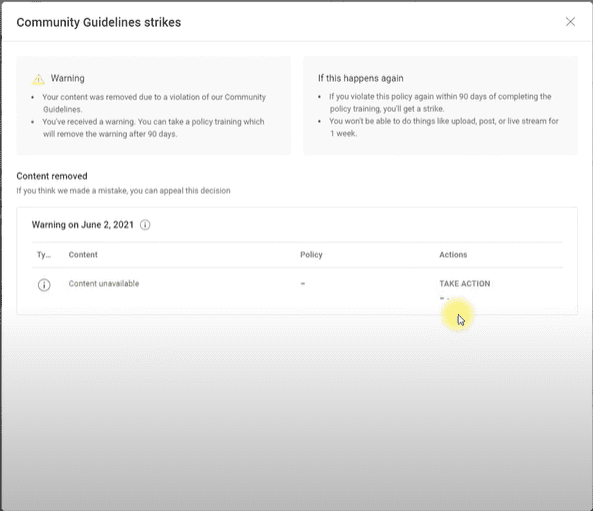
YouTube issues a Community Guidelines warning if any of your content violates its platform rules. Unlike a strike, a warning doesn’t immediately restrict your channel, but it’s still visible in your YouTube Studio dashboard. If you get another violation before the warning expires (usually 90 days), it could escalate into a strike.
Until recently, there was no easy way to resolve a warning, especially when the original video had already been deleted. Fortunately, YouTube now offers policy training to help you remove the warning proactively.
🧩 Step-by-Step: How to Remove the Warning via Policy Training
1. Access Your YouTube Studio
Go to YouTube Studio and log in to your channel.
2. Find the Warning Message
If you have an active warning, you’ll see a yellow banner or box that says something like:
“Active Community Guideline Warning — Take Action”
3. Click on “Take Action”
This opens the policy review window. Even if the original content is unavailable (e.g., deleted years ago), the action is still possible.
4. Start the Review Process
Click on “Begin Review”. YouTube will show you the policy that your video allegedly violated. Read through the explanation to understand the reason for the warning.
5. Choose Your Action
You’ll get two options:
- Appeal the warning (not recommended if the content is deleted)
- Take policy training (recommended for most users)
⚠️ Since the content was removed in this case, we selected policy training.









🎓 What to Expect in the Policy Training
YouTube’s policy training includes a short quiz to ensure that you understand their harmful or dangerous content guidelines. Here’s a sample of what the training includes:
- Questions about whether certain content examples violate policies (e.g., showing how to bypass login restrictions or access restricted websites).
- A series of multiple-choice answers.
- Instant feedback with explanations after each question.
The training takes about 15 minutes to complete.
✅ Completion & Results
After completing the training:
- You’ll receive a confirmation message.
- Your Community Guidelines warning will expire in 90 days (e.g., if completed on September 28, it will expire on December 27).
- If you violate the same policy again before expiration, you’ll receive a strike.
- If you violate a different policy, you’ll receive a new warning and another chance to complete training.
📌 Even if the original video is long gone, completing the training clears the warning and protects your channel from future risks.
👌 Final Thoughts
YouTube’s policy training is a welcome feature that offers creators a second chance—even if a mistake was made years ago. It’s especially helpful if you’ve already deleted the offending content and had no other way to address the warning.
If you find a Community Guideline warning stuck on your dashboard, don’t ignore it—take the training and protect your channel’s future.
📁 Tags and Hashtags
Tags: YouTube Studio, Community Guidelines Warning, YouTube Policy Training, Remove Warning YouTube, YouTube Tips, Channel Strike Prevention, YouTube Dashboard, Deleted Video Warning
Hashtags:
#YouTubeStudio #YouTubeWarning #PolicyTraining #CommunityGuidelines #ContentCreatorTips #YouTubeTips #RemoveStrike #YouTubeHelp #TipsToFix








