If you’re looking for a Linux distribution that combines elegance, ease of use, and powerful customization, Zorin OS is a fantastic choice. Based on Ubuntu, Zorin OS offers a polished experience with a Windows-like interface, making it perfect for newcomers and experienced users alike.
In this article, we’ll explore Zorin OS 17.3, its installation process, key features, and why it stands out among other Linux distros.
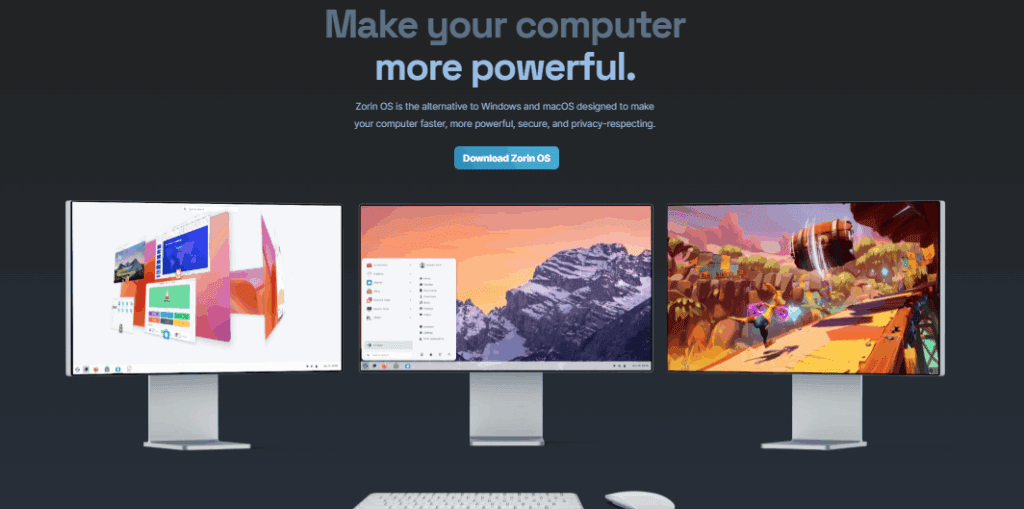
What is Zorin OS?
Zorin OS is an Ubuntu-based Linux distribution designed to provide a familiar and user-friendly experience. It comes in two main versions:
- Zorin OS Core (Free) – A fully-featured desktop OS for general users.
- Zorin OS Pro (Paid) – Includes additional premium layouts and support.
For this review, we’ll focus on the free version (17.3).
🔗 Download Zorin OS: https://zorin.com/os/
Installation Process
Installing Zorin OS is straightforward:
- Download the ISO from the official website.
- Create a bootable USB using tools like Balena Etcher or Rufus.
- Boot into the live environment and select “Try or Install Zorin OS.”
- Follow the installer (language, timezone, partitioning, etc.).
- Set up a username and password, then complete the installation.
💡 Pro Tip: Enable third-party drivers during installation for better hardware compatibility.
First Impressions & Desktop Experience
Zorin OS uses a customized GNOME desktop with a Windows-like layout, making it intuitive for former Windows users.
Key Features:
✅ Sleek & Modern UI – Clean design with smooth animations.
✅ Multiple Layouts – Switch between Windows, macOS, or GNOME-style layouts.
✅ Pre-installed Apps – Includes Brave Browser (default), LibreOffice, and essential tools.
✅ Dark/Light Mode – Customizable themes for better aesthetics.
Performance & Hardware Support
- Runs smoothly on older hardware.
- Uses Linux Kernel 6.8 (slightly older but stable).
- Supports Wi-Fi, Bluetooth, and graphics drivers out of the box.
Customization & Settings
Zorin OS offers deep customization without requiring advanced Linux knowledge.
1. Appearance & Themes
- Change desktop layouts (Windows, macOS, or GNOME).
- Adjust accent colors (blue, orange, green, etc.).
- Enable transparency effects for a modern look.
2. Desktop Effects (3D Workspaces)
- Dynamic workspaces with 3D switching animations.
- Jelly Mode (wobbly windows, similar to KDE Plasma).
3. Window Management
- Alt+Tab behaves like Windows (configurable).
- Middle-click actions (customizable).
Software & Package Management
Zorin OS uses APT (Debian/Ubuntu packages) and includes:




📦 1,800+ pre-installed packages (LibreOffice, GIMP, etc.).
🔄 Easy updates via Software Updater.
🛠 Flatpak & Snap support for additional apps.
💻 Terminal Check:
apt list --installed | wc -l # Shows installed packagesWho Should Use Zorin OS?
✔ Windows/Mac users transitioning to Linux.
✔ Beginners who want a stable, easy-to-use OS.
✔ Developers & professionals needing a reliable system.
Final Verdict
Zorin OS is one of the best Linux distros for users who want a polished, familiar, and powerful operating system. Its Windows-like interface, strong performance, and customization options make it a top choice for both new and experienced Linux users.
🔹 Pros:
- Beautiful, intuitive UI
- Excellent for Windows converts
- Strong hardware support
🔸 Cons:
- Kernel version slightly outdated
- Some pre-installed apps may not be needed
Should You Try Zorin OS?
✅ Yes! If you want a stable, user-friendly Linux distro that just works.
📥 Download Zorin OS: https://zorin.com/os/
Tags:
Linux, Zorin OS, Ubuntu, Open Source, Operating System, Linux Distro
Hashtags:
#Linux #ZorinOS #Ubuntu #OpenSource #Tech #OperatingSystem
Disclaimer: This review is based on Zorin OS 17.3 (Core Edition). Performance may vary depending on hardware. Always back up data before installing a new OS.








