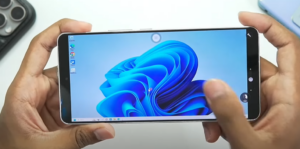
The world of Windows emulation on Android has taken a massive leap forward with Winlator OMOD, an optimized fork of the popular Winlator emulator. Designed to deliver better performance, improved compatibility, and new features, this open-source emulator claims to offer 3-4x faster speeds compared to the original version.

In this article, we’ll explore:
✔ How to set up Winlator OMOD
✔ Best settings for optimal performance
✔ Gameplay tests (including GTA V!)
✔ Why this might be the best Windows emulator for Android yet
What is Winlator OMOD?
Winlator MOD (Optimized Module) is an enhanced version of Winlator, a Windows emulator for Android that allows users to run PC games and applications on their mobile devices. The latest version (10.11) introduces:
✅ Recompiled RootFS – Boosts performance by 2-4x (up to 2000 FPS in benchmarks!)
✅ Mali GPU support – Better graphics compatibility
✅ Improved save data handling – Prevents crashes and data loss
✅ Darker UI theme & smoother animations
How to Set Up Winlator OMOD
Step 1: Download & Install
- Get the latest Winlator OMOD APK from the official source (check the link below).
- Open the app and allow all permissions.
- Wait for the assets to load (first-time setup may take a few minutes).
Step 2: Configure the Best Settings
For maximum performance, use these settings:
- Box64 Version:
0.3.5 - Preset:
Performance - Save Flags Level:
0(reduces stuttering) - Screen Resolution:
800x600(adjust based on your device) - Graphics Driver:
DXVK 1.10.3(best compatibility) - Audio Driver:
PulseAudio - Enable FPS Counter (to monitor performance)
Step 3: Create a Container
- Tap “+” to create a new container.
- Select your game folder (where PC games are stored).
- Set Startup Selection to
Aggressivefor faster loading.
Performance & Gameplay Tests
Benchmark Results
- DirectX 3D Test: 800+ FPS
- Dolphin Test: 1500+ FPS (Snapdragon 8 Gen 2)
GTA V Gameplay Test
- Stable 30 FPS (with occasional drops due to shader compilation)
- No major graphical glitches
- Touch controls work well (after importing a profile)
🔹 Pro Tip: Disabling VSync can push FPS beyond 60, but requires manual config edits.
Why Winlator OMOD Stands Out
✔ Faster than original Winlator (thanks to recompiled RootFS)
✔ Mali GPU support – Great for Exynos & MediaTek devices
✔ Better game compatibility (DirectX, OpenGL, and more)
✔ Open-source & free
Final Verdict: Should You Use It?
✅ YES if:
- You have a high-end Android device (Snapdragon 8 Gen 2/3, Dimensity 9000, etc.)
- You want better performance than standard Winlator
- You’re okay with some setup tweaking
❌ NO if:
- Your phone has weak hardware (may struggle with heavy games)
- You prefer plug-and-play emulators (this requires manual configs)
🔗 Useful Links
- Winlator OMOD Official Page (Note: Replace with actual link when available)
- DXVK Official Site
🏷️ Tags
Winlator, Windows Emulator, Android Gaming, GTA V on Android, PC Emulator, Box64, DXVK, Snapdragon Gaming
#️⃣ Hashtags
#Winlator #WindowsEmulator #AndroidGaming #GTAMobile #PCGamesOnAndroid #Emulation








⚠️ Disclaimer
Emulating Windows games on Android may violate some game licenses. Use only for legally owned software. Performance varies by device—high-end phones recommended.








