Windows users have long feared the iconic Blue Screen of Death — the full-screen crash message that signaled something had gone terribly wrong. But with the latest Windows 11 update (part of the August Patch Tuesday or manually installed update preview), Microsoft has quietly replaced it with something… darker.
Yes, the Blue Screen of Death is officially being replaced with a Black Screen of Death — and while the name may sound equally grim, the look and behavior of the crash screen have changed significantly.
In this blog, we’ll break down:
- What exactly is the new Black Screen of Death (BSOD)
- How it differs from the old blue one
- When and how you’ll encounter it
- And why this change might cause more confusion than clarity
Let’s jump into this update and unpack all the details.
🖥️ What Is the Black Screen of Death in Windows 11?
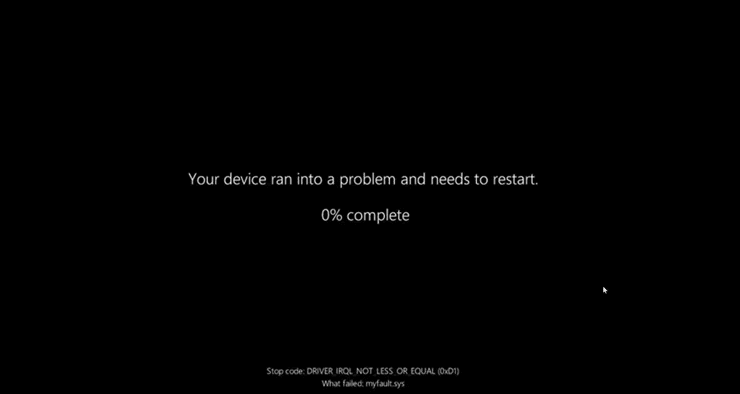
After installing the latest Windows 11 bug fix update preview (or the upcoming Patch Tuesday update in August), users will notice that system crashes now show a black screen instead of the traditional blue one.
Here’s what it looks like:
- A black background
- The familiar sad-face emoji
:( - A message stating: “Your device ran into a problem and needs to restart.”
- A percentage indicator showing the collection of diagnostic data
- A stop code at the bottom, explaining what caused the crash (e.g.,
IRQL_NOT_LESS_OR_EQUAL,MEMORY_MANAGEMENT, etc.)
📝 The content is mostly unchanged — it’s still technically a “BSOD” (Blue/Black Screen of Death) — but visually, it now blends in with many other black-background screens in Windows 11.
🔄 How to Trigger or See This Update
You don’t need to do anything special to receive the new BSOD design — it’s part of the general update rollout for Windows 11.
There are two ways you’ll get it:
- Manually via the optional Update Preview (available now)
- Automatically with the August 2025 Patch Tuesday updates
Once installed, any critical crash that previously triggered a blue screen will now show the new black interface.
⚠️ Why This Might Be a Problem: Update vs Crash Confusion
This change, while mostly cosmetic, raises some usability concerns.
Windows already uses black screens for:






- System startup loading
- Feature updates
- System restores
- Disk check operations
Now, with the crash screen also black, it can be easy to confuse a crash with a routine update or maintenance screen — especially if you’re not paying attention to the small sad face or stop code.
This may cause users to:
- Miss that a crash even happened
- Mistake critical errors for update progress
- Misdiagnose system instability
🎨 Why Did Microsoft Make the Change?
Microsoft has not issued an official explanation for why this visual change was implemented.
However, some theories include:
- UI Consistency: Black screens match Windows 11’s overall dark theme better than blue.
- Simplification: It aligns with other black-background processes during updates and boot.
- Reverting to Earlier Test Behavior: Microsoft actually tested a black screen BSOD in early builds of Windows 11 back in 2021, but reverted to blue due to user backlash. Now it seems they’re bringing it back for good.
🛡️ Is This Just a Visual Change or Something More?
It’s purely cosmetic — the underlying error handling, logging, and recovery systems are the same.
- You’ll still find crash logs in Event Viewer
- Memory dump files (
.dmp) are still created - Diagnostic tools like WhoCrashed and BlueScreenView continue to work
So if you’re a system administrator or tech enthusiast, your troubleshooting workflow remains unchanged — only the visual presentation differs.
🤔 Frequently Asked Questions
Q: Can I switch back to the Blue Screen of Death?
A: As of now, no setting or registry tweak has been provided by Microsoft to revert to the old blue screen. It’s a system-level UI change controlled by updates.
Q: Is this only in Windows 11?
A: Yes, this change currently only affects Windows 11. Windows 10 still retains the traditional blue screen crash interface.
Q: Can I still see the stop code?
A: Yes! The stop code still appears at the bottom of the crash screen, just like before. You can use it to search for causes or fixes.
📝 Final Thoughts: A Simpler Look, But Possibly Confusing
So far, we’ve done a good job understanding what the new Black Screen of Death is and how it differs from the classic blue version. While it may seem like a small update, it could lead to bigger confusion in real-world situations — especially for users who aren’t aware of the change.
While some may appreciate the cleaner, modern appearance, others argue that this shift undermines the visual warning the blue screen once gave. A system crash shouldn’t look like a calm update.
Time will tell how users respond to the new look — but for now, one thing’s certain:
Goodbye Blue Screen… Hello Black Screen.
📥 Want to Stay Safe from BSOD Crashes?
Here are a few tips to prevent system crashes:
- Keep Windows updates installed and drivers up to date.
- Use reliable antivirus software to prevent malware-related BSODs.
- Run tools like SFC /scannow or DISM to fix corrupted system files.
- Avoid unstable overclocking or outdated third-party drivers.
⚠️ Disclaimer
This article discusses visual and functional changes in Windows 11 system-level error screens introduced through official Microsoft updates. These changes are part of system design and cannot be reverted by default user controls unless stated otherwise by Microsoft in future releases.
Tags: Windows 11 BSOD, Black Screen of Death, Windows 11 August update, BSOD UI change, system crash screen, stop code, Windows update preview, Windows 11 troubleshooting
Hashtags:
#Windows11 #BSOD #BlackScreenOfDeath #WindowsUpdate #MicrosoftPatchTuesday #SystemCrash #TechNews #dtptips