Microsoft has finally rolled out a significant feature in Windows 11 that many users have been waiting for — unified updates for third-party applications. This new enhancement streamlines the update process for external apps like Google Chrome, Adobe products, game launchers, and even system drivers. Let’s explore how this feature works, why it matters, and what you can expect in the coming months.
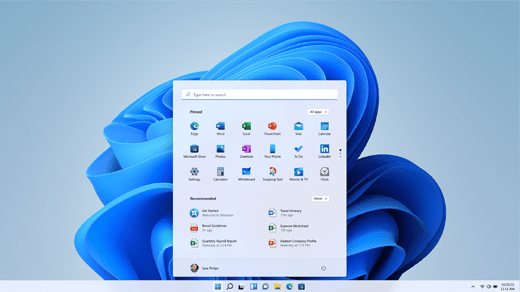
What’s New in Windows 11?
Microsoft has introduced a centralized update system within Windows 11 that allows third-party apps to receive updates directly through the Windows Update settings panel. Traditionally, software like Chrome, Steam, Epic Games, Adobe Photoshop, and other utilities would prompt users individually for updates, often disrupting workflow or gaming sessions. This scattered system is finally getting unified.
Now, with this update:
- You can update multiple third-party applications from a single location.
- The updates will happen through the Windows Settings → Windows Update section.
- All apps can be updated in one go, and potentially even finalized with a single system restart.
This change removes the hassle of manually updating multiple apps one by one and brings a more premium and streamlined experience to users.
Why This Matters
1. No More Manual Checks
Earlier, users had to manually launch apps like Chrome or Steam to check for updates. Each app had its own schedule and notifications, leading to frequent interruptions.
2. Time-Saving
With centralized updates, users save time and bandwidth. Gamers, professionals, and casual users can now install updates in one batch and resume their work or entertainment with minimal disruption.
3. Inspired by Android’s Update System
This system appears to be inspired by Android’s Play Store functionality where all apps are updated from a single interface. Microsoft is aiming to replicate a similar unified experience on Windows desktops.
Supported Applications (Examples)
Here are some commonly used third-party apps that could benefit from this new feature:
- Google Chrome
- Adobe Photoshop
- Adobe After Effects
- Brave Browser
- Epic Games Launcher
- Steam
- Motherboard and GPU driver utilities like ASUS Armoury Crate or MSI Dragon Center
Currently, this feature is being tested with a range of third-party applications and drivers.
Insider Preview & Availability
This functionality is presently available in the Windows Insider Program for developers and early adopters. You can join the Insider Program to test this out before the global rollout. Microsoft has confirmed this in their official blog post titled:
👉 Interacting with a Unified Future for App Updates on Windows
The blog elaborates how bandwidth, CPU usage, notification confusion, and multiple configuration dialogs are being tackled with this unified system. It also mentions add-on support and app update history, helping users track changes and manage updates effectively.








Where Will This Feature Appear?
The centralized update section for third-party apps is expected to appear within the Settings > Windows Update panel. Here’s what might happen:
- You might see a dedicated section for third-party apps within Windows Update.
- When checking for updates, third-party apps will be listed just below the OS updates.
- In the future, support for beta versions of apps might also be integrated.
Possible Pros & Cons
✅ Advantages:
- Centralized update management.
- Time-efficient for regular users and gamers.
- Improved OS experience with fewer pop-ups and interruptions.
- Cleaner update logs and history.
⚠️ Potential Disadvantages:
- Some users prefer not to update apps they rarely use. Hopefully, Microsoft will include toggles to exclude specific apps from automatic updates.
- In-built Microsoft apps might be forced to update, without giving users much control.
Final Thoughts
This move by Microsoft is a welcome upgrade, aiming to modernize Windows update mechanisms. If your system is capable of handling regular updates smoothly, this change will greatly enhance your experience. With a premium feel, unified controls, and seamless updates, Windows 11 is evolving to become more user-centric than ever before.
Let’s hope this feature rolls out to stable builds soon so more users can take advantage of it!
Tags:
Windows 11 update, Microsoft app updates, third-party software updates, unified updates, Windows Insider, Chrome update, Adobe update, Steam, Epic Games Launcher, Brave browser, Windows productivity
Hashtags:
#Windows11 #MicrosoftUpdate #AppUpdates #ThirdPartyApps #TechNews #WindowsInsider #ProductivityTools #GamingUpdates #Adobe #Chrome #Steam
Disclaimer:
The unified app update feature is currently available for Windows Insider Program users only. The general public may not see this feature until it’s officially released in a stable Windows update. Information presented in this article is based on Microsoft’s official blog and early previews. Always ensure your data is backed up before participating in insider builds or testing pre-release features.








