As more users upgrade from Windows 10 to Windows 11, opinions remain divided—especially among those with older hardware. Many feel that Windows 10 performed better on legacy systems, leading them to question whether Windows 11 Pro is the right choice.
For users seeking a lighter, faster, and more streamlined Windows 11 experience, Windows 11 LTSC (Long-Term Servicing Channel) may be the ideal solution. In this article, we’ll compare Windows 11 LTSC vs. Windows 11 Pro, explore performance differences, and help you decide whether switching is worth it.
What is Windows 11 LTSC?
Windows 11 LTSC is a minimalist, bloatware-free version of Windows 11 designed for stability and long-term use. Unlike the standard Windows 11 Pro, LTSC removes unnecessary features, resulting in:
✅ No TPM or Secure Boot requirement (better for older PCs)
✅ No Copilot, Cortana, or pre-installed apps (Weather, News, Clipchamp, etc.)
✅ No Windows Sandbox (reduces background resource usage)
✅ Smaller installation footprint (~15GB vs. ~23GB on Pro)
✅ Better gaming performance & lower RAM usage
Since it’s an official Microsoft release, Windows 11 LTSC is safer than custom ISOs like AtlasOS, Ghost Spectre, or Optimum 11.
Windows 11 LTSC vs. Windows 11 Pro: Key Differences
| Feature | Windows 11 LTSC | Windows 11 Pro |
|---|---|---|
| Bloatware | None (Minimal apps) | Includes Copilot, Cortana, Xbox, etc. |
| System Requirements | No TPM/Secure Boot needed | TPM 2.0 + Secure Boot required |
| Storage Usage | ~15GB | ~23GB |
| Background Services | Fewer running processes | More background tasks |
| Gaming Performance | Better FPS, lower CPU/RAM usage | Slightly heavier |
| Updates | Less frequent (LTSC updates every 2-3 years) | Regular monthly updates |
Performance Comparison: Real-World Testing
When testing Windows 11 LTSC on an older laptop (4GB RAM), we observed:
🔹 ~115 processes (vs. ~150+ on Pro)
🔹 ~50% RAM usage (vs. ~70%+ on Pro)
🔹 Smoother multitasking & faster boot times
🔹 No lag in File Explorer & right-click menus
How to Further Optimize Windows 11 LTSC
For even better performance, use Microsoft’s PowerToys (specifically Winaero Tweaker) to:
- Enable Ultimate Performance Power Plan
- Disable unnecessary background apps
- Adjust visual effects for best performance
- Open System Properties (
sysdm.cpl) → Performance Settings → Adjust for best performance
- Disable telemetry & ads
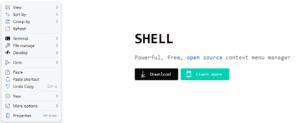
- Restore the classic Windows 10 right-click menu (via Command Prompt):
reg add "HKCU\Software\Classes\CLSID\{86ca1aa0-34aa-4e8b-a509-50c905bae2a2}\InprocServer32" /f /veThen restart File Explorer (via Task Manager).
How to Download & Install Windows 11 LTSC
Since Microsoft doesn’t publicly list LTSC for general users, you’ll need to:
- Download the ISO from Microsoft’s official channels (check Microsoft’s Volume Licensing Service Center).
- Create a bootable USB using Rufus (Download Rufus).
- Install Windows 11 LTSC (similar to a standard Windows setup).
⚠️ Disclaimer: LTSC is intended for enterprise use. Ensure compliance with Microsoft’s licensing terms before installation.







Should You Switch to Windows 11 LTSC?
✅ Best for:
- Older PCs (No TPM requirement, lower RAM usage)
- Gamers (Better FPS, fewer background tasks)
- Privacy-focused users (No telemetry/bloatware)
- Minimalists (Clean, bloat-free experience)
❌ Stick with Windows 11 Pro if:
- You need regular feature updates
- You rely on Microsoft Copilot/AI features
- You use Windows Sandbox or Hyper-V
Final Verdict
If you want a lighter, faster, and more efficient Windows 11 experience—especially on older hardware—Windows 11 LTSC is the best choice. It removes unnecessary bloatware, improves performance, and maintains Microsoft’s official support.
For newer PCs, Windows 11 Pro may still be preferable if you need the latest features.
🔗 Download Links:
Tags:
Windows 11 LTSC, Windows 11 Pro, Windows Optimization, Lightweight Windows, Gaming Performance
Hashtags:
#Windows11 #LTSC #PCOptimization #WindowsPerformance #TechGuide








