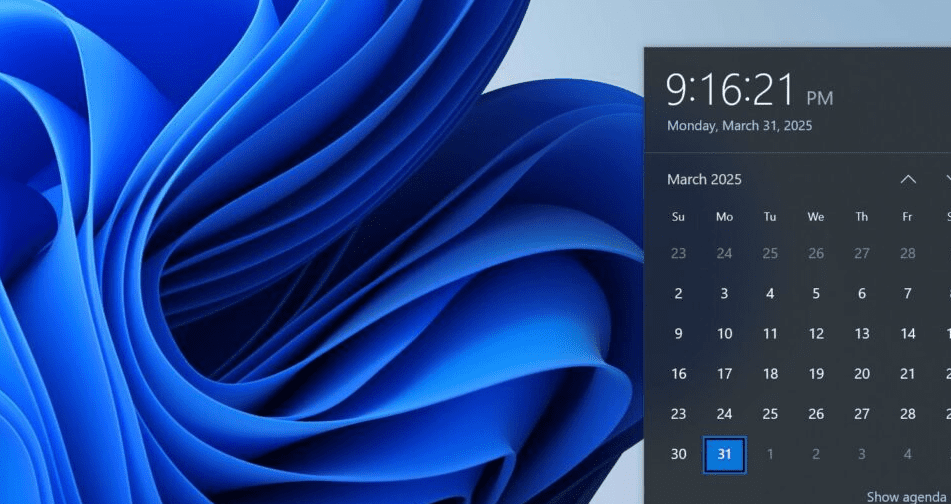
If you’ve been frustrated by Microsoft’s decision to remove seconds from the Windows 10 taskbar clock, you’re not alone. The change, introduced in a March/April update, sparked widespread backlash—so much so that Microsoft is now reversing course.
In this article, we’ll cover:
✅ Why Microsoft removed the seconds (and why they’re bringing them back)
✅ How to get the seconds back right now (Insider Preview method)
✅ When the official fix is rolling out for all users
Why Did Microsoft Remove the Seconds?
In early 2024, Microsoft silently removed seconds from the taskbar clock flyout in Windows 10.
🔹 Possible Reasons:
- Performance optimization (fewer updates to the clock display)
- UI simplification (Microsoft has been streamlining Windows 10 features)
- A mistake? (No official explanation was given)
The move angered many users, leading to massive feedback complaints on the Windows Feedback Hub.
Good News: Microsoft Is Bringing Seconds Back!
Due to overwhelming user demand, Microsoft has confirmed that seconds will return in an upcoming update.
When Will the Fix Arrive?
- Insider Preview (Release Preview Channel) – Already available (as seen in testing).
- Next “C” Update (Bug Fix Update) – Expected next week.
- June Patch Tuesday (Mandatory Update) – If you skip optional updates, this will force the fix.
How to Get Seconds Back Right Now (Insider Preview Method)
If you don’t want to wait, you can join the Windows Insider Program to get early access.
Step 1: Join the Windows Insider Program
- Go to Settings > Update & Security > Windows Insider Program.
- Click “Get started” and link a Microsoft account.
- Select Release Preview Channel (most stable pre-release builds).
Step 2: Install the Latest Preview Update
- Go to Settings > Windows Update.
- Click “Check for updates” and install the latest Insider Preview build.
- Restart your PC.
✅ After reboot, your taskbar clock will show seconds again!
⚠️ Note: Insider builds are generally stable, but minor bugs may occur.
Final Thoughts: Why This Matters
While a small change, the removal of seconds disrupted workflows for many users who rely on precise timekeeping. Thankfully, Microsoft listened—proving that user feedback works.
🔹 What’s Next?





- If you don’t want Insider builds, wait for the June Patch Tuesday update.
- Microsoft may reconsider similar UI changes in the future.
Tags:
Windows 10 update, taskbar clock seconds, Windows Insider, Microsoft feedback, Windows 10 fixes
Hashtags:
#Windows10 #Microsoft #TechNews #WindowsUpdate #TaskbarFix
Disclaimer: Joining the Windows Insider Program may expose your system to pre-release bugs. Backup important data before installing preview builds.
Were you affected by this change? Let us know in the comments! ⏱️💬








