If you use home broadband and notice that your Wi-Fi signal drops in certain corners of your house—like bedrooms, basements, balconies, or even the kitchen—then you’re not alone. Weak Wi-Fi zones are common in many households. The good news is: you don’t have to live with poor signal strength anymore.
In this article, we’ll explain what a Wi-Fi Extender, Booster, or Repeater is, how they work, and why you may need one to improve your home internet experience.
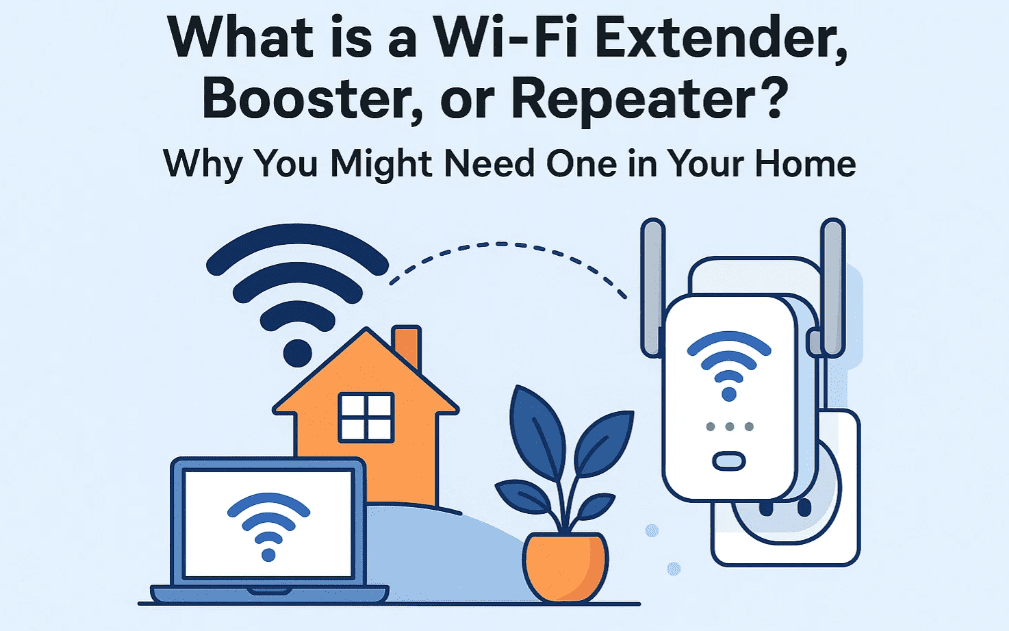
🛰️ What is a Wi-Fi Extender, Booster, or Repeater?
These terms are often used interchangeably, and while there are small technical differences, they essentially perform the same job—they increase the range of your existing Wi-Fi network.
➤ Wi-Fi Extender
A Wi-Fi Extender connects to your router (either via cable or Wi-Fi) and rebroadcasts the signal to cover areas where your router’s signal is weak.
➤ Wi-Fi Repeater
Similar to an extender, a repeater captures your existing Wi-Fi signal and sends it further, creating a secondary network with extended coverage.
➤ Wi-Fi Booster
This is a generic term used for both extenders and repeaters. It simply refers to any device that amplifies Wi-Fi coverage.
🏡 Why You Might Need a Wi-Fi Extender at Home
Wi-Fi routers have a limited signal range, especially in large homes or multi-story buildings. Here are a few common problems and how extenders can help:
| Problem | Solution |
|---|---|
| Weak signal in bedrooms, balconies, or bathrooms | Place a Wi-Fi extender halfway between your router and the problem area |
| Slow internet on smart TVs or gaming consoles | Use a booster to ensure consistent speed for streaming and gaming |
| Drop in video call quality in certain rooms | A repeater can help maintain stable connectivity throughout the house |
🛠️ How to Know If You Need One
- You constantly move closer to the router for better signal.
- Your Zoom calls freeze or lag in specific rooms.
- Smart home devices lose connection frequently.
- Speed tests show a significant drop when moving just one room away.
If these sound familiar, a Wi-Fi extender or repeater could be your ideal fix.
🔍 Choosing the Right Device
There are many models available, but one of the most reliable brands globally is TP-Link. They offer budget-friendly and high-performance options.
✅ Recommended Products:
🧰 TP-Link Wi-Fi Router (Base Router)
If your current router is outdated, consider upgrading it first before buying extenders.
👉 Buy on Amazon [Affiliate link]
📶 Best Wi-Fi Repeater for Range Extension
We recommend TP-Link RE305 or RE220 depending on your home size.
👉 View on Amazon – TP-Link AC1200 RE305 [Affiliate link]








These devices are known for:
- Easy plug-and-play setup
- Strong signal indicator LEDs
- Dual-band support (2.4GHz + 5GHz)
- Compatibility with all standard routers
📈 Setup Guide Overview (Steps)
- Plug in the extender near your router for initial setup.
- Use the WPS button (if available) to pair with the router.
- Once connected, move the extender to a midpoint between your router and the low-signal area.
- Use the LED signal indicator on the device to find the best placement spot.
- Confirm your extended network works properly by testing the signal strength in weak zones.
❓FAQs
Q: Can I use a repeater with a different brand of router?
Yes, most extenders and repeaters are compatible with all standard routers.
Q: Will an extender reduce my internet speed?
Slightly. That’s why dual-band extenders are recommended—they reduce performance drop significantly.
Q: Can I connect multiple extenders in one home?
Yes, but for best performance, consider models with mesh compatibility like TP-Link’s OneMesh system.
🧠 Final Thoughts
Wi-Fi extenders, repeaters, or boosters are essential tools for improving internet coverage in your home. Whether you live in a compact apartment or a multi-story house, you can easily eliminate dead zones and enjoy a seamless Wi-Fi experience in every room.
Don’t settle for unstable connections—choose the right solution and get the coverage you need.
🔗 Recommended Links [Affiliate links]
- 📦 TP-Link Wi-Fi Router (Base)
- 🚀 TP-Link AC1200 RE305 Wi-Fi Extender
- 💡 TP-Link AC750 RE220 Entry-Level Extender
Disclosure: As an Amazon Associate, I earn from qualifying purchases. This helps support the blog at no additional cost to you.
Tags:
wifi extender explained, what is wifi repeater, wifi booster usa, home wifi solution, tp link extender, fix wifi dead zones, wifi tips, internet optimization
Hashtags:
#WiFiExtender #WiFiRepeater #WiFiBooster #TPLink #InternetTips #HomeNetwork #FasterInternet #DeadZoneFix #MeshWiFi #WiFiUSA








