If you’ve ever wanted to transition from Windows to Linux but were intimidated by the completely different user interface and workflow, there’s good news: Vinux is a Linux distribution that looks and feels almost exactly like Windows. Designed to give Windows users a familiar environment while enjoying the power and flexibility of Linux, Vinux could be your perfect starting point into the world of open-source operating systems.
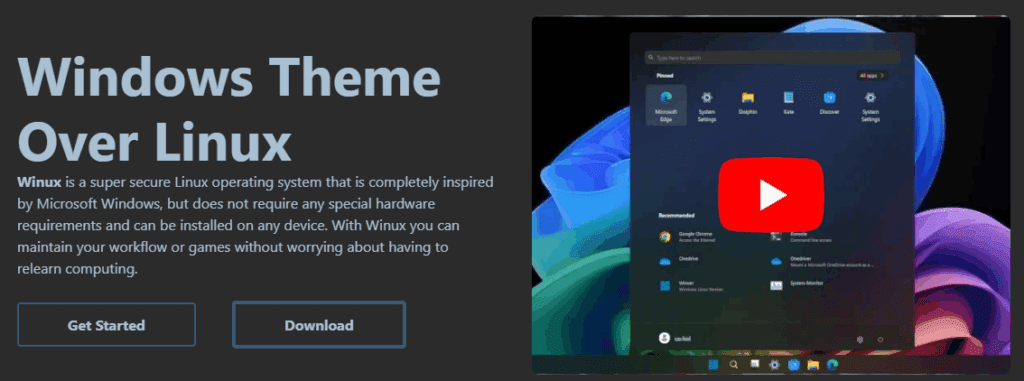
What Is Vinux?
Vinux is a Linux distribution based on Ubuntu with the KDE Plasma desktop environment. Originally named “Wubuntu,” it has evolved to offer an even more polished Windows-like experience under the name Vinux.
From the moment you boot it up, you’ll be greeted with a desktop and start menu that look remarkably similar to Windows 11 or Windows 10 — depending on the theme you choose. It even mimics Windows boot screens and login interfaces.
Why Vinux Feels Like Windows
- Windows UI & Themes: Vinux replicates the look and feel of Windows down to the icons, taskbar, settings menu, and animations. It even lets you switch between themes that resemble Windows 11 or Windows 10, with light, dark, and “toilet” (hybrid) options.
- Preinstalled Wine Integration: Wine is a compatibility layer that allows you to run Windows
.exeapplications directly on Linux. In Vinux, Wine is preinstalled and seamlessly integrated, allowing you to launch.exefiles like VLC Media Player with a simple right-click. - Built-in Power Tools: Vinux includes a unique settings hub called Power Tools, designed to mirror the Windows Settings app. From here, you can customize themes, tweak system performance, and manage installed apps — just like in Windows.
System Requirements & Performance
Despite its Windows-like appearance, Vinux is surprisingly lightweight:
- RAM Usage: Approximately 1.6 GB on idle
- Disk Usage: Around 25 GB after installation
- CPU Load: Minimal, even on virtual machines
This makes it a great option for older systems or lightweight virtual machine testing.
Installation Walkthrough
- Boot from ISO: Upon booting, you’ll see a Windows-like interface asking you to choose your language.
- Start Installation: After entering the desktop, launch the installer.
- Set Timezone and Keyboard: Select your region and preferred keyboard layout.
- Disk Setup: Choose to erase the disk or set custom partitions.
- Create User Account: Provide your name, password, and PC name.
- Finish and Reboot: Vinux installs quickly, and the system restarts into your new desktop environment.
Running Windows Apps with Wine
Vinux comes with Wine pre-installed, allowing you to:
- Download
.exeinstallers (e.g., VLC Media Player) - Right-click and choose “Open with Wine Windows Program Loader”
- Go through the familiar installation steps
- Run the installed program from your application menu
You can also explore the hidden .wine folder in your home directory to manage the Windows-like filesystem structure, including the virtual C:\ drive.
Bonus Features
- OnlyOffice: A powerful Microsoft Office alternative preinstalled on Vinux.
- Microsoft Web Apps: Use Microsoft Word and Excel through the browser by logging into your Microsoft account.
- Customizable Widgets: From weather to system monitors, KDE Plasma’s widget system enhances the desktop experience.
Package Management & Updates
Being Ubuntu-based, Vinux uses the apt package manager. To update your system:
sudo apt update && sudo apt upgrade
You also get access to Ubuntu’s extensive repositories and PPAs for installing additional software.






Who Should Try Vinux?
- Windows users curious about Linux
- Developers needing a Linux base with a Windows UI
- Anyone seeking a transition path from Windows to Linux
- Low-resource system users who want a lightweight, modern OS
Final Thoughts
Vinux is one of the best Linux distributions for those seeking a seamless transition from Windows. Its familiar interface, powerful customization tools, and support for .exe files make it a unique and practical choice. Whether you’re looking to experiment or fully migrate from Windows, Vinux provides a comfortable, user-friendly bridge to the Linux ecosystem.
Disclaimer
Note: Vinux is an independent project and not affiliated with Microsoft. The replication of the Windows UI is for usability purposes only. Users are advised not to use Vinux as a direct replacement for licensed Windows installations in commercial environments where Windows-specific software compliance is required.
Tags
vinux, linux distribution, windows-like linux, kde plasma, ubuntu based linux, wine linux, linux for windows users, linux tutorial, beginner linux distro, run exe on linux
Hashtags
#Vinux #LinuxDistribution #UbuntuBased #KDEPlasma #WindowsAlternative #WineOnLinux #LinuxForBeginners #EXEonLinux #OpenSourceOS #LinuxCustomization






