Roku remains one of the most popular streaming platforms, but many users only scratch the surface of what it can do. Whether you’re a new Roku owner or a longtime user, this guide will help you maximize your device’s capabilities—from secret menus to productivity hacks.
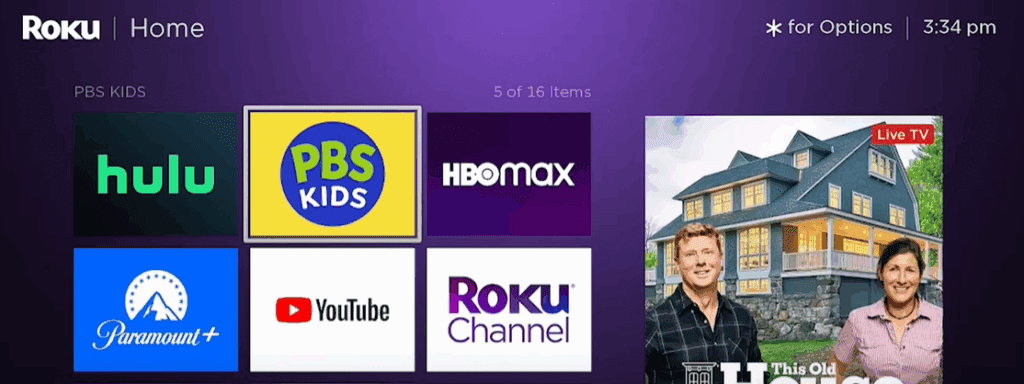
1. Mastering the Roku Home Screen
Customizing Your Channel Layout
- Move channels by highlighting one, pressing the ★ (Star) button, and selecting “Move Channel.”
- Add new channels by selecting “Streaming Channels” > “Search” or browsing categories.
Personalizing Themes
- Go to Settings > Theme to change backgrounds, screensavers, and sound effects.
- Choose from free and premium themes (some require activation).
2. Essential Accessibility & Convenience Features
Instant Replay with Captions
- Missed dialogue? Press the Instant Replay button (↺) to jump back 10 seconds.
- Enable auto-captions on replay:
- Settings > Accessibility > Caption Mode > “On Replay.”
Volume Leveling & Night Mode
- Smooth out loud/quiet audio during movies:
- Play content > Press ★ (Star) > Volume Mode > “Leveling.”
- Night Mode caps max volume to avoid disturbing others.
Bandwidth Saver (Auto-Shutoff)
- Prevent unnecessary data usage:
- Settings > Network > Bandwidth Saver > Turn On/Off.
- Default: Turns off Roku after 4 hours of inactivity.
3. The Roku Mobile App: A Game-Changer
Keyboard Input & Remote Control
- Use your phone to type usernames/passwords faster.
- Navigate via the virtual remote in the app.
Private Listening
- Connect Bluetooth headphones to your phone for silent viewing.
- Supports up to 4 headphones simultaneously.
Apple Watch & Alexa Integration
- Control Roku via Apple Watch (play/pause, voice search).
- Alexa Voice Commands:
- “Alexa, open Netflix on Roku”
- “Alexa, pause Roku”
4. Secret Menus (Like a Video Game Cheat Code!)
1. Advertising & Image Settings
- Press: Home 5x, then ↑ → ↓ ← ↑.
- Adjust ad cycles, enable auto-pairing for gaming remotes.
2. Advanced Wireless Diagnostics
- Press: Home 5x, then ↑ ↓ ↑ ↓ ↑.
- View Wi-Fi signal strength, glitch rates, and run speed tests.
3. System & Platform Info
- Press: Home 5x, then ⏩ ⏸ ⏪ ⏸ ⏩.
- Check device temperature, IP address, and remote battery life.
5. Guest Mode for Rentals or Shared Use
- Ideal for Airbnb or loaning your Roku.
- Set up via Roku.com or on-device:
- Settings > System > Guest Mode > Enable with PIN.
- Guests can log into their accounts, and all data auto-wipes on their checkout date.
Final Thoughts
Roku’s hidden features transform it from a simple streamer into a powerful, customizable hub. Whether optimizing audio, navigating secret menus, or using voice controls, these tips ensure you’re getting the best experience possible.
For more help, visit Roku’s Official Support.
Tags:
Roku tips, Roku tricks, secret Roku menus, Roku remote hacks, streaming devices, Roku setup, Roku app
Hashtags:
#Roku #StreamingHacks #TechTips #HomeTheater #RokuSecrets #CordCutter
Visited 23 times, 1 visit(s) today