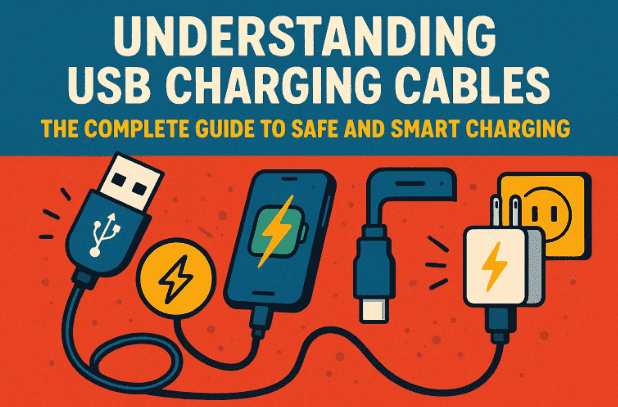
In today’s gadget-filled world, nearly every device — from smartphones to smartwatches — comes with a USB cable. Yet, many users still feel confused when they find only the charging cable inside the box and not the actual charger block. The natural question arises: Are all USB cables the same? Do they all charge equally fast and safely?
This detailed guide explains how USB charging works, the difference between USB-A and USB-C, how voltage and amperage affect charging speed, and what really happens when your device “talks” to your charger. By the end, you’ll know exactly how to choose and use your USB cables wisely.
1. Why Devices Now Come Without Chargers
Over the last few years, many manufacturers stopped including chargers in the box. This move was partly for environmental reasons — to reduce e-waste — and partly because most households already own multiple USB chargers.
If you open your drawer, you’ll likely find several little charging bricks from old phones, tablets, or Bluetooth devices. These chargers often outlive the gadgets they came with. The truth is: USB charging has become standardized enough that one charger can serve multiple devices — as long as you understand what type of USB connection it supports.
Let’s start by understanding the foundation: USB-A, the classic port that shaped our charging habits for years.
2. The Basics of USB-A — The Original Charging Standard
Before diving into USB-C and fast charging, it’s important to know what USB-A is and why it matters.
USB-A is the older, rectangular-shaped connector that you’ve likely seen on countless cables and laptops. It’s part of the first generation of USB (Universal Serial Bus) standards and has one major defining characteristic:
- It always provides 5 volts of power.
This rule is built right into the USB-A specification. Regardless of the cable or device, when you see a USB-A port, you can be confident that it delivers 5V — no more, no less.
However, voltage is only one part of the equation. The current (measured in amperes or amps) determines how much power actually flows to your device.
Originally, USB-A ports supplied just 0.5 amps (500 mA) — enough for keyboards or small accessories, but quite slow for charging modern smartphones.
Later USB-A versions improved:






- USB 2.0 → 500 mA (0.5 A)
- USB 3.0 → 900 mA (0.9 A)
- Dedicated charging ports → up to 1.5 A
That means if you plug your phone into an older USB-A port, it will still charge, but more slowly. The process remains safe, though not optimal.
So far, so good — but then came a revolution: USB-C.
3. Moving Forward with USB-C — Smaller, Faster, Smarter
Now let’s move to the next generation — the compact, reversible, and powerful USB-C.
USB-C looks different from USB-A:
- It’s smaller and oval-shaped.
- It can be plugged in either way up (no more “flip and retry” frustration).
- It supports both data transfer and power delivery at much higher speeds.
But the biggest change is how much power USB-C can handle.
USB-C supports multiple voltage levels:
- 5V
- 9V
- 15V
- 20V
And with Extended Power Range (EPR) introduced in later USB Power Delivery (PD) versions, it can even handle:
- 28V
- 36V
- 48V
This flexibility allows USB-C to power not just phones but also laptops, monitors, and even some gaming consoles.
4. How USB-C Power Delivery (PD) Works
Now, here’s where things get interesting. When you plug a USB-C charger into your device, it’s not just raw electricity flowing through immediately. There’s actually a “conversation” happening behind the scenes between three participants:
- The power supply (charger)
- The device (like your phone or laptop)
- The cable itself
This conversation is part of the USB Power Delivery protocol.
The charger first announces, “Here’s what I can offer — I support 5V, 9V, 15V, and 20V.”
Your device replies, “I can safely take 9V at up to 2A.”
The cable may add, “I can handle up to 60W (or 240W, depending on its design).”
Once they all agree on the safest, most efficient combination, the charging process begins.
If this negotiation doesn’t happen — for example, if the cable doesn’t support PD or the charger is a basic one — the system defaults to the safe 5V mode.
This is why USB-C devices rarely get “fried” by over-voltage. The system is built to protect both ends automatically.
5. The Role of the Cable — Passive vs Active Cables
So far we’ve talked about the port and the charger, but what about the cable itself?
There are two main types of USB cables:
1. Passive Cables
These are the simplest form — just wires connecting two ends. They don’t have any chips or circuits inside.
If you use a passive cable, power simply flows through according to the limits set by the charger and the device.
2. Active Cables
Many modern USB-C cables include a tiny built-in chip (also known as an e-marker).
This chip identifies the cable’s capabilities — such as whether it supports 60W, 100W, or 240W charging — and ensures safe negotiation with compatible chargers and devices.
For example, high-power USB-C cables used for laptops or monitors must have this chip, or the system may limit the power flow for safety.
This explains why some cheap cables charge slower — they might not support higher wattages, or they might lack that safety chip.
6. Are All USB Cables Universal?
In theory, USB standardization makes cables universal. But in practice, not all cables are created equal.
Here’s a simple breakdown:
| Cable Type | Connector | Typical Voltage | Max Power | Common Usage |
|---|---|---|---|---|
| USB-A to Micro-USB | USB-A | 5V | 2.4W–7.5W | Older phones, accessories |
| USB-A to USB-C | USB-A | 5V | 7.5W–10W | Entry-level USB-C devices |
| USB-C to USB-C (PD) | USB-C | 5V–20V+ | Up to 240W | Phones, tablets, laptops |
| USB-C to Lightning | USB-C | 5V–9V | 18W–30W | iPhones, AirPods |
| Thunderbolt 4 (USB-C) | USB-C | 5V–20V | 100W–240W | High-end devices, docks |
So, while your phone cable might fit your laptop, it may not charge it efficiently or at all if it can’t carry enough power.
The key is to use the right combination:
- USB-C charger + USB-C cable = fastest possible charging
- USB-A charger + USB-C cable = slower, but still safe
7. Common Myths About USB Charging
Let’s pause for a moment and clear up some common misconceptions that often confuse users.
Myth 1: Using a “faster” charger will damage my phone.
→ Not true. USB Power Delivery is designed to prevent overcharging. Your phone will only take what it can handle.
Myth 2: All USB cables charge at the same speed.
→ False. Cable quality and supported wattage make a big difference.
Myth 3: You must use the manufacturer’s original charger.
→ Not necessarily. As long as the charger and cable are USB-IF certified (see usb.org), any brand can safely charge your device.
8. The Rise of “Charger-Less” Boxes
Today, it’s increasingly common to find just the USB-C to USB-C cable in your new phone’s box. While it may seem inconvenient, the logic is simple:
- You probably already own compatible chargers.
- Universal USB-C chargers can charge nearly anything.
- It helps reduce electronic waste.
If you ever need an extra charger, USB-C chargers are now widely available and affordable — just ensure it’s certified and supports PD (Power Delivery).
9. Tips for Safe and Efficient Charging
So far, we’ve learned how USB cables and chargers communicate, but what can you do to keep your devices safe and efficient? Let’s go over some practical recommendations.
Before we list them, remember that charging safety isn’t just about voltage — it’s about the quality of the components you use daily.
- Use certified accessories. Always buy from reputable brands that are USB-IF certified.
- Check cable rating. Look for markings such as “60W,” “100W,” or “240W” on the cable or packaging.
- Avoid damaged cables. Frayed or bent connectors can cause overheating or short circuits.
- Keep ports clean. Dust inside USB ports can interfere with charging and even cause sparks.
- Don’t cover devices while charging. It traps heat and slows performance.
- Use the original or equivalent wattage charger. A higher-watt charger won’t harm your device, but a lower-watt one will charge slower.
These habits can extend your cable life and keep your devices performing optimally.
10. How to Know Your Cable’s Capacity
Unfortunately, most cables don’t list their voltage or amperage rating on the jacket. However, you can identify their capability by:
- Checking the original packaging or the manufacturer’s website.
- Using a USB power meter — a small tool that displays voltage, current, and power output.
- Noticing how fast your device charges compared to known high-speed cables.
If you’re frequently using devices that support fast charging or laptops, investing in a good 100W USB-C PD cable is worth it.
11. Frequently Asked Questions (FAQ)
Q1. Can I use my old USB-A charger for my new USB-C phone?
Yes, you can. It will charge slower, but it’s perfectly safe.
Q2. What happens if my charger provides more watts than my phone supports?
Your phone automatically limits the intake to a safe level. It will not “overcharge.”
Q3. How can I tell if my charger supports fast charging?
Check for terms like PD (Power Delivery) or Quick Charge on the charger body or specifications.
Q4. Do all USB-C cables support video and data transfer?
No. Some are charge-only cables. For monitors or docks, use cables labeled as USB-C 3.1 Gen 2 or Thunderbolt 4.
Q5. Can I use the same USB-C cable for my laptop and phone?
Yes, if it supports enough wattage (generally 60W+). Otherwise, it might not charge your laptop efficiently.
12. Final Thoughts — USB Has Truly Simplified Charging
It’s amazing how far USB technology has come. From the clunky days of the old USB-A ports to the universal flexibility of USB-C, charging has become safer, faster, and smarter.
You no longer need to worry about volts, amps, or matching chargers to each device. The USB standard takes care of it for you — through negotiation, standardization, and built-in safety protocols.
As long as you stick to trusted, certified cables and chargers, your devices will remain protected.
If your phone supports USB-C charging, make sure to use a USB-C Power Delivery charger for the best performance. It’s a small upgrade that makes a big difference in everyday convenience.
Disclaimer:
Always use certified and tested charging accessories from reliable manufacturers. Avoid counterfeit or uncertified USB cables that may lack proper insulation or safety chips. Improper accessories can pose risks of overheating or device damage.
Official USB Standards Resource: https://www.usb.org/
#USB #FastCharging #USBC #USBA #PowerDelivery #TechGuide #ChargingSafety #dtptips








