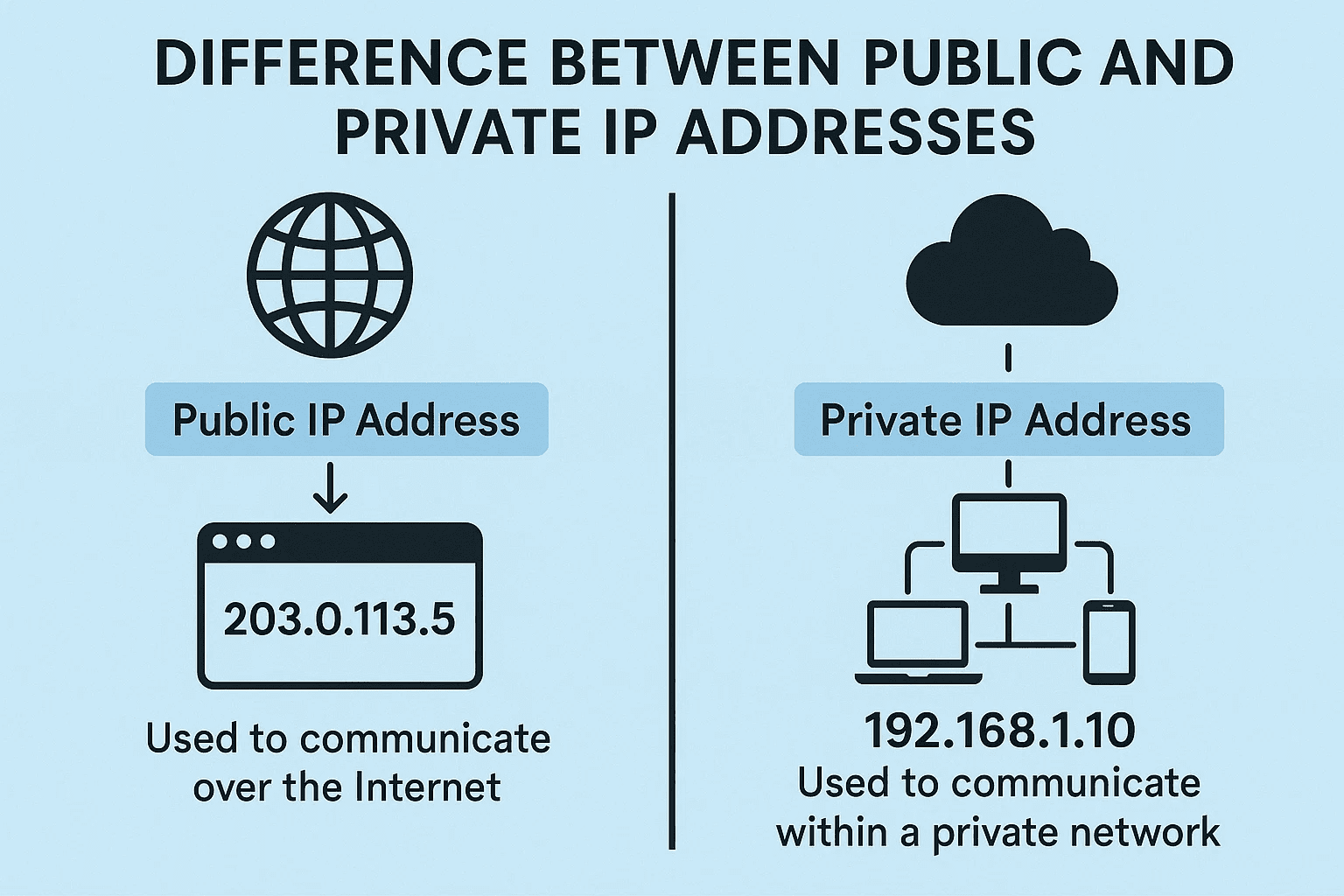
When connecting to the internet or setting up a network, you might come across the terms public IP address and private IP address. While they might sound similar, they serve very different purposes in networking. In this article, we’ll explore these two types of IPv4 addresses in detail—what they are, how they work, why both are necessary, and how they impact your privacy and connectivity.
What is an IP Address?
An IP address (Internet Protocol address) is a unique numerical identifier assigned to each device connected to a network. It enables devices to communicate with each other over a network or the internet. Without an IP address, a device cannot participate in any type of digital communication.
There are two main types of IP addresses:
- Public IP addresses
- Private IP addresses
We’ll focus specifically on IPv4 (Internet Protocol version 4) in this article, which is still widely used today.
What Is a Public IP Address?
When you subscribe to an internet connection through your Internet Service Provider (ISP), you are assigned a public IP address. This IP address:
- Is registered and visible on the internet.
- Is globally unique—no other device on the internet shares your public IP.
- Enables access to the internet for your home or office network.
Why Public IPs Are Limited
Although IPv4 allows for over 4 billion addresses, the rapid expansion of internet-connected devices led to a shortage. To address this, engineers developed the concept of private IP addresses to reduce the number of public IPs needed.
What Is a Private IP Address?
A private IP address is used within a local network (like your home or office). These addresses are not visible on the public internet. Devices like laptops, smartphones, and printers are typically assigned a private IP by your router’s DHCP (Dynamic Host Configuration Protocol) service.
Private IP addresses:
- Cannot access the internet directly.
- Must be translated into a public IP address to access the internet. This process is handled by NAT (Network Address Translation), a feature in your router.
- Are non-unique globally—the same private IPs can exist in multiple separate networks.
Why Use Private IPs?
Let’s consider a home with 5 devices (laptop, smartphone, smart TV, tablet, printer). Instead of getting 5 public IPs from your ISP (which would be expensive and inefficient), your router assigns each of these devices a private IP address. Then, when any of these devices want to access the internet, NAT translates the request using the single public IP provided by your ISP.
This approach:
- Saves IP address space
- Reduces cost
- Improves network security
Classes and Ranges of Private IP Addresses
There are three main classes of private IP addresses, each intended for different types of networks:









| Class | Starting Range | Typical Use Case |
|---|---|---|
| A | 10.0.0.0 – 10.255.255.255 | Large enterprises |
| B | 172.16.0.0 – 172.31.255.255 | Medium-sized organizations |
| C | 192.168.0.0 – 192.168.255.255 | Small businesses and homes |
Most home networks use Class C (192.168.x.x) addresses. For example, your home computer might have an IP like 192.168.1.2.
How to Check Your IP Address
Here’s how you can find both your private and public IP addresses:
To check your private IP address:
- Windows:
Open Command Prompt and type:ipconfig - macOS / Linux:
Open Terminal and type:ifconfig
Your local IP will usually look something like 192.168.x.x or 10.x.x.x.
To check your public IP address:
Open a web browser and visit:
👉 https://www.whatsmyipaddress.com
This will display the IP address your ISP has assigned to your modem/router.
Summary: Public vs. Private IPs
| Feature | Public IP | Private IP |
|---|---|---|
| Visibility | Visible on the internet | Only within local networks |
| Registration | Globally registered | Not registered publicly |
| Accessibility | Can access the internet directly | Cannot access internet directly |
| Assigned by | Internet Service Provider (ISP) | Router (via DHCP) |
| Cost | Paid (comes with ISP plan) | Free |
| Security | Less secure (requires firewall/VPN) | More secure (not internet-facing) |
| Uniqueness | Globally unique | Can be reused across networks |
Security Considerations
- Public IPs are traceable and expose your device to the open internet.
🔐 To enhance security, consider using tools like:- VPNs (Virtual Private Networks): Encrypt your internet traffic and hide your public IP.
Example VPN provider: https://www.nordvpn.com - Proxies: Route traffic through an intermediary server.
- VPNs (Virtual Private Networks): Encrypt your internet traffic and hide your public IP.
- Private IPs are not visible to the outside world and are thus inherently more secure.
Final Thoughts
Understanding the distinction between public and private IP addresses is essential for managing networks, setting up devices, and protecting your online privacy. While public IPs connect you to the world, private IPs manage communication within your home or office. Together, and with the help of NAT and DHCP, they make internet connectivity seamless and scalable.
Tags:
public IP address, private IP address, IPv4, router, NAT, DHCP, network address translation, local network, ISP, internet security, VPN
Hashtags:
#PublicIP #PrivateIP #IPv4 #NAT #DHCP #NetworkSecurity #HomeNetworking #InternetPrivacy #VPN #IPaddressExplained
Disclaimer:
This article is intended for educational purposes only. The IP address ranges and services mentioned are standard as per IPv4 networking and may vary depending on your region, ISP, or network setup. Always consult a certified network technician for enterprise network configurations.








