In today’s digitally connected world, having internet access is almost as essential as electricity. But while most people use the internet daily, many are still unclear about the roles of the devices that make this access possible—specifically, the modem and the router. These two terms are often used interchangeably, but they serve very different purposes within your network setup.
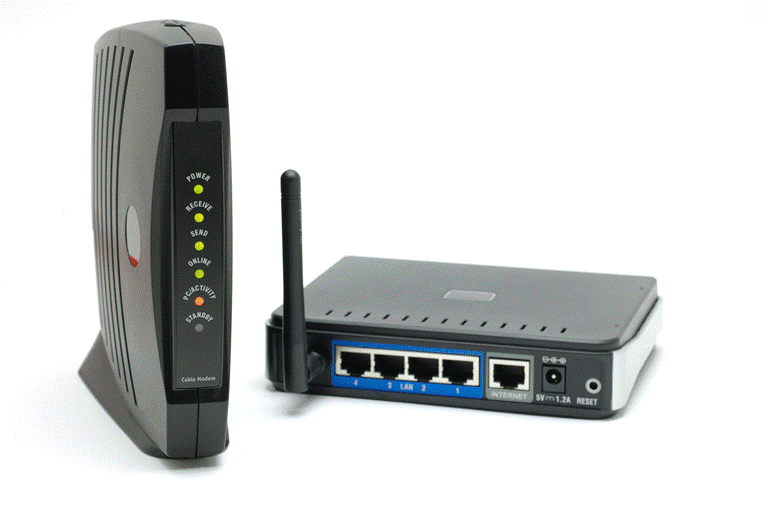
In this article, we’ll clearly explain what modems and routers do, how they differ, and how they work together to get your devices online. Whether you’re setting up your home network or just want to understand your existing setup better, this detailed guide will walk you through everything you need to know.
What Is a Modem?
A modem (short for modulator-demodulator) is the device responsible for bringing the internet into your home or office from your Internet Service Provider (ISP). It creates and maintains a connection with your ISP, essentially acting as the gateway between the global internet and your local network.
Why Do You Need a Modem?
The main job of a modem is to translate signals:
- Digital devices like computers communicate in digital signals.
- The internet, however, operates using analog signals.
So, the modem acts as a translator:
- It demodulates incoming analog data from your ISP and converts it into digital signals your computer can understand.
- It also modulates outgoing digital data from your computer into analog signals for the internet.
That’s where the term “modem” comes from—modulator-demodulator.
What Is a Router?
A router comes into play after the modem. While the modem connects your home or office to the internet, the router connects all your devices to the modem—and to each other—creating a local network.
Main Functions of a Router:
- Distributes Internet Access: A router takes the internet connection from your modem and shares it with multiple devices—computers, phones, tablets, smart TVs, etc.
- Wired & Wireless Access:
- It often includes a built-in switch with multiple Ethernet ports for wired connections.
- It also functions as a wireless access point, allowing Wi-Fi-enabled devices to connect wirelessly.
Do You Always Need a Router?
Not necessarily. If you have only one device that needs internet access, you can plug it directly into the modem via an Ethernet cable. However, in most homes and offices, multiple devices need internet simultaneously. That’s where a router becomes essential.
Types of Modems
There are different types of modems, depending on the type of internet connection you use:
- Cable Modems
- Use coaxial cables (the same used for cable TV).
- Commonly provided by companies like Comcast.
- DSL Modems
- Use standard phone lines for data transmission.
- Often provided by companies like AT&T.
You must use the correct modem for your internet service type—DSL modems won’t work with cable internet and vice versa.
Combo Devices: Modem + Router in One
Many modern internet devices combine both modem and router functionalities in one physical unit. These combo devices:










- Bring internet into your home like a modem.
- Distribute that connection to devices like a router.
This setup simplifies installation and saves space, but may offer less flexibility than having separate devices.
How a Network Looks in Real Life
Let’s visualize some common network setups:
- Home or Small Office with Multiple Devices
- Internet → Cable/DSL Modem → SOHO (Small Office/Home Office) Router → Multiple devices (computers, tablets, phones)
- Business Network
- Internet → Cable Modem → Business-Class Router → Computers, servers, and additional networking equipment
- Single Device Internet Use
- Internet → Modem → Single Device (no router needed)
Where Do Hubs and Switches Fit?
You might be wondering how hubs and switches relate to modems and routers. Here’s how:
- Most home routers already come with a built-in switch (typically 4 ports) to allow multiple wired connections.
- If you need more than 4 wired connections, you can attach a separate switch to the router to expand the number of available Ethernet ports.
There’s generally no need for an additional switch unless you’re running a larger wired setup.
Recap: Modem vs. Router
| Feature | Modem | Router |
|---|---|---|
| Purpose | Connects to ISP and internet | Connects multiple devices to the modem |
| Signal Conversion | Yes (Analog ↔ Digital) | No |
| Needed for Internet? | Yes | Only if multiple devices need access |
| Types | Cable, DSL | SOHO, Business |
| Wireless Functionality | No (unless it’s a combo device) | Yes (in most modern routers) |
| Has Ethernet Ports? | Usually 1 | Typically 4 or more |
Final Thoughts
Understanding the difference between a modem and a router is essential for setting up or troubleshooting your internet connection. The modem brings internet into your space, while the router distributes it to your devices. While combo units can do both, knowing how each component works separately gives you more control over your network setup.
If you’re planning to upgrade or replace your network hardware, ensure you’re getting the right type of modem for your ISP and the right kind of router for your coverage needs.
Tags:
modem, router, difference between modem and router, how internet works, networking basics, modem vs router, DSL modem, cable modem, combo modem router, ethernet switch
Hashtags:
#Modem #Router #NetworkingBasics #InternetSetup #WiFiRouter #DSL #CableModem #ModemVsRouter #HomeNetworking #ISP
Disclaimer:
Information in this article is provided for educational purposes. Always consult your internet service provider or network specialist when selecting or installing network hardware. The brands and providers mentioned (Comcast, AT&T) are referenced only as examples.







