Have you ever wondered how major websites like Facebook, YouTube, or Amazon serve millions of users simultaneously without crashing? Or how your requests get routed securely and efficiently to the right destination? The answer lies in a combination of powerful technologies: Proxies, Reverse Proxies, and Load Balancers.
This article breaks down these complex yet essential networking components in a simple and relatable way. Whether you’re an aspiring engineer or a curious learner, by the end of this guide, you’ll have a clear understanding of how the web works behind the scenes.
What is a Proxy Server?
Let’s start with a relatable analogy.
Imagine you’re planning to dine at a popular restaurant, but you don’t want to interact directly with the staff. So, you send a personal assistant to make the reservation and handle communication. The staff never sees you; they only interact with your assistant.
In this scenario:
- You = Your computer/laptop.
- Personal Assistant = Proxy Server.
- Restaurant = The Internet.
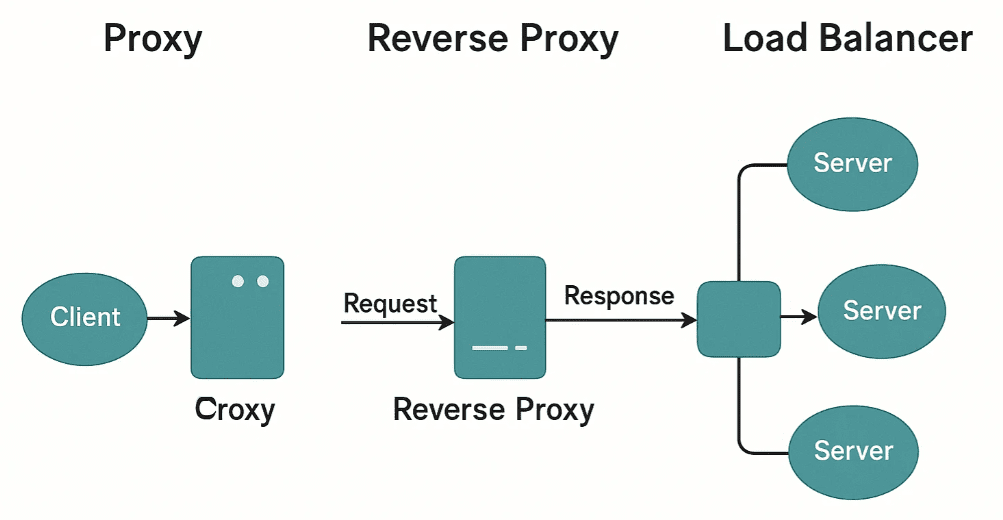
A proxy server acts as a middleman between your device (or a private network) and the public internet. It processes your web requests, forwards them, receives responses, and returns them back—often after checking or modifying the content.
Key Benefits of a Proxy Server:
- Security & Filtering:
The proxy inspects all incoming data and filters out malicious websites, scripts, or harmful content before delivering it to your system. - Access Control:
Companies use proxies to block certain websites or types of content to maintain workplace productivity and network safety. - Activity Monitoring:
Logs all user activity, helping administrators track internet usage. - Caching:
If multiple users request the same resource (e.g., a tutorial video), the proxy can serve a locally stored copy to reduce bandwidth usage. - Anonymity:
It hides the user’s IP address and adds a layer of privacy.
This type of proxy setup is called a Forward Proxy because it sits in front of the client and forwards requests to the internet.
What is a Reverse Proxy?
Let’s go back to our restaurant analogy.
You’ve made a reservation and arrived at the restaurant. Instead of looking for your own table, you check in with the receptionist. The receptionist reviews available tables and takes you to the right one.
In this analogy:
- Receptionist = Reverse Proxy.
- Tables (Dining Areas) = Web Servers.
A Reverse Proxy sits in front of one or more servers and manages the incoming traffic from clients. It decides which server should handle a specific request.










Key Features of Reverse Proxies:
- Load Balancing:
Distributes incoming requests evenly across multiple servers to avoid overloading any one server. - Security Gateway:
Shields backend servers from direct internet exposure. It performs SSL termination, checks for vulnerabilities, and blocks malicious requests. - Caching:
Like forward proxies, reverse proxies can cache frequently accessed data and speed up responses. - Detailed Logging & Monitoring:
Helps with troubleshooting and analytics. - Advanced Routing:
Routes requests based on cookies, headers, user sessions, or URLs. For instance, ensuring the same user always connects to the same server (called sticky sessions).
Load Balancers: A Special Type of Reverse Proxy
Load balancers are often confused with reverse proxies, but here’s the distinction:
- A Load Balancer is a function of a reverse proxy.
- It distributes traffic based on algorithms like Round Robin, Least Connections, or IP Hashing.
- It ensures high availability, scalability, and fault tolerance for web applications.
Cloud Load Balancer vs Reverse Proxy
Many cloud platforms like AWS, Azure, and Google Cloud offer cloud-based load balancers. So why would anyone still use a reverse proxy like Nginx?
Here’s the answer:
| Cloud Load Balancer | Reverse Proxy (e.g., NGINX) |
|---|---|
| Manages external traffic | Manages internal routing within server networks |
| Good for basic routing and SSL termination | Great for advanced routing logic and traffic inspection |
| Scales globally | Scales locally within server clusters |
| Limited control | Highly customizable |
A recommended setup is to use both:
- Cloud Load Balancer at the perimeter.
- Reverse Proxy (like NGINX) inside the private network for more intelligent request handling.
What About Node.js & Express?
You might have seen proxies or servers automatically start when running a Node.js or Java application. Are these reverse proxies?
Not quite.
Node.js doesn’t have built-in reverse proxy features. However, using a framework like Express.js, you can build custom routing logic and lightweight HTTP servers. These are mostly used for serving dynamic content and APIs.
Comparison: NGINX vs Express.js
| Feature | NGINX | Express.js |
|---|---|---|
| Role | Web Server + Reverse Proxy | Web Framework (Node.js) |
| Best Use | Static content, Load Balancing | Dynamic APIs, Business Logic |
| Performance | High Concurrent Users | Less Efficient for High Traffic |
| SSL Termination | Yes | No (without extra libraries) |
| In Production | Used in front of Express apps | Used behind NGINX |
In production, NGINX is typically placed in front of an Express.js application to handle:
- Static files
- SSL Termination
- Load Balancing
- Security headers
While Express.js focuses on:
- Business logic
- Dynamic routes
- Custom middleware
Real-World Application: Kubernetes & Microservices
In a Kubernetes cluster with microservices:
- Ingress Controller (acts as a reverse proxy) manages internal routing and security.
- Cloud Load Balancer handles public traffic from users, shielding the cluster.
This multi-layered architecture is scalable, secure, and flexible, ideal for large distributed systems.
Conclusion
To recap:
- Forward Proxy protects the client side and anonymizes outgoing traffic.
- Reverse Proxy protects the server side and intelligently manages incoming traffic.
- Load Balancer is often part of a reverse proxy and distributes traffic across servers.
These tools are foundational for building scalable, secure, and performant web applications.
Useful Tools and Frameworks
- NGINX – Web Server & Reverse Proxy
- Express.js – Web Framework for Node.js
- AWS Elastic Load Balancing
Tags:
proxy server, reverse proxy, load balancer, nginx, expressjs, forward proxy, web server, ssl termination, cloud infrastructure, kubernetes ingress
Hashtags:
#ProxyServer #ReverseProxy #LoadBalancer #NGINX #ExpressJS #WebInfrastructure #Kubernetes #CloudComputing #DevOps #Networking
Disclaimer:
This article is intended for educational purposes only. Configuration of proxies and load balancers in production environments should be handled by experienced system administrators or DevOps engineers to ensure security and performance.








