Imagine having a sleek, unified game launcher on your Android device that handles PSP, PS2, GBA, Dreamcast, Nintendo 3DS, and even Switch titles—all in one place. No more jumping between multiple emulator apps. That’s exactly what the ES-DE Frontend delivers. It transforms your Android phone or tablet into a full-fledged retro gaming console with beautiful box art, gameplay trailers, and advanced customization options.
Whether you’re a nostalgic gamer or a power user wanting an organized library, this guide will walk you through everything—from installation to advanced UI theming.

🎮 What is ES-DE Frontend?
ES-DE (EmulationStation Desktop Edition) is a powerful Android frontend that consolidates all your emulated games into a modern, console-like interface. Think of it as the Android version of LaunchBox or EmulationStation, but mobile-friendly.
📱 Device & Software Requirements
Before you begin, make sure your device meets the following criteria:
- Android version: 11 or higher
- Emulators: Must be pre-installed (e.g., RetroArch, Redream, AetherSX2, etc.)
- ROMs: You’ll need your own legally obtained game files
- Storage permissions: Required for full functionality
📥 How to Download ES-DE Frontend on Android
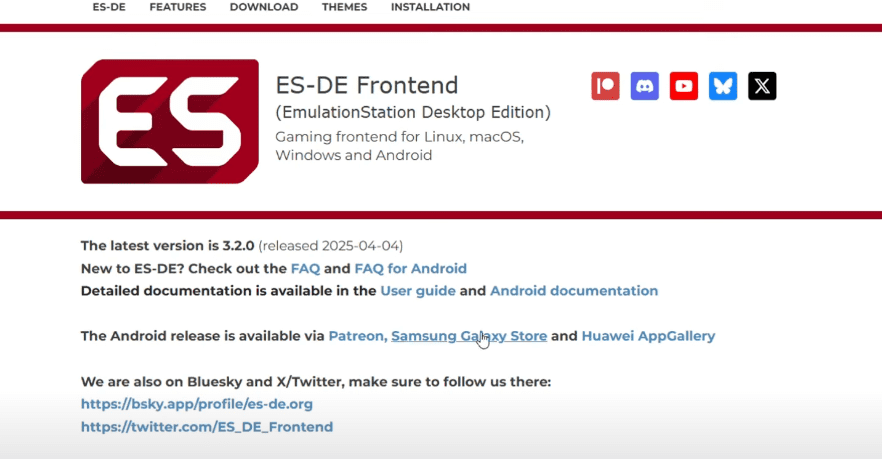
ES-DE Frontend is not available on the Google Play Store, but it can still be downloaded officially via:
💵 Price: Approx. $5.50 USD
📌 If you’re using a non-Samsung/Huawei device, the Patreon version is your best bet.
🚀 Step-by-Step Setup Guide
✅ 1. Install and Grant Permissions
Once you’ve downloaded the ES-DE APK from an official source:
- Install it on your Android device
- Launch the app
- Grant storage permissions when prompted
✅ 2. Choose App and ROM Directories
You’ll be prompted to:
- Select an application data folder (where the app stores configs and themes)
- Set a ROMs folder – You can create a dedicated directory like
/storage/emulated/0/ESDE/ROMS - ES-DE will then automatically create subfolders (e.g.,
DS,GBA,Dreamcast, etc.)
📁 Tip: Place your games inside their corresponding subfolder. Example:
/storage/emulated/0/ESDE/ROMS/GBA/yourgame.gba
🖼️ 3. Scraping Metadata and Artwork
Once your ROMs are detected:
- Go to the Menu > Scraper
- Choose between:
- Games DB – For metadata, screenshots, and box covers
- ScreenScraper – Includes gameplay videos and deeper artwork
✅ Configure Scraping Options
- Go to Content Settings
- Toggle what you want: box front/back, descriptions, title art, videos, etc.
- Once done, go back and select Scrape These Systems
- Choose the systems you’ve added, then click Start
⏳ This process may take several minutes depending on your library size.

⚠️ Fixing Unmatched Games
If some games don’t display metadata:
- Rename the ROM file for better recognition
- Or manually edit the metadata within the app
🎨 4. Customize the Interface with Themes
Want your setup to look truly premium? Download and apply themes:
- Go to Menu > UI Settings > Theme Downloader
- Some popular themes:
- CoinOps
- Epic Noir
- Colorful Revisited
- Mania
🎥 Many themes support dynamic logos, animations, and video previews for games.
🔗 5. Link Emulators to ES-DE
While ES-DE handles the frontend, the actual gameplay runs via emulators.
🔧 Default Setup
- ES-DE auto-detects compatible emulators (if already installed)
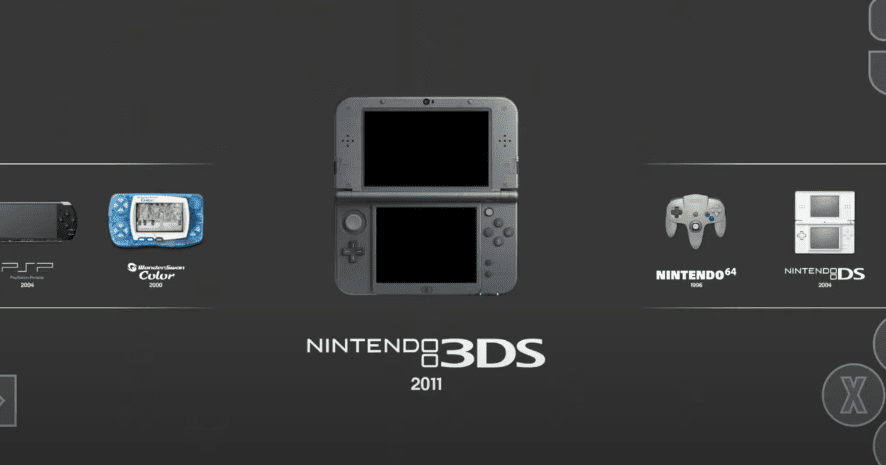
🛠️ Manual Configuration
- Go to Menu > Other Settings > Alternate Emulators
- Assign emulators per system:
🎮 Supports both on-screen controls and Bluetooth gamepads.
🌐 Supported Systems
ES-DE supports a wide array of retro systems:
- NES, SNES, Genesis
- PSP, PS2, Nintendo DS/3DS
- Dreamcast, Switch (Yuzu or Skyline)
- GBA, GameCube, Wii, and many more
🙋 FAQ: ES-DE on Android
Q: Is ES-DE legal to use?
Yes, ES-DE is just a frontend. However, always ensure you own the game ROMs legally. Downloading copyrighted ROMs is illegal in most jurisdictions.
Q: Can I use it without rooting my phone?
Absolutely. ES-DE works perfectly on non-rooted devices running Android 11 or higher.
Q: Can I play modern systems like Switch or PS2?
Yes, provided you use compatible emulators like Skyline (for Switch) or AetherSX2 (for PS2).
Q: Can I back up my setup?
Yes. Your configurations, themes, and metadata are saved in the ES-DE app data folder, which you can copy to cloud storage or external drives.
🎁 Bonus: App Giveaway Info
While this article is for educational purposes, it’s worth noting that many users are participating in giveaways to win paid emulator apps like ES-DE. Follow the developer on Patreon or Reddit forums to stay in the loop.
⚠️ Disclaimer
This guide is for educational and informational purposes only. Emulators themselves are legal tools. However, downloading and distributing copyrighted ROMs without ownership may violate intellectual property laws. Please ensure you are complying with your local laws. No ROM download links are or will be provided in this article.
🛠️ Suggested Emulator Downloads (U.S. Play Store)
🔖 Tags
esde frontend, android emulation, retro gaming android, game launcher android, android emulator ui, best android frontend, android game scraper, retroarch frontend, emulationstation android
📣 Hashtags
#ESDE #AndroidEmulation #RetroGaming #GamingOnAndroid #GameLauncher #EmulatorFrontend #RetroArch #AndroidGamers #PSPOnAndroid #SwitchEmulation








