Looking for a reliable and feature-rich media player for your Windows 11 PC in 2025? This article covers the top 5 best free video players that deliver excellent performance, audio enhancements, wide format support, and sleek interfaces—all without costing a dime.
Whether you want high-quality audio playback, advanced customization, or support for rare file formats, one of these media players is sure to fit your needs.
🥇 1. VLC Media Player – The Ultimate All-Rounder
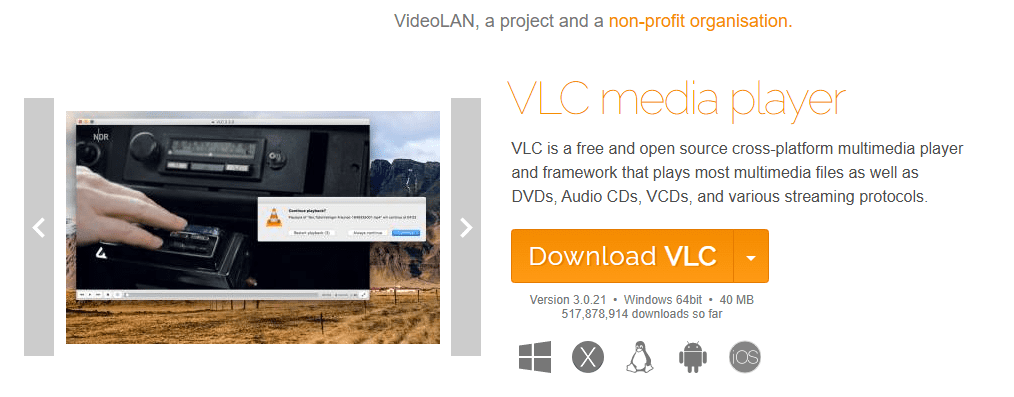
Arguably the most popular media player in the world, VLC Media Player stands at the top of our list for good reason. It supports virtually every audio and video file format without needing additional codecs. Despite its compact size (just around 40–60 MB), VLC is packed with advanced features like:
- Extensive customization options
- Audio effects including reverb and equalizers
- Support for lo-fi and slow-motion audio playback
- Wide subtitle support
- Hardware acceleration
- Plugin and skin customization
VLC is perfect for users who want a lightweight yet powerful player that handles everything you throw at it with ease.
🥈 2. GOM Player – For Superior Audio Customization
Coming in second is GOM Player, a fantastic choice for users who prioritize audio quality and effects. This media player offers a ton of audio processing features such as:
- Reverb and 3D studio audio effects
- Enhanced sound customization and filters
- Support for custom skins and interface tweaks
- Format support for most common and advanced media types
One standout feature is its Reverb Effect, which significantly boosts the immersive audio experience—especially noticeable in music and movie playback. If you’re an audiophile or just love tweaking sound settings, this one is for you.
🥉 3. PotPlayer – Packed With Pro-Level Features
PotPlayer is a highly configurable media player known for its robust set of features and sleek interface. It supports both 32-bit and 64-bit systems and offers options usually seen in premium players:
- Advanced audio and video filters
- 3D video support
- 360-degree video playback
- Integrated equalizer
- Minimal system resource usage
PotPlayer offers more control than most basic players, making it a favorite among power users who like to fine-tune their media experience.







🧩 4. KMPlayer – Lightweight and Easy to Use
If you’re working with a low-spec or older PC, KMPlayer is a solid choice. It’s lightweight, simple to use, and available across multiple platforms including Windows, macOS, Android, and iOS.
Features include:
- 3D menu and effects
- Subtitle support
- Decent file format compatibility
- Clean, beginner-friendly UI
While not as feature-rich as VLC or PotPlayer, KMPlayer provides all the essential tools in a smaller footprint.
🎵 5. GOM Audio – Bonus Pick for Music Lovers
Though this list focuses on video players, GOM Audio is worth mentioning for users who primarily listen to music. It supports various audio formats and enhances the sound with features like:
- Equalizer presets
- Sound filters
- Skins and interface customization
It’s an excellent option for those who want a dedicated and visually customizable music player.
Final Thoughts
All five media players listed here are excellent in their own right. Whether you’re into movies, music, or general media playback, there’s something here for everyone. Try out a few and see which one fits your needs best.
Have questions or need help choosing? Drop a comment below or check out each software’s official site for more details.
Tags: media players, Windows 11, VLC Media Player, GOM Player, PotPlayer, KMPlayer, free video player, best media player 2025, video software
Hashtags: #VideoPlayer #Windows11 #VLCMediaPlayer #GOMPlayer #PotPlayer #KMPlayer #FreeSoftware #TechGuide2025 #BestMediaPlayer #WindowsApps








