Do you think you need to spend hundreds of dollars for professional video editing software? Think again! Some of the best tools available today are completely free—and just as powerful as premium options.
In this article, we’ll explore the top free video editing software and help you choose the best one for your needs, whether you’re a beginner, content creator, or professional editor.
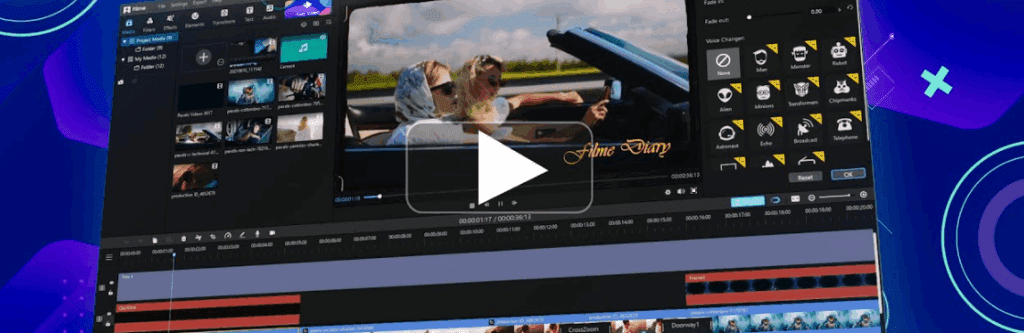
1. CapCut – Best for Short-Form & Social Media Content
Developed by the team behind TikTok, CapCut has become a favorite for short-form videos, but it also works well for longer projects.
Key Features:
✔ Mobile & Desktop Versions – Edit on the go or with a full-featured desktop app.
✔ Auto Captions & Background Removal – AI-powered tools for quick editing.
✔ Drag-and-Drop Timeline – Intuitive and beginner-friendly.
✔ No Watermark on Exports – Unlike many free editors.
Limitations:
- Some advanced AI features (like skin retouching) require CapCut Pro.
Best For: TikTok, Instagram Reels, and YouTube Shorts creators.
👉 Try CapCut here.
2. DaVinci Resolve – The Professional’s Choice
Used by filmmakers and YouTubers, DaVinci Resolve is a Hollywood-grade editor—and it’s 100% free.
Why It Stands Out:
✔ All-in-One Tool – Editing, color grading, audio mixing (Fairlight), and VFX (Fusion).
✔ Industry-Standard Color Correction – Used in major films and TV shows.
✔ Free vs. Paid Version – The free version covers 90% of features; the Studio version (one-time fee) adds AI tools like noise reduction and 4K+ support.
Learning Curve: Steeper than other options, but worth it for serious editors.
Best For: Filmmakers, YouTubers, and professionals who need high-end editing for free.








👉 Download DaVinci Resolve here.
3. Canva – Simple & Web-Based Editing
Yes, Canva does video editing too! While known for graphics, its video editor is surprisingly capable.
What Canva Offers:
✔ Drag-and-Drop Editor – Easy trimming, transitions, and text animations.
✔ Free Stock Library – Royalty-free music, clips, and templates.
✔ Great for Social Media – Perfect for YouTube intros, Instagram stories, and ads.
Limitations:
- Canva Pro unlocks background removal, brand kits, and Magic Resize.
Best For: Marketers, social media managers, and beginners.
👉 Try Canva Video Editor here.
4. Clipchamp – Best for Windows Users
Built into Windows 11, Clipchamp is a browser-based editor that’s fast and easy to use.
Key Features:
✔ Screen & Webcam Recording – Great for tutorials.
✔ AI Enhancements – Auto-captions, filters, and templates.
✔ 1080p Exports (Free) – No watermarks.
Limitations:
- Some premium stock assets require a subscription.
Best For: Casual editors, Windows users, and quick projects.
👉 Try Clipchamp here.
5. Kdenlive – Free & Open-Source Powerhouse
If you want professional features without paying, Kdenlive is a fantastic open-source option.
Why Choose Kdenlive?
✔ Multi-Track Editing – Supports 4K, proxies, and keyframe effects.
✔ Cross-Platform – Works on Windows, Mac, and Linux.
✔ No Hidden Costs – 100% free forever.
Learning Curve: More complex than CapCut or Clipchamp, but highly customizable.
Best For: Budget-conscious creators who need advanced control.
👉 Download Kdenlive here.
Bonus: Automate Your Workflow with Zapier
Editing videos is just one part of content creation. Zapier helps automate repetitive tasks, like:
✔ Auto-uploading videos from Google Drive to YouTube.
✔ Generating social posts from new YouTube uploads.
✔ Syncing files across Adobe Cloud, Dropbox, and more.
👉 Try Zapier for free here.
Which Video Editor Should You Use?
| Software | Best For | Key Strength |
|---|---|---|
| CapCut | Social media clips | Fast, mobile-friendly, no watermark |
| DaVinci Resolve | Professional editing | Hollywood-grade tools for free |
| Canva | Simple social edits | Drag-and-drop, stock assets |
| Clipchamp | Windows users | Built-in, easy recording tools |
| Kdenlive | Open-source enthusiasts | Advanced features, no restrictions |
Final Thoughts
You don’t need expensive software to create high-quality videos. Whether you’re editing TikTok clips, YouTube videos, or short films, there’s a free tool for you.
- Beginners? → CapCut or Canva
- Advanced users? → DaVinci Resolve or Kdenlive
- Windows fans? → Clipchamp
Which editor are you using? Let us know in the comments!
Tags:
video editing, free software, CapCut, DaVinci Resolve, Canva, Clipchamp, Kdenlive, open-source, YouTube editing, social media content
VideoEditing #FreeSoftware #CapCut #DaVinciResolve #Canva #Clipchamp #Kdenlive #ContentCreation #YouTubeTips #OpenSource








