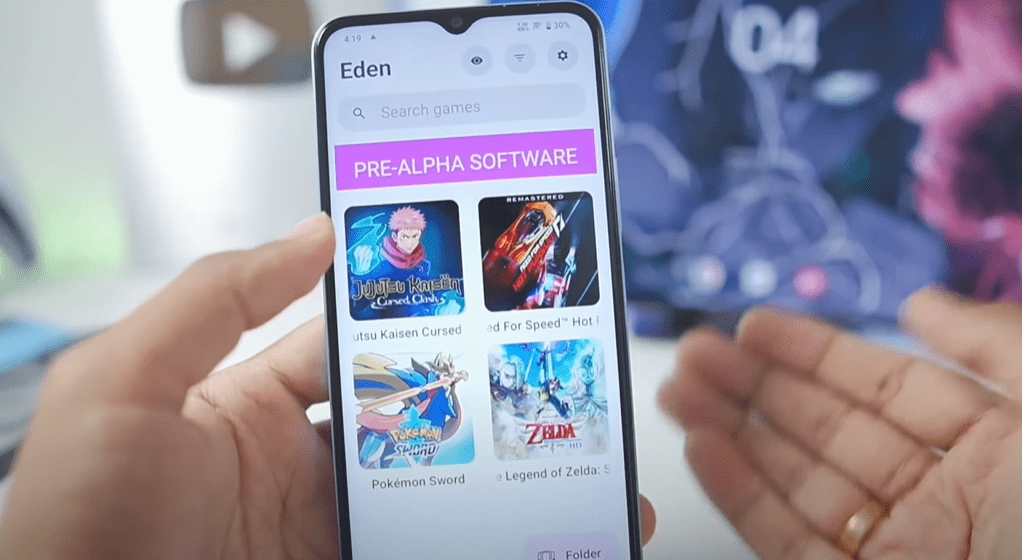
Nintendo Switch emulation on Android has taken a significant leap forward with the Eden Emulator, a new open-source project that aims to bring smooth Switch gaming to mobile devices. In this article, we’ll test the latest Eden Emulator v0.0.2 (Pre-Alpha) on a low-end Snapdragon 4 Gen 1 device (with Adreno 619 GPU and just 6GB RAM) to see how well it performs.
What is the Eden Emulator?
The Eden Emulator is an emerging Nintendo Switch emulator for Android, offering compatibility with various Switch games. The latest v0.0.2 pre-alpha includes:
✔ Bug fixes & performance improvements
✔ Better shader backend stability
✔ Citra migration issue fixes
✔ Enhanced compatibility with low-end devices
🔗 Download Eden Emulator: GitHub Repository (Note: Since this is a pre-alpha build, expect instability.)
Best Settings for Low-End Devices
To maximize performance on weaker hardware, use these settings:
Graphics Settings
- Accuracy Level: Normal
- Resolution Scaling: 0.5x (for better FPS)
- VSync Mode: Mailbox
- Aspect Ratio: Stretch to Window
- Enable: Force Maximum Clocks & Asynchronous Shaders
System Settings
- Disable: Limit Speed Percentage (for potential FPS boosts)
- Enable: Performance Overlay & Battery Temperature Monitor
Advanced Tweaks
- Use Custom GPU Driver: Mesa Turnip Adreno v25.2.0 (Revision 4) for better rendering.
(Note: Default settings are optimized, but custom drivers may help with stability.)
Game Performance Tests
1. Jujutsu Kaisen: Cursed Clash
- Initial Boot: Successful
- Performance: 6-15 FPS (with frequent stutters)
- Crash Rate: High (game froze multiple times)
2. The Legend of Zelda: Skyward Sword
- Performance: 30-38 FPS indoors (playable)
- Demanding Areas: Drops to ~20 FPS
- Stability: Better than Jujutsu Kaisen
3. Pokémon Sword
- Issue: Crashes without a save file
- With Save File: Boots but freezes in open-world areas
- FPS: Unstable (frequent crashes)
Verdict:
✅ Decent performance in lighter games (Zelda, 2D titles)
❌ Heavy games (Pokémon Sword, Jujutsu Kaisen) crash frequently
⚠ Pre-alpha instability expected—not fully optimized yet
Final Thoughts: Is Eden Emulator Worth It?
The Eden Emulator shows promising performance even on low-end Snapdragon 4 Gen 1 devices, but it’s still in early development.
Pros:
✔ Playable FPS in some games
✔ Open-source & actively updated
✔ Custom driver support for better compatibility
Cons:
❌ Frequent crashes in demanding games
❌ Requires manual tweaks for stability
❌ Not yet optimized for Mali GPUs
🔹 Best for testing & lightweight games
🔹 Not yet ready for full gameplay sessions
Tags
Nintendo Switch Emulator, Eden Emulator, Android Emulation, Low-End Gaming, Switch on Android, Emulator Settings








Hashtags
#EdenEmulator #NintendoSwitch #AndroidGaming #Emulation #LowEndGaming #SwitchEmulator
Disclaimer:
- Eden Emulator is in pre-alpha—expect bugs and crashes.
- Performance varies by device.
- Always use legally owned game ROMs.
Would you try the Eden Emulator on your device? Let us know in the comments! 🚀








