If you’re running Windows 11 24H2 and having trouble installing the KB5062660 preview cumulative update, you’re not alone. Microsoft recently rolled out this update with 29 new features, including the Black Screen of Death...
Read More
File History vs Backup & Restore in Windows: Which Backup Tool Should You Use for File-Level Backups?
Keeping your files safe should always be a top priority — especially if you’re working on important documents, personal projects, or work data. Fortunately, Windows offers two built-in file backup tools: File History and...
Read More
How to Fix Blurry Icons and Fonts in Windows 11/10 – A Step-by-Step Guide
If your desktop icons or fonts look blurry on your Windows 11 or Windows 10 system, you’re not alone. It’s a common issue, especially on high-resolution displays or when certain system settings are misconfigured....
Read More
How to Change Text Size in Windows 11 or 10: A Simple Step-by-Step Guide
Sometimes, the default text size in Windows can feel too small — especially on high-resolution displays. Whether you’re facing eye strain or just want better visibility, Windows allows you to increase or decrease the...
Read More
How to Quickly Hide System Tray Icons in Windows Without Using Settings
Your system tray (also known as the notification area) can get cluttered quickly—especially if you run a lot of apps in the background. From antivirus icons to third-party tools, having too many icons here...
Read More
Transform Your Windows Desktop with Live Wallpapers Plus: A Free Animated Wallpaper App
If you’re someone who loves personalizing your desktop, giving it a fresh and dynamic look, then you’ll absolutely enjoy what we’re covering today. Static wallpapers are great—but what if your background could come alive...
Read More
How to Fix Laptop Battery Draining Fast on Windows 11/10 — Step-by-Step Guide
If your Windows laptop battery is draining unusually fast, you’re not alone. This is one of the most common issues faced by laptop users, especially after updates or prolonged usage. The good news is...
Read More
How to Fix “We Couldn’t Find a Fingerprint Scanner Compatible with Windows Hello” on Windows 11/10
Struggling to set up your fingerprint scanner using Windows Hello, only to be met with the frustrating error:“We couldn’t find a fingerprint scanner compatible with Windows Hello”?You’re not alone — and the good news...
Read More
How to Fix the Yellow Exclamation Mark on Windows Defender in Windows 11/10
Have you ever noticed a yellow exclamation mark on the Windows Security (Windows Defender) icon in your taskbar and wondered what it means or how to remove it? You’re not alone. This symbol usually...
Read More
Speed Up Your Windows 11 PC: Ultimate Guide to Boost Performance Smoothly
If your Windows 11 PC feels sluggish or takes forever to boot, don’t panic. You’re not alone—and the good news is that there’s plenty you can do to fix it. Whether it’s slow app...
Read More
How to Fix Microsoft Edge Not Opening or Responding in Windows: 5 Proven Solutions
If Microsoft Edge is not opening, freezing, or failing to respond on your Windows PC, you’re not alone. It’s a common issue faced by many Windows users, especially after updates or file corruption. In...
Read More
How to Increase Virtual Memory (Virtual RAM) in Windows 11 to Boost Performance – A Complete Step-by-Step Guide
If your system is slowing down while running heavy software or games, and you’re tired of frequent buffering or lag, increasing your virtual memory (also known as virtual RAM) in Windows 11 can offer...
Read More

Microsoft Edge Just Got Faster in 2025: Here’s What Changed and Why It Matters
Microsoft has been making serious strides to improve its flagship browser, Microsoft Edge, and the latest update may just be its most impressive yet. With the rollout of Web UI 2.0 and continued backend...
Read More
What is Windows Sandbox and How to Configure It in Windows 11/10
Windows Sandbox is a lightweight, temporary virtual environment designed for safely running untrusted applications or opening suspicious files without risking your main Windows installation. It is included as an optional feature in Windows 10...
Read More

How to Fix “Ethernet Doesn’t Have a Valid IP Configuration” in Windows – Step-by-Step Guide
If you’re struggling with Ethernet issues like “Identifying Network,” “Obtaining IP Address,” or the dreaded “Ethernet doesn’t have a valid IP configuration” error, you’re not alone. This common networking problem typically occurs when your...
Read More

How to Reduce Process Count in Windows 11 to Boost Gaming FPS and Overall Performance
If you’ve opened Task Manager on your Windows PC and noticed an overwhelming number of background processes, you’re not alone. Many of these processes can increase system load, slow down performance, and even impact...
Read More

🖥️ New Gaming Laptop? Do These Things First for Best Performance
So you’ve just unboxed your brand-new gaming laptop—exciting times ahead! But if you’re not very experienced with laptops, setting things up correctly from the start is crucial. With the right steps, you can maximize...
Read More
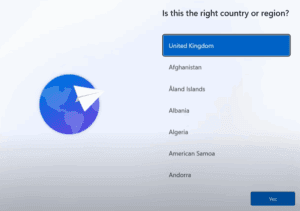
How to Bypass Microsoft Account Requirement in Windows 11 (Latest Method – 2025 Update)
Microsoft has made it increasingly difficult for users to bypass the requirement of signing in with a Microsoft account during the Windows 11 setup process. Older methods such as using the OOBE\BYPASSNRO command have...
Read More
Microsoft to Make Microsoft Account Mandatory in Windows 11: Here’s What You Need to Know
Microsoft is once again shaking things up for Windows users. The company has confirmed that it is removing a widely used command-line workaround that allowed users to bypass the requirement of signing in with...
Read More
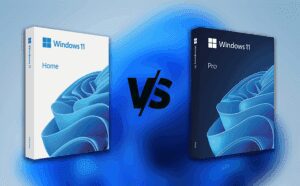
Windows 11 Home vs Windows 11 Pro: Which One Should You Choose?
Hello friends!In this article, we will discuss an important topic for anyone considering upgrading or installing Windows 11: Windows 11 Home vs Windows 11 Pro.Which version is better? Which one should you use? What...
Read More

How to Customize Windows 11 Desktop Using Rainmeter
If you are feeling a little bored with the default look of Windows 11, don’t worry — you’re not alone! Many users eventually want to spice up their desktop’s appearance, and today, we will...
Read More