Before we begin unfolding everything that Microsoft has packed into this update, let’s first set the scene. November has always been a month of anticipation for Windows users — partly because Microsoft usually pushes...
Read More
🕵️♂️ Windows 11 Is Secretly Keeping a “Digital Diary” — Here’s Where It Lives and How to Delete It Forever
Most people assume that once they close an app, delete their browsing history, or remove recent files, their PC instantly forgets what happened. But that assumption isn’t entirely true — especially on Windows 11....
Read More
🔎 Windows 11 Copilot Privacy Guide: What It Collects, Where the Data Goes, and How to Take Back Control
When Microsoft introduced Copilot in Windows 11, it promised an intelligent assistant built directly into the operating system — something that could answer questions, summarize emails, adjust system settings, or help you work faster....
Read More
What’s New in Windows 11 Build 26200.5722 (25H2 & 24H2 Dev/Beta Channels): Full Feature Breakdown
Windows 11 continues to evolve rapidly, and with the latest insider build 26200.5722 now rolling out to Dev and Beta Channels (25H2 and 24H2), Microsoft is making some serious improvements — especially for Copilot+...
Read More
How to Change Your IP Address on Windows 11 and 10 (Step-by-Step Guide)
Have you ever wanted to change your IP address manually—maybe for troubleshooting, network customization, or simply gaining more control over your network settings? Whether you’re on Windows 10 or Windows 11, setting a static...
Read More
How to Increase Virtual Memory (Virtual RAM) in Windows 11 to Boost Performance – A Complete Step-by-Step Guide
If your system is slowing down while running heavy software or games, and you’re tired of frequent buffering or lag, increasing your virtual memory (also known as virtual RAM) in Windows 11 can offer...
Read More
How to Remove Copilot AI from Notepad in Windows 11 (2025 Update)
Microsoft has been steadily evolving the classic Notepad app, and as of recent updates in 2025, it’s becoming more than just a plain text editor. With new formatting options and integrated AI features, Notepad...
Read More
Windows 11 Insider Canary Build 27891: What’s New, Fixed, and Known Issues Explained in Detail
Microsoft continues to enhance the Windows 11 experience with its latest Insider Preview Build 27891, now available on the Canary Channel. This release packs several under-the-hood improvements, bug fixes, and even a few hidden...
Read More
The Ultimate Guide to Personalizing Windows 11: Customization & Settings Explained
Windows 11 offers powerful customization options to tailor your PC experience. Whether you want to change the taskbar layout, optimize system performance, or enhance privacy, this guide covers everything you need to know. 📌...
Read More
How to Fix Lag and Slow Performance Issues in Windows 11: A Complete Optimization Guide
Many users, even those with new Windows 11 PCs, have been experiencing lag and slow performance. If you’re facing similar problems, don’t worry. This article covers effective methods to improve your system’s speed and...
Read More
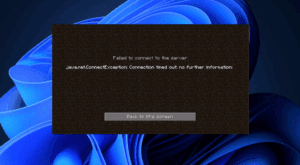
How to Fix “Minecraft Connection Timed Out – No Further Information” Error in TLauncher (2025 Guide)
If you’re a Minecraft fan using TLauncher, you may have encountered the frustrating error:“Connection Timed Out – No Further Information.”This issue can stop you from joining multiplayer servers and enjoying the game with friends....
Read More
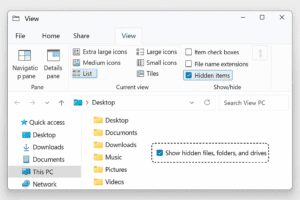
How to Show Hidden Files and Folders in Windows File Explorer: A Quick Guide
Windows hides certain files and folders by default to protect critical system data from accidental changes. However, there are times when you need to access these hidden locations—whether for troubleshooting, deleting leftover app data,...
Read More
Optimize Gaming Performance on Windows 11 by Disabling These Two Settings
If you’re experiencing lagging issues or FPS (frames per second) drops while gaming on Windows 11, there might be two hidden settings quietly affecting your system’s performance. Disabling these specific features can help improve...
Read More
Why Microsoft’s Windows Copilot Integration Frustrates Users – And What You Can Do About It
Microsoft has taken a firm stance on integrating AI into its ecosystem, with Windows Copilot being a central feature in recent updates of Windows 11, particularly version 24H2. While AI-driven tools can offer productivity...
Read More
How to Revert to Classic Notepad in Windows 11 and Remove Copilot Integration
If you’re not a fan of the modern Notepad in Windows 11, especially after the addition of tabs and Microsoft Copilot integration, you’re not alone. Many users prefer the simplicity and minimalism of the...
Read More
How to Fix High Internet Data Usage on Windows 11/10 PCs
If you’re using your PC or laptop on a limited internet plan—especially through mobile data—you might have noticed your data running out surprisingly fast. This can be frustrating, especially if you’re unsure why your...
Read More
How to Enable Secure Boot in Windows 11 – A Step-by-Step Guide
If you’re looking to enhance your PC’s security and ensure your system is fully compatible with Windows 11 features, enabling Secure Boot is a smart move. Secure Boot helps protect your computer from malware...
Read More
How to Switch from a Microsoft Account to a Local Account on Windows 11
Switching back to a local account after setting up your machine with a Microsoft account can be beneficial for privacy and personal preferences. While Microsoft strongly encourages users to utilize Microsoft accounts for login,...
Read More