Keeping your Windows drivers updated is essential for system performance, hardware reliability, and overall user experience. If you’ve been facing issues like lag, hardware malfunction, or outdated components, updating drivers can resolve many of...
Read More
How to Fix Lag and Slow Performance Issues in Windows 11: A Complete Optimization Guide
Many users, even those with new Windows 11 PCs, have been experiencing lag and slow performance. If you’re facing similar problems, don’t worry. This article covers effective methods to improve your system’s speed and...
Read More
How to Remove Bloatware and Optimize Windows 11 Using WinTune
If you’re looking for a powerful and user-friendly way to debloat and optimize your Windows 11 system, there’s a new tool worth checking out — WinTune. This lightweight yet comprehensive utility helps you clean...
Read More
The Ultimate Guide to Cleaning Cache & Junk Files in Windows
Introduction Is your Windows PC or laptop running slow, freezing, or lagging? Over time, cache and junk files accumulate in hidden locations, consuming valuable storage and slowing down performance. This comprehensive guide will show...
Read More
Optimizing Windows 11 for Maximum Performance: A Step-by-Step Guide
Introduction If your Windows 11 system feels sluggish or unresponsive, several default settings may be consuming unnecessary resources. This guide will help you disable unnecessary features, clean temporary files, and optimize performance for a...
Read More
How to Reduce Process Count in Windows 11 to Boost Gaming FPS and Overall Performance
If you’ve opened Task Manager on your Windows PC and noticed an overwhelming number of background processes, you’re not alone. Many of these processes can increase system load, slow down performance, and even impact...
Read More
Why Your PC is Slow: Bad Code Might Be the Real Culprit
If your computer feels sluggish, you might assume it’s due to aging hardware—but poorly optimized software could be the real problem. A recent blog post by a Microsoft engineer sheds light on how bad...
Read More
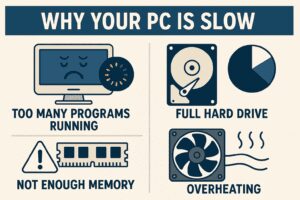
7 Reasons Why Your Windows PC is Slow (And How to Fix Them)
After working with Windows computers for over 35 years, I’ve identified seven common reasons why PCs slow down—whether gradually over time or suddenly overnight. In this guide, I’ll walk you through each issue and...
Read More
Fixyfier: The All-in-One Free Windows Repair Tool for Everyone
If you’re tired of troubleshooting your Windows PC manually or struggling to understand complex system settings and commands, Fixyfier might be the solution you’ve been looking for. Designed for both beginners and IT professionals,...
Read More
How to Undervolt Your Ryzen CPU for Better Performance and Lower Temperatures
If you’ve already tried overclocking your Ryzen processor and are looking for ways to enhance performance further—without increasing power consumption or thermals—undervolting might be the solution you need. In this guide, we’ll walk you...
Read More
How to Speed Up Windows 10/11 Updates: Optimize Storage, Network & Bandwidth Settings
Windows 10 and 11 updates are essential for security patches, feature enhancements, and bug fixes. However, many users find that these updates can take an unexpectedly long time to download and install. If you’re...
Read More
How to Completely Remove All Viruses from Your Windows 10/11 PC – For Free!
If your Windows PC is running slower than usual, or you’re worried that viruses or malware may be compromising your personal data, it’s time to take action. Fortunately, there’s a powerful and completely free...
Read More
The Ultimate Guide to Clearing Cache in Windows 11/10 for Better Performance
Is your Windows PC running slower than usual? Over time, temporary files, browser caches, and system junk can accumulate, consuming valuable storage space and reducing performance. In this comprehensive guide, we’ll walk you through...
Read More
How to Clear RAM Cache in Windows 10/11 for Better Performance
Is your Windows PC slowing down over time? One often-overlooked culprit is cached RAM memory, which can consume valuable system resources. In this guide, we’ll show you two effective methods to clear RAM cache—manually...
Read More
10 Best Free Software Alternatives for Windows Users
Are you tired of paying for expensive software subscriptions? Whether you need a PDF editor, video editor, or office suite, there are high-quality free alternatives available. In this article, we’ll explore 10 must-have free...
Read More
Boost Windows 11 Performance with Windows 11 Debloater: The Ultimate Optimization Tool
Is your new Windows 11 PC running slower than expected? Even high-end machines can suffer from bloatware, background processes, and unnecessary services that drain performance. Fortunately, Windows 11 Debloater is a free, powerful tool...
Read More
Windows 11 LTSC vs. Windows 11 Pro: Which One is Right for You?
As more users upgrade from Windows 10 to Windows 11, opinions remain divided—especially among those with older hardware. Many feel that Windows 10 performed better on legacy systems, leading them to question whether Windows...
Read More
Boost Your Windows 11 Performance by Disabling These 5 Background Services
Is your Windows 11 PC running slower than usual? Over time, unnecessary background services and applications can consume valuable system resources, leading to sluggish performance—especially if you’re not using an SSD. Fortunately, you can...
Read More
How to Stop Apps from Preventing Windows 11 Shutdown
Are you tired of seeing “This app is preventing shutdown” messages when trying to turn off your Windows 11 PC? While this is a safety feature (not a bug), it can be frustrating—especially when...
Read More
The Complete Guide to Installing Windows 11 LTSC: Everything You Need to Know
Windows 11 LTSC (Long-Term Servicing Channel) represents Microsoft’s most stable and lightweight version of Windows 11, specifically designed for users who prioritize reliability over constant feature updates. Unlike standard Windows 11 versions that receive...
Read More