Keeping a Windows PC clean and fast is one of those tasks most people know they should do — yet somehow forget or postpone until the system starts slowing down. Over the years, I’ve...
Read More
🧹 Why Do System Cleanup Utilities Report So Many Errors on a Supposedly Clean System?
We’ve all been there — you run your favorite cleanup tool, it tells you your system is healthy, and everything seems fine. But then you try a “free trial” of another cleaning utility, and...
Read More
🖥️ I freed up 150GB from C: Drive: A Complete Step-by-Step Guide for Windows 10 – 11
Is your C drive always running low on space? You’re not alone. Many Windows 10 and Windows 11 users face this issue, and it can make your system sluggish, cause programs to misbehave, and...
Read More
C: Drive Full in Windows 11 – Free Up Space That Actually Works
If you’re using Windows 11 and seeing that red warning bar on your C drive, don’t worry — you’re not alone. Many users face the issue of their system drive (C:) getting completely filled...
Read More
Clear ALL Cache in Windows 11 (2025) – Boost Your Windows Performance
If your Windows PC has started to feel sluggish, unresponsive, or takes longer than usual to boot up—don’t worry. You don’t need to buy a new system. A little spring cleaning can work wonders!...
Read More
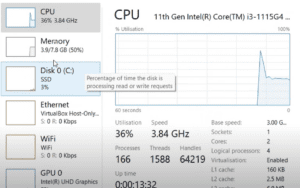
How to Fix 100% Disk Usage on Windows: A Step-by-Step Optimization Guide
If you’re experiencing a laggy Windows system, where the disk usage is constantly at 100% in Task Manager — don’t panic. This issue is surprisingly common, especially on older systems or even some SSD-based...
Read More
💻 How to Make Your Slow Windows PC Fast Again – Step-by-Step Junk Cleanup and Speed Boost Guide (2025)
If your Windows computer has started to feel sluggish lately — taking ages to boot, freezing when you open Chrome, or lagging during basic tasks — you’re not alone. Over time, every PC accumulates...
Read More
How to Clear All Cache in Windows 11 to Boost Speed and Free Up Space
Is your Windows 11 PC slowing down or running out of disk space? Over time, various types of cached files accumulate and consume both memory and storage. This detailed guide will help you safely...
Read More
🧹 How to Free Up Space on Your Windows C Drive: A Complete Cleanup Guide
Running out of space on your Windows C drive can slow down your system, prevent updates, and even cause software crashes. If your C drive is full, it’s time to clear out unnecessary junk...
Read More
Ultimate Guide: Super Quick Tips to Optimize Your Windows PC for Better Performance
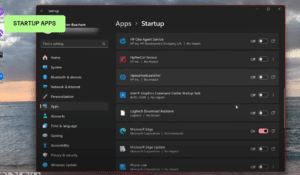
Over time, your Windows PC can begin to slow down due to background processes, bloatware, startup apps, and unnecessary system effects. Fortunately, with a few quick tweaks, you can significantly enhance your PC’s performance...
Read More
🛠️ Comprehensive Guide to Resolving Windows Update Issues
Experiencing persistent Windows Update errors can be frustrating. This detailed guide provides a step-by-step approach to troubleshoot and resolve common Windows Update problems, ensuring your system remains up-to-date and secure. 🧹 Step 1: Free...
Read More
How to Clear Cache and Junk Files from Your Windows PC for Better Performance
Over time, your Windows PC accumulates cache and junk files that slow down performance. Clearing these unnecessary files helps free up storage, improve speed, and enhance system efficiency. In this guide, we will walk...
Read More
How to Fix High Memory and CPU Usage on Windows 11 and Windows 10
Are you experiencing high memory and CPU usage on your Windows 11 or Windows 10 laptop or desktop, especially when playing games or running resource-intensive applications? If your computer is hitting 100% disk usage,...
Read More
Windows 11: 7 Hidden Tips to Boost and Customize Windows 11
Windows 11 brings a fresh interface, but there are several hidden features that can help you speed up and customize your experience. Here’s a detailed guide: 1. Move the Start Button The new default...
Read More