A new contender has stepped into the world of Nintendo Switch emulation — Sumi Emulator. Available for both Android and Windows, this emulator promises top-tier performance and has already stirred conversations in the emulation community. While it may look like another fork of existing emulators, under the surface, Sumi brings a few unexpected twists — both promising and concerning.
What is Sumi Emulator?
Sumi Emulator is a new open-source Nintendo Switch emulator that emphasizes performance above all. Unlike traditional emulators that balance accuracy and compatibility, Sumi’s unique approach includes running games at 200% speed. Even when compared to Sudachi Emulator (a known high-performance fork), Sumi outperformed it, despite Sudachi being pushed to 400% speed.
At present, Sumi is available for Android and Windows platforms. According to the GitHub repository, Mac and Linux builds are planned, but not yet available.
Sumi Emulator: Performance vs. Reliability
While the emulator is fast — and we mean really fast — that doesn’t mean it’s without issues. Here’s a detailed breakdown of what works, and what doesn’t.
⚙️ Performance Tests: Sumi vs Other Emulators
🕹 Bayonetta 3
- Sumi outperformed Sudachi with an average 12 FPS increase, making it one of the best-performing forks for this title.
🧝 Zelda: Tears of the Kingdom
- Performance matched other top forks but showed a slight FPS lead in some scenes.
🌌 No Man’s Sky
- Sumi once again came out ahead, consistently delivering better frame rates than its competitors.
🧪 Android-Specific Performance
🔥 Heating Issues
Even in relatively cool conditions (22°C), the emulator caused thermal throttling within 4 minutes of running Zelda: Tears of the Kingdom. This issue is not as prevalent in other emulators like Eden, Citron, or Sudachi under similar conditions.
🎮 Game-Specific Tests
- Zelda: Breath of the Wild
Ran at up to 45 FPS, outperforming other emulators which struggled to stay above 30 FPS. - Mario Kart 8 Deluxe
Couldn’t install the 64-bit update, but in 32-bit mode, the emulator peaked at 70 FPS. However, stuttering and pauses were still present. - Super Mario Odyssey
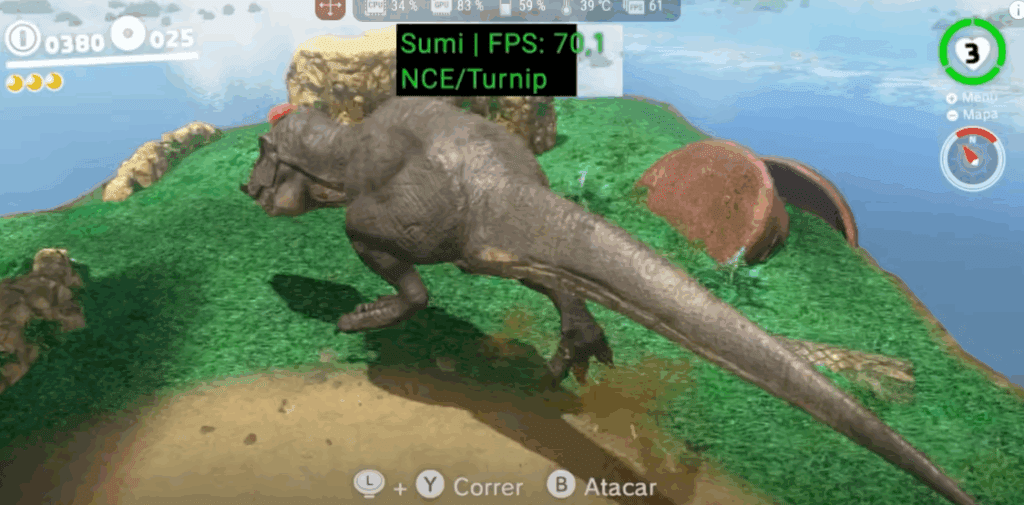
During the demanding dinosaur section, performance never dipped below 61 FPS — a remarkable feat.
🚨 Major Issues and Concerns
Despite impressive benchmarks, Sumi suffers from serious flaws:
- Broken Controller Support (Windows)
- Doesn’t detect DualShock 4 or Xbox controllers.
- Changing settings or enabling APIs has no effect.
- Game Update Installation Failure (Android)
- Emulator crashes when attempting to install updates.
- Workaround: Use version 0.3 to install updates, then upgrade to the latest version.
- Overheating & Thermal Throttling
- Causes performance dips and requires external cooling.
- Not observed in rival emulators under same conditions.
- Developer Credibility
- Lists 353 contributors, but most contributions date before 2024 — likely fabricated.
- No contact from developers; even their Discord link is broken.
- Open-Source Integrity
- The interface is suspiciously similar to Citron.
- Some elements like Vulkan 1.4 seem taken from Eden without proper attribution.
🤔 Should You Trust Sumi Emulator?
While the performance gains are undeniable, the lack of transparency, controller issues, and critical bugs make Sumi a risky emulator to trust — at least for now. Until the developers clarify the source of their code and fix basic features, users are advised to proceed with caution.
Disclaimer: This article is for informational purposes only. The emulator itself is legal, but using pirated ROMs or firmware is illegal. Always use original, legally obtained game copies.
🔗 Download & Source
- Sumi Emulator GitHub Repository: https://github.com/Sumi-Emulator
Final Thoughts
Sumi has potential to disrupt the Nintendo Switch emulator space, but that depends entirely on how its developers engage with the community, fix core bugs, and offer transparency. Until then, it remains a promising but controversial project that might just be a clever fork — or something greater.
If you’re curious enough to try it, test it at your own risk — and preferably on a secondary device.
🏷️ Tags
Nintendo Switch emulator, Android gaming, PC emulator, Sumi emulator, emulator performance, Zelda on Android, Mario Kart 8 Android, Citron emulator, Sudachi emulator








🔖 Hashtags
#SumiEmulator #SwitchEmulator #AndroidGaming #PCGaming #EmulationCommunity #ZeldaTearsOfTheKingdom #MarioKart8 #SuperMarioOdyssey #EmulatorReview #OpenSourceGaming
Let me know if you want a follow-up blog comparing Sumi to Eden, Sudachi, and Ryujinx.








