A new name has entered the Nintendo Switch emulation world — Sumi Emulator, now available across Android, Windows, Mac, and Linux platforms. Built as a fusion of Citron and Sudachi emulators, Sumi is quickly gaining attention for its ambitious goal: offering the most optimized and performant Nintendo Switch emulator experience, especially on Android devices running ARM v8 architecture.
In this detailed article, we’ll walk you through the setup, unique features, pros, cons, and real-world performance results of Sumi Emulator on an Android tablet. Whether you’re a casual gamer or a dedicated emulation enthusiast, this guide will help you understand if Sumi is worth your time.
🔧 What Is Sumi Emulator?
Sumi is an experimental multi-platform emulator focused heavily on ARM-based Android devices. According to its official GitHub page, Sumi merges the compatibility features of Sudachi with the user experience of Citron, all while introducing its own unique enhancements. The emulator was released in a v0.9.0 preview build, with significant performance upgrades:
- New VSync renderer for better frame pacing
- Improved compatibility across titles
- Enhanced graphics rendering
- Lower-latency input support
Despite being based on existing emulators, Sumi is not just another fork — it’s designed to be faster, leaner, and more flexible.
🛠️ Setting Up Sumi Emulator on Android
Step 1: Installation
- Head to Sumi’s GitHub page.
- Download the latest APK for Android.
- Install the APK and launch the app.
Step 2: Initial Configuration
- Accept the terms and continue to the emulator’s main interface.
- While the UI resembles that of Citron and Sudachi, it comes with custom branding and hybrid capabilities.
- Be aware: devices with Snapdragon 8 Gen 1/Elite processors may experience crashes when opening settings, due to Sudachi’s inherited bug.
⚙️ Best Emulator Settings for Performance
Once you’re past the setup, you can access the settings and apply the best configuration for smoother gameplay:
🔩 System Tab
- Turn Off “Limit Speed Percentage” to unleash full performance.
🎮 Graphics Tab
- Resolution Scaling: Adjustable from 1x to 0.25x (exclusive to Sumi).
- Warning: While 0.25x improves FPS, it significantly degrades image quality.
- VSync Mode: Set to Mailbox for smoother frame rendering.
- Enable:
- Force Maximum Clocks
- Compile Shaders
🧪 Debug Tab
- Leave most settings at default unless you’re advanced.
- Q-Launch feature (Nintendo’s UI simulator) is currently not supported.
🔗 Multiplayer Mode
- Fully functional, carried over from recent Citron versions.
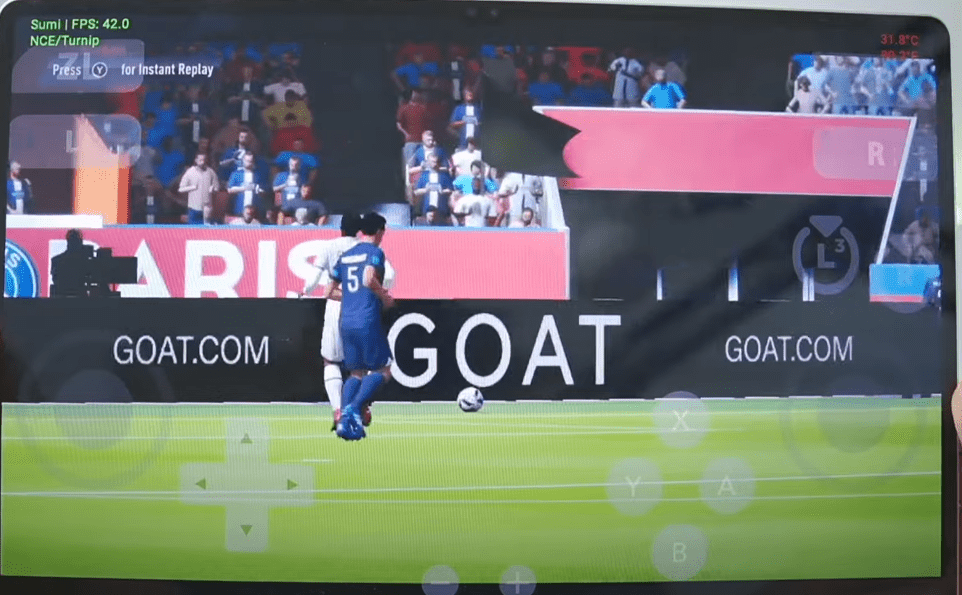
🧪 Real-World Testing: FIFA 23 on Android
Test Device:
- Samsung Galaxy Tab S9 Ultra
- Snapdragon 888 processor
GPU Driver Used:
- Mesa Turnip Adreno Driver 25.2.0 rev 5
(custom GPU driver support is crucial for performance and visual stability)
Test Scenarios:
At 0.25x Resolution:
- Game booted successfully
- FPS: ~50–60 FPS
- Graphics were heavily pixelated and text unreadable
- Not recommended for actual play despite FPS gain
At 1x Resolution:
- Clear visuals with readable interface
- FPS: Consistently ~40–60 FPS
- No major graphical bugs or stuttering
- Overall better balance between performance and quality
Conclusion: Resolution scaling currently does not improve FPS, making it ineffective beyond visual degradation.
📊 Summary: Pros and Cons
| Pros | Cons |
|---|---|
| Great performance for an early build | Resolution scaling doesn’t enhance FPS |
| Fully open-source and regularly updated | Crashes on Snapdragon 8 Gen 1/Elite processors |
| Functional multiplayer support | Q-Launch not yet available |
| Optimized for ARM v8 Android | Inherits some bugs from Sudachi emulator |
⚠️ Disclaimer
Sumi Emulator is 100% legal as software, but running Nintendo Switch games requires legally obtained game files and keys. This article does not provide or support piracy. Always use your own dumped game files and keys for ethical and legal compliance.
Tags:
nintendo switch emulator, sumi emulator android, android switch emulator, open source emulator, gaming emulator, graphics optimization, emulator setup, switch gaming android, mesa turnip driver, snapdragon gpu drivers
Hashtags:
#SumiEmulator #SwitchEmulatorAndroid #OpenSourceEmulator #AndroidGaming #EmulationPerformance #GamingOnAndroid #FIFA23 #SnapdragonGaming #MesaDriver #CitronEmulator #SudachiEmulator



Final Thoughts
Sumi is a strong contender in the mobile emulation landscape, especially for those using high-end Android devices. With rapid development, community support, and increasing compatibility, it’s a project worth keeping an eye on. While it still needs fine-tuning and bug fixes, the foundation is solid.
Keep testing, keep gaming — and stay tuned for future updates as Sumi evolves.








