After nearly 22 years of revolutionizing global communication, Skype will officially shut down on May 5, 2025. This marks the end of an era for one of the most iconic internet communication platforms, which changed how people stayed in touch across borders—long before services like Zoom and FaceTime became household names.
Launched in 2003, Skype allowed users to make free voice and video calls over the internet, and it quickly gained massive popularity. At its peak in 2010, the platform boasted over 300 million monthly users. However, usage has declined significantly over the years, and Microsoft—Skype’s parent company—has decided to sunset the service.

So what does this mean for users and their valuable data?
Why Is Skype Being Shut Down?
According to Microsoft, Skype’s user base has dramatically decreased. Monthly usage has dropped from 150 million in 2011 to just 23 million today. As Microsoft continues to invest in and promote Microsoft Teams as its unified communication platform, Skype has taken a backseat and will now be phased out completely.
What Will Happen to Your Skype Data?
When Skype shuts down on May 5, 2025, it will no longer be accessible. However, you have until January 2026 to migrate or download all your Skype data before it is permanently deleted.
To help with the transition, Microsoft is offering a seamless migration path to Microsoft Teams, which will allow users to carry over their existing chats, contacts, and other data.
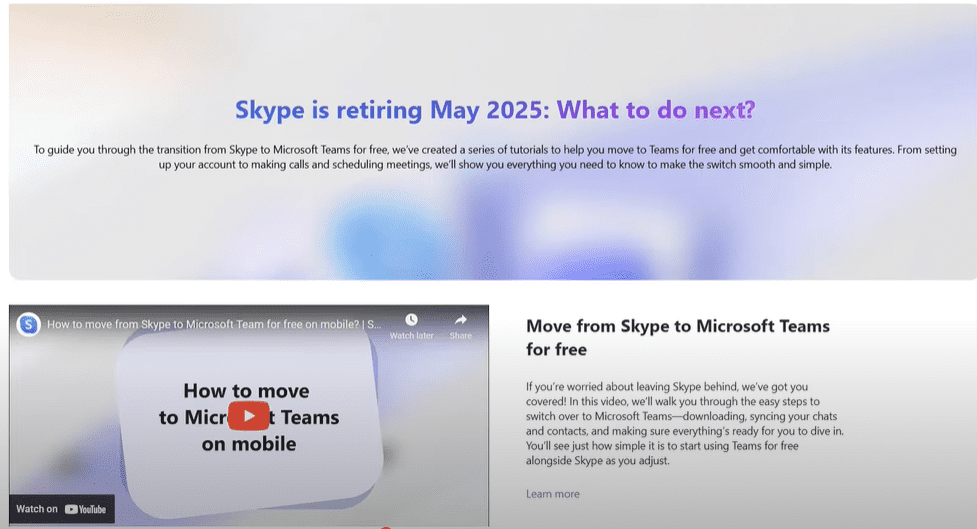
How to Migrate from Skype to Microsoft Teams
Here’s a step-by-step guide to transition smoothly from Skype to Teams:
- Visit the Official Migration Page:
Go to Skype.com/movetoteams to begin the migration process. - Sign In with Your Skype Credentials:
Use your current Skype login details to sign into Microsoft Teams. Microsoft will automatically transfer your Skype data, including chats and contacts. - Access Your Skype Data on Teams:
Once logged in, your entire Skype history and contacts will appear within Teams. - Start Using Microsoft Teams:
After the transition, you can continue chatting and video calling with your existing contacts via the Teams interface. Teams is available for both individuals and organizations and offers advanced communication features.
✅ Microsoft Teams is available for free and can be accessed at https://www.microsoft.com/en/microsoft-teams
What If You Don’t Want to Use Microsoft Teams?
If Microsoft Teams isn’t your preferred platform, you still have the option to download all your Skype data and use it elsewhere. To do this:
- Visit Skype’s Export My Data page: https://go.skype.com/export
- Select what data you want to download (e.g., chat history, media files).
- Export and save the files securely.
Make sure to complete this step before January 2026, as Microsoft will delete all data after this deadline.
What Happens If You Do Nothing?
If you don’t take any action—either by transitioning to Microsoft Teams or exporting your data—all your Skype data will be permanently deleted after January 2026. This includes all your chat history, contacts, shared files, and call logs.











A Look Back at Skype’s Legacy
Skype changed the world of communication. Whether it was connecting families across continents, enabling business meetings from remote locations, or just catching up with friends, Skype brought people closer when physical distances seemed too great.
Though Skype’s journey is ending, its legacy continues through platforms like Microsoft Teams that build upon and enhance its features.
Final Thoughts
The closure of Skype is certainly the end of an era, but Microsoft is offering a well-structured migration to Teams that makes the transition relatively simple and secure. To avoid losing your data, it’s crucial to act well before January 2026.
Visit the official Skype to Teams transition page today and ensure that your conversations and memories remain intact.
Tags: Skype shutdown, Skype 2025 end, migrate Skype to Teams, Microsoft Teams migration, Skype data export, Skype history backup, Skype closing down, Microsoft Teams guide
Hashtags:
#SkypeShutdown #MicrosoftTeams #SkypeToTeams #ExportSkypeData #Skype2025 #OnlineCommunication #VideoCalls #MicrosoftNews #DigitalMigration








