What if we told you that your old Android phone could run a full desktop operating system—not in a virtual machine, not streamed remotely, but natively? Sounds insane, right?
Well, it’s not.
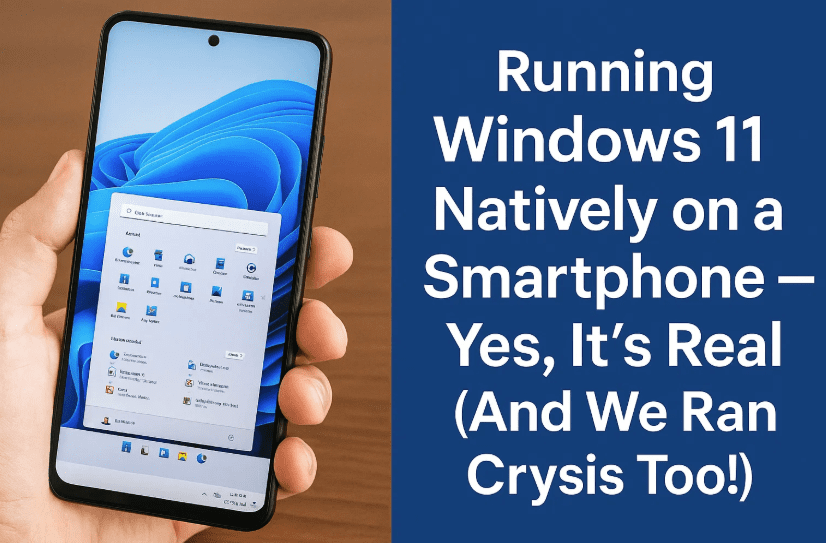
This blog explores how Windows 11 is running natively on a OnePlus 6T smartphone powered by a Snapdragon 845. Not only is it smooth, functional, and bootable, but we even managed to run AAA PC games like Crysis 3, CS:GO, and Tomb Raider right on the phone.
Let’s take you through the wild step-by-step journey, tools involved, compatibility requirements, and gaming benchmarks that redefine what’s possible with mobile hardware.
🤯 Yes, This is Windows 11 — Running Natively on a Smartphone
Let’s start with the unbelievable: this is not a VM, not remote desktop, and not emulation.
We’re running full Windows 11 ARM64 directly on a OnePlus 6T smartphone using the Snapdragon 845 chip. Touch input works, apps launch, and gaming is possible (to an extent).
This wasn’t magic. It was enabled by an amazing community project…
🧩 Project Renegade — The Gateway to Boot Windows on Android
So far, we’ve done a good job explaining the result. Now let’s move to the actual method. The biggest obstacle to running desktop OS on a phone is UEFI boot support.
Enter Project Renegade.
🔗 Visit Project Renegade on GitHub
🚀 What Does It Do?
- Fakes a UEFI bootloader using the Android boot process.
- Tricks the phone into thinking it’s booting a Linux kernel.
- Loads Windows 11 ARM64 or even Linux directly from the bootloader.
It supports Snapdragon 845-based phones and provides:



- Custom UEFI builds
- A boot shim disguised as a kernel
- Community-tuned drivers for Wi-Fi, display, touch, and more
🧠 It’s still very experimental and unstable. Prepare for blue screens, hard resets, and starting over multiple times.
🛠️ Setup Overview — How It Works
❗ Disclaimer: This is not beginner-friendly. Flashing UEFI and OS images requires advanced knowledge of bootloaders, partitioning, and recovery tools. Proceed at your own risk.
Here’s a simplified breakdown:
1. Unlock Bootloader on OnePlus 6T
You’ll need OEM unlock enabled and an unlocked bootloader.
2. Flash Custom UEFI
Using a Project Renegade UEFI file compiled or prebuilt for your device.
3. Flash Windows 11 ARM64 Image
Use tools like Wimlib or DISM to deploy the ARM64 image to your phone’s partition.
4. Boot Using the Shim
Project Renegade’s shim tricks the bootloader into thinking it’s loading Android, when it’s actually Windows.
5. Optional: Add Drivers
- GPU, Wi-Fi, touch, audio drivers must be manually added.
- Most come pre-packaged for Snapdragon 845 devices.
🖥️ Windows 11 Experience on a Smartphone — What Works & What Doesn’t
Now comes the fun part—how does it feel to use Windows 11 on a phone?
✅ What Works
- Touchscreen input
- USB mouse/keyboard support
- Display scaling and rotation
- App compatibility via ARM64 and x86 emulation
- Basic gaming
❌ What Doesn’t (or barely does)
- Battery management
- Power button functions (can require hacks)
- Audio drivers are hit or miss
- No Face ID (despite the giant notch)
- Very limited thermal management
🎮 Gaming Benchmarks on Windows 11 Smartphone
Let’s be honest: no one expects Crysis 3 to run on a 3-year-old smartphone… but it did. Let’s walk through performance benchmarks and game tests.
📊 Device Specs:
- Chipset: Qualcomm Snapdragon 845
- CPU: 8 cores
- GPU: Adreno 630
- RAM: 8GB
- OS: Windows 11 ARM64 (Native Boot)
🧪 Benchmark Scores
- Cinebench R23 Multi-Core: ~1000
- Cinebench R23 Single-Core: ~250
- 3DMark Night Raid: ~2900 (on par with NVIDIA GT 630)
⏱️ Cinebench took nearly an hour—because it’s x86 software being emulated!
🕹️ Game Performance
Let’s move to the games. Below are highlights of how each title performed:
✅ Crysis 3 (1080p, windowed 540p magnified)
- Native 1080p boot = 5–10 FPS
- Downscaling to 540p = 15–20 FPS
- Usable but not smooth
- Thermals were a concern—external cooling recommended
✅ Counter-Strike: Global Offensive (CSGO)
- Native 1080p = 20–30 FPS
- Quite playable and smooth
- Mouse + keyboard makes it enjoyable
✅ Euro Truck Simulator 2
- Surprisingly sluggish
- CPU bottleneck limits performance
- GPU usage < 30%
✅ Skyrim
- Starts at 40 FPS in low complexity scenes
- Drops dramatically in populated areas
- Again, CPU is the bottleneck
✅ Tomb Raider (2013)
- 1080p = ~20 FPS
- 540p = 30–50 FPS (playable!)
- Even TressFX hair rendering worked on Adreno GPU
- Looks better than a 2013 gaming laptop!
❌ GTA V & Neon Noir (Ray Tracing)
- Runs, but:
- GTA V: < 1 FPS
- Neon Noir: ~0.2 FPS (1 frame every 5 seconds!)
- These games are CPU-bound and emulate GPU acceleration poorly
🧠 Why Some Games Run Poorly?
The Snapdragon 845 doesn’t support native 64-bit GPU drivers for Windows. That means some games fall back to CPU-rendered virtual GPUs—which is painfully slow.
Games that rely heavily on DirectX 11, hardware ray tracing, or CPU-heavy scenes will perform worse than expected.
🧰 Pro Tips for Better Performance
Here are a few clever tricks used to improve the experience:
- Use windowed mode + Windows Magnifier to simulate resolution scaling
- Use active cooling (fan or thermal pad) to prevent overheating
- Avoid 1080p unless absolutely needed; 540p works better
- Stick to older or well-optimized games (2012–2016 era)
🧠 FAQs
❓ Can any smartphone run Windows 11?
No. It must be an ARM-based device, preferably with:
- Snapdragon 845
- Unlocked bootloader
- Community UEFI and driver support
❓ Can you use the phone normally after this?
Not easily. It often requires resetting partitions, and Android backup may be erased. Dual-booting is possible, but not stable.
❓ Is it safe?
There’s always a risk of soft-bricking your device. You should only try this if you’re experienced in bootloader recovery and flashing.
📌 Final Thoughts — Windows 11 on Smartphones Is Real, but Not Practical… Yet
Running Windows 11 natively on a smartphone like the OnePlus 6T is a technical marvel. It pushes the limits of what’s possible with open hardware and software.
- The fact that we got games like Tomb Raider, CSGO, and even Crysis 3 to run is nothing short of astonishing.
- But for now, this is still a hobbyist project, not a practical alternative to a real PC.
If nothing else, it shows the potential of ARM hardware, and just how far mobile chips have come. Who knows? Maybe one day, your phone will be your desktop.
🏷️ Tags:
windows 11 smartphone, project renegade tutorial, windows arm64 installation, oneplus 6t windows 11, windows 11 native boot on android, arm64 gaming benchmarks, run crysis on phone, csgo on smartphone, tomb raider snapdragon, windows phone revival
🔖 Hashtags:
#Windows11OnPhone #ProjectRenegade #Snapdragon845 #WindowsARM #TechHacks #RunCrysis #MobileGaming #OnePlus6T #ARMWindows #Geekerwan
Disclaimer: This guide is for educational purposes only. Flashing custom firmware or OS on smartphones can void your warranty and may permanently damage your device. Always back up your data and proceed at your own risk. Refer to Project Renegade for the latest instructions and supported devices.