If you’re looking to upgrade your streaming setup, Roku has no shortage of options. In fact, there are 10 different Roku streaming devices available, ranging from entry-level models to advanced ones with enhanced audio and video capabilities. With so many choices, it can be overwhelming to pick the right one.
In this article, we’ll help simplify that decision by comparing two of Roku’s most popular mid-range options: the Roku Express 4K+ and the Roku Streaming Stick 4K. Both devices support 4K resolution and HDR, but they differ in some critical areas that could affect your viewing experience.

Let’s dive into the comparison.
What’s in the Box?
Roku Express 4K+
- Roku device
- HDMI cable
- Power cable and adapter
- Remote control (with TV controls and voice support)
- Two AAA batteries
- Double-sided adhesive tape (for mounting)
The Roku Express 4K+ is a small box that sits on your TV stand or can be mounted under your television. Note that the remote must be pointed directly at the device for it to work properly.
Roku Streaming Stick 4K
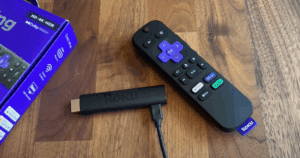
- Streaming stick
- Remote control (with TV controls and voice support)
- Power cable
- Wireless receiver built into the cable
- Two AAA batteries
The Streaming Stick 4K plugs directly into your TV’s HDMI port and hides behind the screen, offering a sleek, invisible setup. It also includes a long-range Wi-Fi receiver for improved connectivity.
Hardware Differences
Although both devices perform similarly in terms of streaming quality, here are the key hardware differences:
| Feature | Roku Express 4K+ | Roku Streaming Stick 4K |
|---|---|---|
| Design | Small box | Plug-in stick |
| Remote Type | Enhanced (TV control) | Enhanced (TV control) |
| Wi-Fi Connectivity | Dual-band Wi-Fi | Long-range MIMO dual-band Wi-Fi |
| Dolby Vision Support | ❌ | ✅ |
| Memory (RAM) | 1 GB | 1 GB |
| Processor | Quad-core | Quad-core |
| Mounting Options | Sticky tape required | Plugs directly into TV |
Both devices come with the same processor and RAM (1 GB), which is a significant upgrade over Roku’s 1080p-only models that offer just 512 MB RAM. This means better performance and less sluggishness over time.
Setup and Installation
- Roku Express 4K+ needs to be placed visibly because the remote works via infrared.
- Roku Streaming Stick 4K plugs directly into the TV and stays hidden, using a Wi-Fi receiver to connect wirelessly.
If you prefer a clean, cable-free look, the Streaming Stick 4K is the better choice.
Display and Video Capabilities
Both models support:
- 4K resolution at 60fps
- HDR10 and HDR10+
Only the Streaming Stick 4K supports Dolby Vision, which offers better color depth and contrast for supported content.
Software and User Interface
The Roku OS is identical across all Roku devices, so your experience won’t differ whether you’re using the Express 4K+ or Streaming Stick 4K.








- Access to all major apps like Netflix, Disney+, Hulu, Prime Video, and more.
- Live TV options.
- Free and paid movie and TV content.
- Easy app organization and shortcuts.
You can customize your home screen, manage apps, and enjoy Roku’s intuitive and straightforward user interface regardless of which device you choose.
Remote Control Comparison
The Express 4K+ remote is the same as the one that comes with the Streaming Stick 4K. Both feature:
- TV power and volume control.
- Voice search and commands.
- Shortcut buttons for popular streaming services.
If you opt for the Streaming Stick 4K+ (not just the base model), you get a more advanced remote similar to the Roku Ultra. This upgraded remote includes:
- A headphone jack for private listening.
- Additional programmable shortcut buttons.
Price and Value
The Roku Streaming Stick 4K typically costs about $10 more than the Express 4K+. For that extra cost, you get:
- Better Wi-Fi performance.
- Support for Dolby Vision.
- Sleeker, more compact setup behind your TV.
If you want cleaner installation and slightly better performance, the Streaming Stick 4K is well worth the small price bump.
Final Verdict
| Criteria | Recommended Model |
|---|---|
| Budget-friendly option | Roku Express 4K+ |
| Best performance | Roku Streaming Stick 4K |
| Sleek and hidden setup | Roku Streaming Stick 4K |
| Dolby Vision support | Roku Streaming Stick 4K |
Both devices offer excellent value and performance. If you don’t mind the device being visible and want to save a few bucks, go with the Roku Express 4K+. However, for only $10 more, the Roku Streaming Stick 4K gives you more advanced features, better Wi-Fi, and Dolby Vision.
You can learn more and compare devices directly at Roku’s official website.
Tags and Hashtags
Tags: roku express 4k plus, roku streaming stick 4k, roku device comparison, 4k streaming device, dolby vision streaming, roku buying guide, roku remote features, streaming stick vs express, roku 2025
Hashtags:
#Roku #StreamingDevices #4KStreaming #DolbyVision #CordCutting #SmartTV #RokuGuide #StreamingStick #HomeEntertainment #MediaPlayer








