ReactOS is a fascinating free and open-source operating system designed to run Windows applications and use Windows drivers. Built from scratch using clean room reverse engineering (without using any Microsoft code), ReactOS aims to deliver Windows NT compatibility in a lightweight, community-driven package.
With the latest version, ReactOS 0.4.15, released in March 2025, we decided to take an in-depth look at what this OS offers, how to install and use it, and its potential for legacy software support.
🌐 What Is ReactOS?
ReactOS is an open-source operating system that has been in development since 1996. It aims to provide compatibility with software and drivers made for Microsoft Windows NT versions such as Windows XP, 2000, and 2003. This makes it ideal for running older Windows applications or reviving legacy hardware.
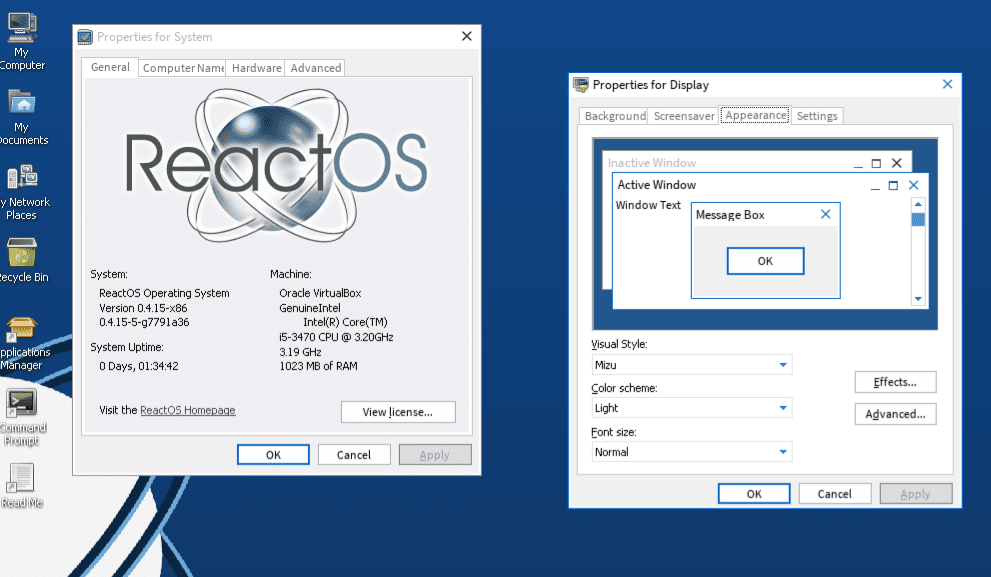
Official website: https://reactos.org
🆕 What’s New in ReactOS 0.4.15?
ReactOS 0.4.15 includes several key updates:
- Major improvements in Plug and Play, Audio support, Memory management, and Cache control
- Enhancements in Registry healing, System tools, Security, and the User Shell
- Better compatibility with various legacy hardware
Importantly, the OS remains 32-bit, though an experimental 64-bit build is available through nightly builds for those willing to experiment.
💾 Downloading ReactOS
To get started, you can choose between:
- Live CD Image: For testing ReactOS without installation.
- Boot CD Image: For full installation on real hardware or virtual machines.
Both can be downloaded via the Download page on the ReactOS website.
Do note:
- Most real hardware support is limited to older devices.
- The system is still in alpha, so expect bugs and instability, especially with modern hardware.
🛠️ Creating a Live USB Using Etcher
Once downloaded, you can write the ISO to a USB drive using Balena Etcher:
- Open Etcher.
- Select the downloaded ReactOS Live CD ISO.
- Select the target USB drive.
- Click Flash.
⚠️ Tip: Use older laptops or desktops for real hardware tests. Newer systems may not boot or may display compatibility errors.










💻 Running ReactOS from USB on Real Hardware
ReactOS may not work on all modern systems. In our test:
- It did not boot on Intel i5-10400 or 14100F.
- It partially booted but failed on Ryzen 5600G.
- It worked successfully on an old Asus laptop with AMD C60 CPU.
You can consult the hardware compatibility list on their site for confirmed working systems.
🖥️ Installing ReactOS in a Virtual Machine (VirtualBox)
Using Oracle VirtualBox, you can install ReactOS easily. Here’s how:
- Open VirtualBox and click New.
- Name your VM as ReactOS.
- Select Other Windows (32-bit).
- Allocate 1 CPU and 512 MB to 4 GB RAM (max 4 GB as it’s a 32-bit OS).
- Create a 10 GB virtual hard disk.
- Mount the ReactOS Boot ISO to the virtual optical drive.
- Start the VM and follow the installation steps:
- Press Enter to install ReactOS.
- Choose a partition and quick format it.
- Accept default bootloader settings.
- Set admin password and time zone.
- Complete the setup and reboot.
After rebooting, remove the ISO from the virtual drive to avoid re-launching the installer.
🧩 Installing Guest Additions
To enable full-screen resolution and better integration in VirtualBox:
- Go to Devices > Insert Guest Additions CD Image.
- Open My Computer inside ReactOS.
- Run the installer from the CD.
- Reboot the system once installed.
You can now scale ReactOS to resolutions like 1920×1080 or view in full screen with better performance.
🌐 Internet Browsing and App Installation
ReactOS comes with Wine Internet Explorer, a minimal browser that can access simple websites like Google or explainingcomputers.com. However, complex websites (e.g., YouTube) may not load correctly.
Instead, ReactOS includes a built-in Application Manager with categories like:
- Audio & Video
- Games & Fun
- Internet
- Office
- Graphics (even includes older versions of Blender)
- Finance
- Development
These can be installed directly from the app manager.
📦 Running Classic Windows Software
One of ReactOS’s main appeals is support for older Windows applications. In our test:
✅ Microsoft Office XP (Word, Excel, PowerPoint) installed and ran smoothly.
✅ Adobe Audition 1.5 worked perfectly, including audio playback.
✅ Blender (early version) ran with minor graphical glitches.
⚠️ Microsoft Access gave an error while creating a new database.
Overall, software compatibility is impressive for a system still in alpha.
⚠️ Limitations and Stability
While ReactOS shows major progress, it’s still far from stable:
- Installation of some hardware drivers can crash the system.
- Modern hardware support is limited.
- Browsing capability is minimal.
That said, in a virtual machine or on older hardware, ReactOS performs surprisingly well for running legacy software.
✅ Conclusion: A Niche OS with Huge Potential
ReactOS 0.4.15 is not ready for everyday desktop use, but it offers incredible potential as a lightweight environment for legacy applications, especially in virtualized environments. It’s actively developed, legal, free, and open-source.
If you need a system to run older Windows software on Linux or just want to tinker with alternative OSes, ReactOS is well worth exploring.
🔗 Useful Links
- 🌐 Official Website: https://reactos.org
- 📥 Download Page: https://reactos.org/download
- 🧪 Hardware Compatibility: https://reactos.org/wiki/Supported_Hardware
- 🛠️ Balena Etcher (for USB creation): https://etcher.io
📌 Tags
ReactOS, open-source OS, legacy software, virtual machine, Windows XP alternative, free operating system, ReactOS 0.4.15, Windows emulator, FOSS OS, software compatibility
🔖 Hashtags
#ReactOS #OpenSource #WindowsAlternative #VirtualMachine #LegacySoftware #FreeOperatingSystem #ReactOS2025 #WindowsAppsOnLinux #ReactOSVM #TechGuide
⚠️ Disclaimer
ReactOS is still in alpha development. While it can successfully run many legacy Windows applications, it may crash or behave unpredictably, especially with modern hardware or drivers. Use it for testing, educational purposes, or in a virtual machine environment.







