If you’ve ever dreamed of playing Nintendo Switch games like Pokémon Sword, Need for Speed: Hot Pursuit, or Crash Bandicoot directly on your Android device — you’re in luck. The final version of NuuSho Emulator v35 is now available, and it brings exceptional performance, especially on high-end devices like those powered by Snapdragon 8 Gen series processors.
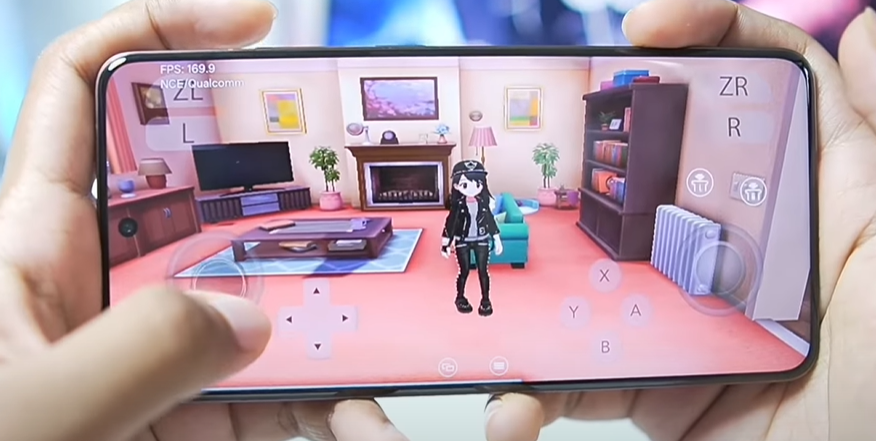
In this article, we’ll walk you through what’s new in the final build of NuuSho, how to set it up properly, the best settings to use for optimal gameplay, and compatibility with popular games and devices.
✅ Important Note: NuuSho Emulator is a fork of Yuzu Android and combines features from multiple Nintendo Switch emulators to provide a stable and high-performance experience on Android.
🚀 What Is NuuSho Emulator?
NuuSho Emulator is a long-running fork of Yuzu Android. It merges various Nintendo Switch emulator features into a single package, aiming to deliver enhanced compatibility and performance on Android smartphones. Version 35 marks the final release of NuuSho, and it’s packed with fixes and improvements, particularly for MediaTek-based devices.
🆕 What’s New in Version 35?
Here’s a quick overview of the updates in the final release:
- Support for 17 and 18.0 stubs
- Fixed RPC-related bugs
- Cube updates and enhanced performance
- Crash Bandicoot series now stable on MediaTek processors
- Fixed issues with One Piece: Odyssey and Jump Force on MediaTek
- Introduced speed limiter support up to 1000%
- QLaunch support added (experimental)
- Enhanced compatibility with custom and default graphics drivers
- MediaTek compatibility significantly improved
📲 How to Set Up NuuSho Emulator on Android
Step 1: Download & Install NuuSho v35
Start by downloading the final v35 build of the NuuSho Emulator from its official GitHub page.
⚠️ Disclaimer: This guide assumes that you legally own your Nintendo Switch games and firmware. Dumping and using pirated ROMs or BIOS files is illegal and not endorsed.
Step 2: Initial Setup
- Open the emulator and tap “Skip” on the intro screen.
- Import required files (Switch keys, firmware) to run games. You will need the
prod.keysandtitle.keysfiles. - Tap “Continue” once setup is complete.
⚙️ Best Settings for Smooth Gameplay
System Settings:
- Speed Limit Percentage: Set to 500% (can go up to 1000%)
- Docked Mode: Disabled for better performance
Graphics Settings:
- Resolution: 0.75x (to balance visuals and performance)
- VSync Mode: Mailbox
- Graphics Accuracy: Low
- VM Mode: Aggressive
- Aspect Ratio: Stretch to Window
- Enable:
- Post-Maximum Clocks
- Erosynchronous Shaders
Audio Settings:
- Output Engine: Auto
🛠 Optional: Graphics Driver Customization
If you’re using a Snapdragon-based Android device, you can import custom Mesa Turnip graphics drivers for even better performance.
One of the best options currently is the Mesa Turnip Adreno driver 25.2.0-0 r6 which offers great compatibility and graphical improvements.
Also, NuuSho supports Rapper, the system default graphics driver used by Android devices. If custom drivers cause graphical issues, revert to the default system GPU driver.
🎮 Game Compatibility & Testing
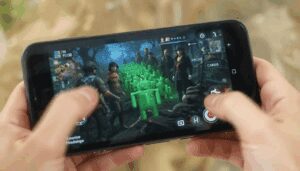
Here’s a quick summary of game tests conducted on a Snapdragon 8 Gen processor device:

✅ Pokémon Sword
- Runs at 200+ FPS indoors and around 80 FPS outdoors.
- Graphics are sharp, and gameplay is ultra-smooth.
- Works great with the N22 benchmark build.
⚠️ Jujutsu Kaisen: Cursed Clash
- Crashed after launch with a custom GPU driver.
- Worked after switching to system GPU driver.
- Character models didn’t render properly — likely an emulator issue.
✅ Need for Speed: Hot Pursuit
- Stable 30 FPS gameplay.
- Graphics rendered correctly, and gameplay was smooth.
- Minor stuttering in some scenes, but overall very playable.
For MediaTek users, this update significantly improves support. Games like Crash Bandicoot and Jump Force now run reliably.
❌ QLaunch Status
NuuSho’s experimental QLaunch feature is present but currently not booting on some devices. Alternatively, MiEdit home themes do load, but stability may vary.
🔧 Device Recommendations
- Best Performance: Snapdragon 8 Gen 1/2/3 processors
- Compatible: MediaTek Dimensity series (post v35 improvements)
- Low-End Devices: Performance may vary; expect lower FPS and potential compatibility issues.
📝 Final Thoughts
The final version of NuuSho v35 offers impressive improvements, particularly for MediaTek users and those using custom GPU drivers. With proper setup and settings, you can enjoy Nintendo Switch titles like Pokémon Sword or Need for Speed directly on your Android phone — at high frame rates and with surprisingly good visuals.
Whether you’re testing out experimental QLaunch features or just want a plug-and-play setup, NuuSho remains one of the most versatile Switch emulators for Android users today.
🔗 Useful Links
- 🔄 Download NuuSho Emulator – GitHub
- 🎮 Mesa Turnip Drivers
(Use with caution and install only if you know how to replace Android GPU drivers.)
📢 Disclaimer
This article is for educational purposes only. Please ensure you legally own all Nintendo Switch games and system files you use with the emulator. The author does not promote piracy or the use of illegal ROMs or BIOS files.
🏷 Tags:
Nintendo Switch emulator, Android gaming, NuuSho emulator, Yuzu Android fork, Pokémon Sword Android, emulator setup guide, Snapdragon gaming, Mesa Turnip driver, MediaTek compatibility, Android Switch games
#Hashtags:
#NuuSho #YuzuAndroid #NintendoSwitchEmulator #AndroidGaming #SnapdragonGaming #PokemonSword #EmulatorSetup #MesaTurnip #MediaTekSupport #MobileGaming








