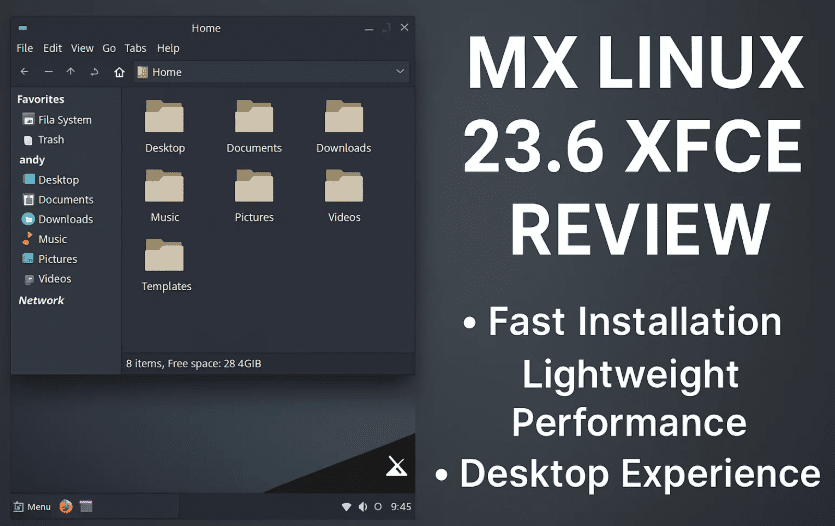
If you’re looking for a fast, lightweight, and beginner-friendly Linux distribution, MX Linux might just be the perfect fit for you. Based on Debian 12 and supported until 2028, the latest release MX Linux 23.6 XFCE edition offers a smooth experience with great customization options and reliable performance — even on older hardware.
In this blog, we’ll explore:
- 🧩 What MX Linux is and its versions
- ⚙️ Installation process and configuration
- 💻 System performance and RAM usage
- 🎨 Appearance customization
- 📦 Default apps and package overview
- 🧠 Final thoughts and FAQs
Let’s dive into this detailed hands-on experience of MX Linux XFCE edition.
🔍 What is MX Linux?
MX Linux is a Debian-based Linux distribution known for its stability, performance, and pre-installed system tools. It is especially recommended for users looking for a lightweight yet full-featured desktop environment.
✨ Variants Available:
- XFCE – Lightweight and fast (default)
- KDE Plasma – A bit heavier but feature-rich
- Fluxbox – Minimalist and ultra-light (to be covered in another article)
For this walkthrough, we’ll be reviewing MX Linux 23.6 XFCE Edition.
🖥️ Installation Experience (Virtual Machine)
🌐 Base System:
- Version: MX Linux 23.6
- Based on: Debian 12 (Bookworm)
- Support: Until 2028
⚙️ Setup Process:
- Booted into the Live ISO (XFCE desktop)
- Selected full disk format for a clean install
- Set hostname:
linuxmitra.example - Configured locale, timezone (Asia/Kolkata), and keyboard settings manually
- Disabled root password setup (secure setup)
- Installation started while settings were being configured
🕐 Total time: ~4 minutes including setup and installation. That’s even faster than many Arch-based systems!
🚀 First Boot & Desktop Experience
🎛️ Display Manager:
- Uses LightDM
- Minimal pop-up interface but functional
- Boot animation is smooth and polished
📂 Default Tools & Utilities:
- MX Welcome screen
- MX Tools like snapshot, repo manager, boot repair, and more
- Popular apps section to install common software
- MX Package Installer supports:
- Debian repos
- Flatpak support
- MX test repo
🧪 Terminal Testing & Package Insights
🧰 What’s Pre-installed?
- Ran:
sudo apt update - Noticed: No update fetched — meaning internet wasn’t used during install
- Installed packages count: ~2100
- Many are part of MX Linux’s custom tooling ecosystem
✔️ Good news: You can install MX Linux offline, and it boots with basic utilities ready.
📈 RAM Usage & System Resource Consumption
Checked using Task Manager:
- RAM Usage (Idle): ~1.1 GB
- Running Processes: ~250
- Background Services:
- PipeWire (audio)
- LightDM
- GSettings
- System tray and clipboard manager
🔍 For an XFCE distro, 1.1 GB is slightly higher, but understandable due to extra MX tools bundled.
🎨 Customization Options
🖼️ Wallpaper & Desktop Settings:
- Preloaded with MX Linux branding wallpapers
- You can disable or change them easily
🎨 Appearance Themes:
- Available Themes: Arc, Greybird, MX Comfort, etc.
- Icon Packs: Moka, Papirus, Numix
- Installed Moka for a clean look
🔡 Fonts:
- Default: Monospace
- Lacks pre-installed Noto fonts (a suggestion for developers to consider)
⌨️ Keyboard Shortcuts:
Easily configurable from the XFCE settings manager
🌐 Web Browser & Version
- Default: Firefox ESR
- Version installed: One version behind the latest
- Updates not pulled due to offline install
- You can manually run updates once online
📦 Software Center and Package Management
- Uses APT as the base
- Additional GUI: MX Package Installer
- Offers categorized software (office, audio, system tools, etc.)
- Repo Manager: Lets you choose from official Debian and MX Test Repos
- Flatpak: Supported out of the box (disabled by default)
📋 Miscellaneous Features & Tools
🧾 Clipboard Manager:
- Default clipboard app included — useful and responsive
🔍 File Manager:
- Thunar: Lightweight and my personal favorite. Fast and clean.
🧰 MX Tools (Highlights):
- Snapshot tool – backup your system
- Job Scheduler
- Disk Manager
- Deb Installer
- Chroot rescue tool
🧠 Useful Resources
- Switching to Linux in 2025: Practical Advice for New Users (Beyond Just Installing the OS)
- Garuda Linux: A Stunning, Customizable Arch-Based Distro
- Nobara Linux 12: The Best Fedora-Based Linux Distro for Gamers and Creators
- Exploring Manjaro Linux in 2025 – The Best Arch-Based Distro for Beginners
- How to Set Up Kali Linux and Metasploitable 2 on VirtualBox (Beginner-Friendly Guide)
- How to Run Linux on Windows Using WSL (Windows Subsystem for Linux)
❓ FAQs
Q: Is MX Linux beginner-friendly?
Yes, especially the XFCE edition. Easy installer, good documentation, and pre-configured tools make it perfect for new users.







Q: Can I install MX Linux without internet?
Yes. One of its standout features is a fully offline-capable installation.
Q: Is it lighter than Linux Mint?
In many ways, yes. It uses XFCE by default and is less resource-hungry than Cinnamon.
Q: What’s the RAM usage?
Around 1.1 GB idle with system tools running — slightly above average for XFCE, but stable.
Q: Can I use Flatpak or Snap?
Flatpak is supported out of the box (Snap is not included by default).
🧠 Final Thoughts
MX Linux XFCE 23.6 is one of the most polished, stable, and user-friendly Linux distributions available in 2025. The fast installation, system tools, offline capability, and low resource usage make it ideal for:
- Beginners switching from Windows
- Users with older hardware
- Power users who want customization with Debian stability
While some may find the default branding a bit too prominent and RAM usage slightly above expectations, MX Linux still shines with its usability, reliability, and strong community support.
🔗 Useful Links:
🏷️ Tags:
mx linux, mx linux 2025, mx linux xfce, linux distro review, linux for beginners, xfce linux, debian based linux, linux offline installer, low ram linux, thunar file manager
📢 Hashtags:
#MXLinux #LinuxXFCE #DebianBased #LightweightLinux #LinuxReview #MXLinux23 #OpenSource #LinuxCustomization #LowEndPC #LinuxForBeginners
If you’re considering trying MX Linux, give it a spin on a virtual machine or an old PC.
🧠 And let us know in the comments — What’s your favorite lightweight Linux distro?







