The MSI Titan 18 (2025) is the most powerful gaming laptop we’ve ever tested—but before you empty your bank account for this beast, there are some critical issues you need to know about.
Design & Build Quality
Premium but Heavy
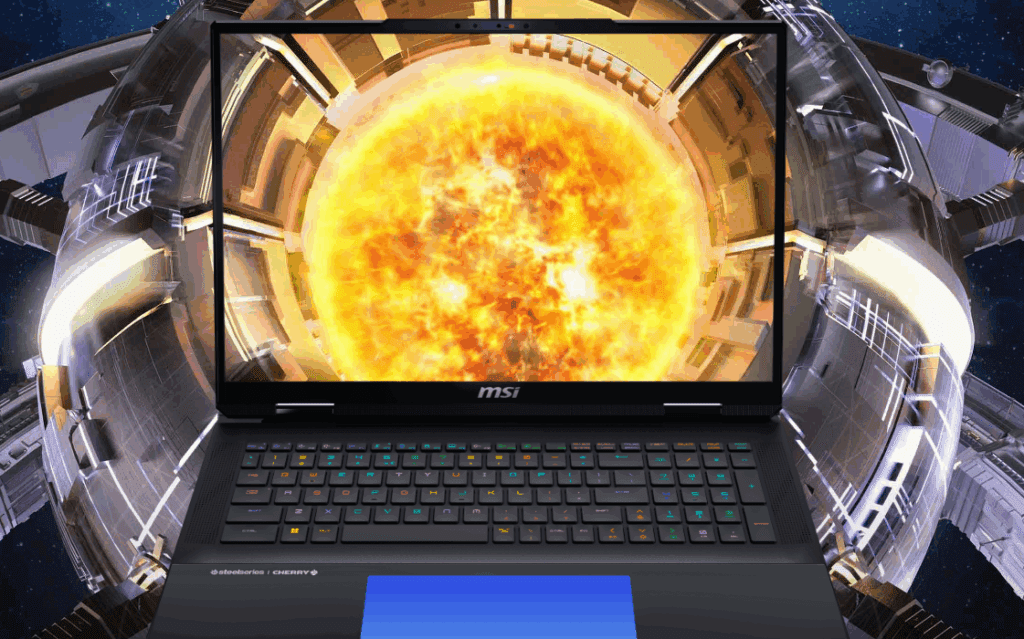
- Chassis: Magnesium aluminum with a plastic wrist rest (feels glass-like).
- Color Options: Standard black/silver or a limited Norse Myth edition (more expensive).
- Weight: 8 lbs (3.6 kg) + 4.8 lbs (2.2 kg) for the 400W charger (total: ~12.8 lbs / 5.8 kg).
- Hinges: Sturdy, no screen wobble, easy to open with one hand.
✅ Pros: Solid build, minimal flex.
❌ Cons: Extremely heavy—not a portable machine.
Keyboard & Touchpad: A Mixed Bag
Mechanical Keyboard (Cherry MX Ultra Low Profile)
- Per-key RGB lighting (customizable via SteelSeries software).
- Tactile but loud—not ideal for quiet environments.
- Only some keys are mechanical (green highlights = mechanical, red = membrane).
Seamless Haptic Touchpad (The Worst We’ve Used)
- Inconsistent clicks—struggles with double-clicking & dragging.
- No physical border—hard to locate when RGB is off.
- Frustrating for productivity—better off using a mouse.
Performance & Hardware
Specs (Tested Model)
- CPU: Intel Core Ultra 9 285HX
- GPU: NVIDIA RTX 5090 (Laptop)
- RAM: 64GB DDR5-6400 (2 slots, upgradable to 96GB)
- Storage: 4x M.2 slots (1x Gen5 + 3x Gen4)
- Display: 18″ UHD+ Mini-LED (120Hz, 1200 nits HDR)
✅ Pros:
✔ Top-tier gaming & productivity performance
✔ Four SSD slots (great for storage expansion)
✔ Brightest laptop screen tested (1200 nits!)
❌ Cons:
✖ No Advanced Optimus or G-Sync (unacceptable at this price)
✖ Runs hot under load (keyboard temps reach 45°C+)
Gaming & Thermals
Performance in Games (RTX 5090)
| Game (Max Settings) | FPS (Native UHD) | FPS (DLSS 4 Performance) |
|---|---|---|
| Cyberpunk 2077 | 58 FPS | 112 FPS |
| Black Myth Wukong | 72 FPS | 98 FPS |
| Alan Wake 2 | 64 FPS | 89 FPS |
✅ Pros: Breaks performance records in most games.
❌ Cons: Fan noise is loud—expect jet-engine sounds under load.
Thermal Performance
- CPU throttles at 100°C in Extreme Mode.
- Cooling pad helps but doesn’t eliminate heat.
- Keyboard gets uncomfortably warm during gaming.
Upgradability & Ports
Internal Upgrades
- RAM: 2x DDR5 slots (vs. 4 in last-gen—but runs faster at 6400MHz).
- Storage: 4x M.2 slots (Gen5 + Gen4, labeled clearly).
Port Selection
- Rear Ports (for bulky cables):
- 2x Thunderbolt 4
- HDMI 2.1
- Ethernet
- Power
- Side Ports:
- 1x USB-C
- 2x USB-A
- SD Card Reader
❌ Annoyance: Port icons are on the bottom (not visible when plugging in).
Battery Life & Software
Battery (99Wh)
- ~5-6 hours of light use (better than last-gen).
- 21% drain in 24 hours when asleep.
MSI Center Software
- Performance Modes: Eco, Balanced, Extreme.
- Fan Control: Customizable, but max fans = loud.
Final Verdict: Who Should Buy It?
✅ Buy If:
✔ You need maximum performance & 4x SSD slots.
✔ You don’t care about portability (it’s a desktop replacement).
✔ You’ll use an external mouse (the touchpad is terrible).
❌ Avoid If:
✖ You want G-Sync / Advanced Optimus (missing at this price).
✖ You prefer quieter, cooler laptops (fans get loud, keyboard gets hot).
✖ You’re on a budget (starts at $4,800).
Alternatives to Consider:
- ASUS ROG Scar 18 (Better touchpad, G-Sync)
- Gigabyte Aorus 18 (Advanced Optimus, lighter)
🔹 Best Deals: Check gaminglaptop.deals for discounts.
Tags
MSI Titan 18, RTX 5090 laptop, gaming laptop review, high-end laptops, Mini-LED display
Hashtags
#MSITitan18 #GamingLaptop #RTX5090 #LaptopReview #TechReview







Disclaimer: Prices and availability may change. Always check official retailers before purchasing. Game benchmarks may vary based on settings.








