As Windows 10 approaches its official end of support in October 2025, Microsoft is rolling out a new migration tool aimed at encouraging the remaining eligible users to transition to Windows 11. This tool, designed to simplify the process of transferring data from one PC to another, is part of Microsoft’s broader strategy to close the gap between Windows 10 and Windows 11 usage—especially for the estimated 240 million devices that are still running Windows 10 but are eligible for upgrade.
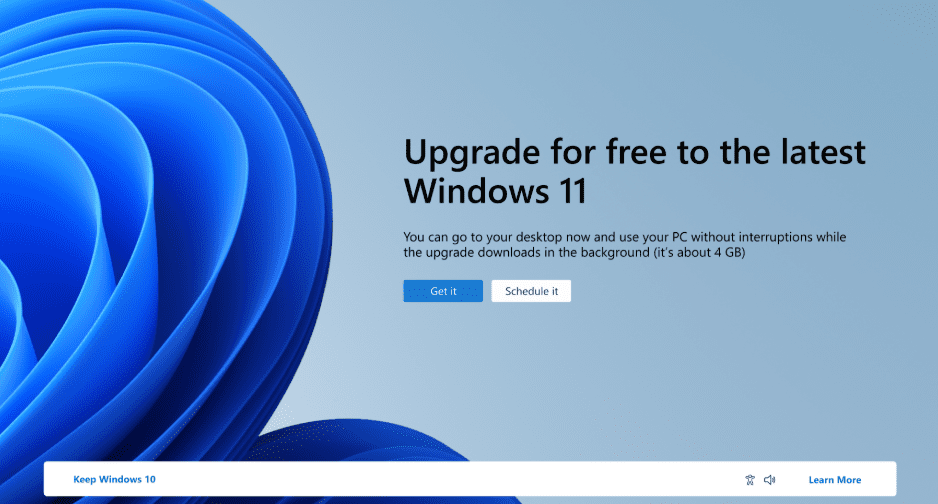
Let’s dive into what this tool does, who it’s for, and what it means for the future of Windows users.
🔄 What Is This New Migration Tool?
Microsoft has introduced a PC-to-PC transfer feature built directly into Windows 10. Though still under testing, this tool is expected to roll out soon to the general public.
✔️ Key Features:
- Transfers your complete user profile from one Windows PC to another.
- Migrates settings, folders, apps, and data.
- Requires both PCs to be on the same network.
- Secure pairing using a generated code on both systems.
Once both PCs are connected and paired, you can easily migrate all your selected content to a new Windows 11 device without losing personalization or installed data.
🧪 Currently in Insider Preview
This feature is being tested through the Windows Insider Program and is available in specific builds. You may find it labeled under optional features as “Transfer” or “Migration Tool.” For early access:
- Join the Windows Insider Program
- Ensure you’re on Windows 10 Build 22H2 or higher
- Use tools like ViVeTool (advanced users only) to enable the feature manually
Note: As it’s still in preview, Microsoft hasn’t officially enabled this for all users yet, so features may change before the public release.
🖥️ Why Is Microsoft Rushing This?
🚨 Urgency Behind the Move:
- Windows 10 End-of-Life: Official support ends in October 2025.
- Upgrade Push: Microsoft is making a final effort to get the eligible 240 million systems moved to Windows 11.
- Linux Shift: Many users frustrated with Windows 11’s telemetry, account enforcement, and performance issues are considering alternatives like Linux.
- User Retention: Microsoft hopes this seamless migration experience encourages upgrades rather than abandonment of Windows altogether.
❗ What About Users With Incompatible PCs?
Unfortunately, Microsoft has not provided any upgrade options for the hundreds of millions of users with devices that don’t meet Windows 11’s hardware requirements (e.g., lack of TPM 2.0, unsupported CPUs). These users are left with two choices:
- Pay for Extended Security Updates (ESU) after October 2025.
- Switch to alternative operating systems, such as a Linux distribution.
This has caused considerable backlash among users who feel abandoned by Microsoft.
🧰 How to Use the New PC Transfer Tool (When Available)
Once released, here’s how the process will work:
- Go to Settings > Optional Features
- Look for a tool named something like “Transfer” or “Migration Tool.”
- Enable Windows Backup (New Version)
- Search “Windows Backup” in the Start Menu.
- You’ll find the new tool: “Transfer information to new PC.”
- Ensure Both PCs Are on the Same Network
- This is essential for secure transfer.
- Pair the Devices
- A code will appear on one PC and must be entered on the other.
- Start the Transfer
- Select what you want to move (apps, files, settings) and begin the process.
Note: As of now, the complete process is only available to Insider Build users, but Microsoft promises it will roll out broadly soon.
🧾 Additional Backup Capabilities
This tool is not just for PC-to-PC transfer. It also supports:








- Folder Backup
- App Data Backup
- Settings Synchronization
These features are valuable even for users who aren’t planning to upgrade right away.
⚠️ Why Some Users Are Still Hesitant to Upgrade
Many users continue to stick with Windows 10 due to:
- Privacy Concerns: Telemetry, Recall, and increased data collection in Windows 11.
- Forced Microsoft Account Sign-In: Local account setup has been made intentionally difficult.
- Performance Issues: Reports of bugs in the upcoming Windows 11 24H2 version.
- Familiarity: Users simply prefer Windows 10’s interface and performance.
Some are choosing to:
- Pay for Extended Security Updates.
- Install Windows 10 IoT LTSC edition.
- Switch to Linux distributions like Ubuntu, Fedora, or Linux Mint.
❓ Frequently Asked Questions
Q1: Is this tool available on all Windows 10 PCs now?
Not yet. It’s in testing via the Windows Insider Program. It will be rolled out to more users soon.
Q2: Will this tool be included in future Windows 10 updates?
Yes, Microsoft has indicated that it will be part of an upcoming official build before end-of-life support ends.
Q3: Do I need to use a Microsoft account to use this tool?
It’s likely, as Microsoft continues pushing for account-linked features.
Q4: What happens if I don’t upgrade to Windows 11?
After October 2025, your PC won’t receive security updates unless you purchase extended support or use alternatives.
📥 Download Links
- Join the Windows Insider Program: insider.windows.com
- Official Windows Backup Info: support.microsoft.com/backup
🏷️ Tags:
windows 10 migration tool, transfer to new pc, microsoft windows backup, pc to pc data transfer, windows 11 upgrade, windows 10 end of life, windows insider, windows 10 support
🔖 Hashtags:
#Windows10 #Windows11 #DataMigration #MicrosoftUpgrade #PCBackup #InsiderPreview #WindowsSupport #TechNews #WindowsTransferTool #LinuxAlternative
📝 Disclaimer:
This article is based on information available at the time of writing and is intended for educational and informational purposes only. Features discussed may change or be removed before public release. Users should always back up data independently before attempting system transfers or upgrades.








