Microsoft has taken a significant step forward by enhancing Notepad, one of the most basic and long-standing applications in the Windows operating system. While many users were disappointed by the deprecation of WordPad, it now seems Microsoft is rethinking its approach by adding advanced features to Notepad—making it a lightweight word processor in its own right.
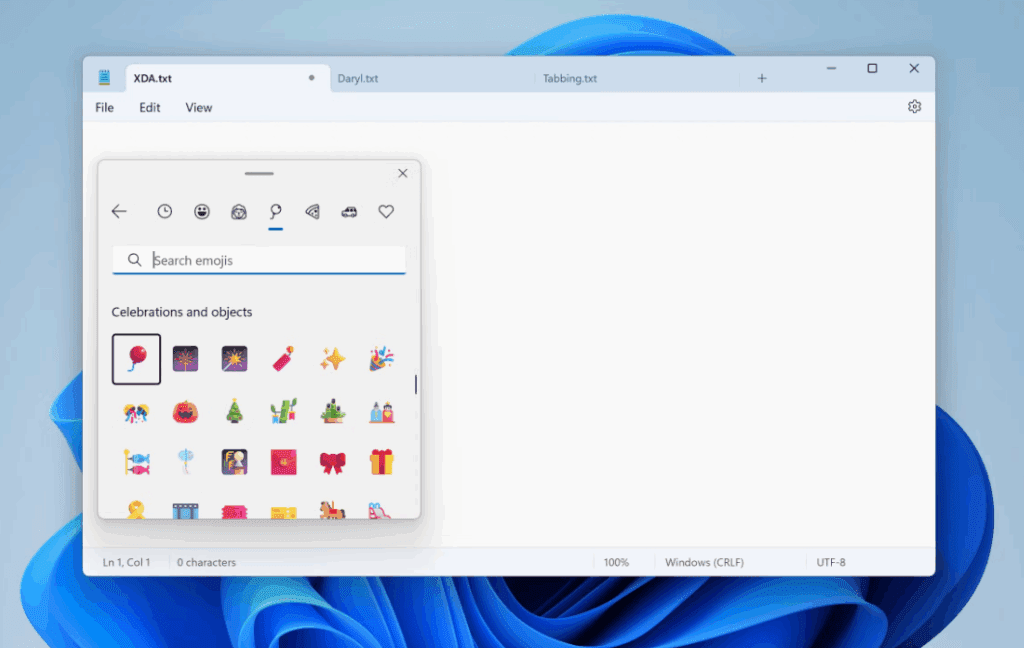
From Plain Text Editor to Smart Writing Tool
Traditionally, Notepad has served as a simple text editor with no formatting capabilities. Users who wanted to write something more polished—such as a resume or formal letter—relied on WordPad, which offered basic formatting features like bold, italics, font changes, and paragraph alignment.
Now, Microsoft is rolling out a significant update to Notepad in its Windows Insider Dev and Canary builds, equipping the app with several formatting tools previously only available in WordPad.
What’s New in Notepad?
Here are some of the new features being introduced:
- Text Formatting Options
Users can now access basic formatting tools like:- Bold, italic, underline
- Font size and style adjustments
- Text alignment (left, center, right)
- AI Text Assistance
Notepad is now also integrated with AI-powered writing tools, allowing users to:- Generate text using AI
- Rewrite selected content to improve clarity or tone
- Automatically suggest alternatives to user-written content
These features bring Notepad closer to a full-featured word processor, while maintaining the lightweight and fast-loading characteristics that users love.
Availability
As of now, these new features are being tested in the Windows Insider Dev and Canary channels, so not all users will see them immediately. If you’re part of the Windows Insider Program and on one of these builds, you may already have access to the updated Notepad experience.
For users on stable versions of Windows 11, the rollout may take a bit longer as Microsoft gathers feedback and fine-tunes the new functionality.
You can learn more or download the latest official Notepad app via the Microsoft Store here:
🔗 Microsoft Notepad on Microsoft Store
Why This Matters
The deprecation of WordPad left a gap for casual users who needed light word processing features. By enhancing Notepad, Microsoft is filling that void without forcing users to switch to heavier tools like Microsoft Word or third-party editors.
These updates not only modernize Notepad but also reflect Microsoft’s ongoing strategy to integrate AI into everyday tools to boost productivity.
Tags
Notepad update, Microsoft Notepad, Notepad AI features, WordPad replacement, Windows 11 Insider, Notepad formatting, Windows 11 text editor, Microsoft tools, lightweight word processor, AI writing tools









Hashtags
#MicrosoftNotepad #Windows11 #NotepadUpdate #AIWriting #TextEditor #WordPadAlternative #WindowsInsider #MicrosoftAI #ProductivityTools #TechNews
Disclaimer
Features discussed in this article are currently available only in Windows Insider Dev and Canary builds. They may change or be removed in future updates before public release. Always back up your data before installing pre-release software.







