In the world of compact computing, mini PCs continue to surprise us with how much power can fit into such a small package. Today, we’re reviewing a particularly interesting contender — the MeLE Quieter 4C Mini PC.
Despite its small footprint, this PC delivers capable performance, whisper-quiet operation, and surprising versatility. Let’s break it all down — from unboxing to benchmarks, real-world testing, Linux compatibility, and final verdict.
📦 Unboxing the MeLE Quieter 4C Mini PC
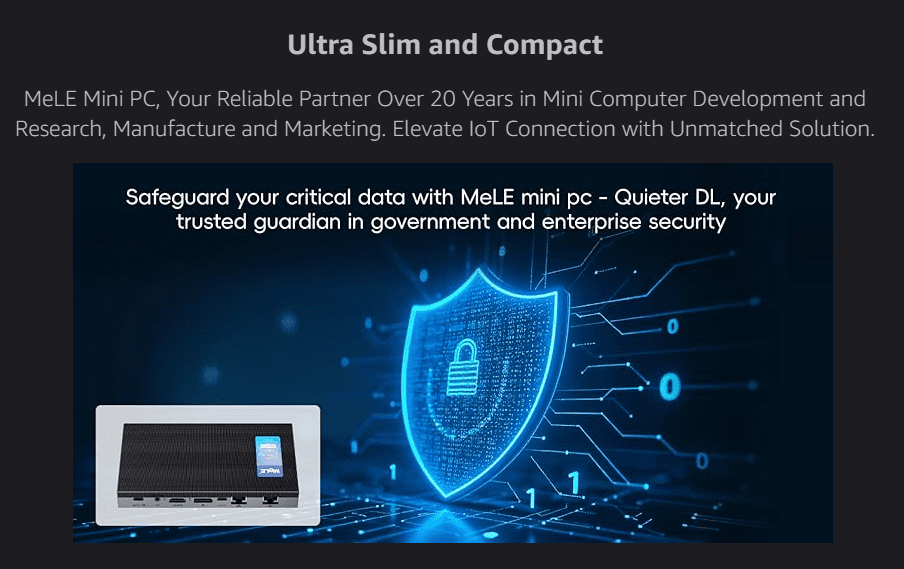
Straight out of the box, the MeLE Quieter 4C impresses with its compact design. It’s smaller than most smartphones (though a bit thicker) and features a premium all-metal chassis.
What’s in the box:
- MeLE Quieter 4C Mini PC
- Power adapter
- VESA mounting kit
- Quick start guide
- Passive cooling diagram
This model ships with:
- Intel N150 CPU
- 16GB DDR5 RAM
- 512GB NVMe SSD
- Windows 11 Pro (pre-activated)
Lower-end variants use eMMC storage and may have less RAM, so double-check specs before buying.
💻 Ports & Build Quality
This is one area where the Quieter 4C shines. It’s designed with connectivity in mind.
Front & Sides:
- Power button
- 3x USB-A ports (2x USB 3.0)
Rear:
- 2x HDMI 2.0
- 1x Gigabit Ethernet
- 1x 3.5mm Audio jack
- 2x USB-C ports (one for power, one supports data + alt-mode)
- 1x microSD card slot
The USB-C alt-mode support allows you to power and display with a single cable — great for cable management!
💰 Pricing Overview
At the time of writing, here’s a rough snapshot of pricing for the MeLE Quieter 4C:
| Region | Variant | Price |
|---|---|---|
| Amazon US | N100 | $206.99 (Prime), $229.99 (non-Prime) |
| Amazon UK | N100 / N150 | £239.99 / £289.99 |
| Amazon DE | N100 only | Varies |
| Amazon FR | N150 only | Varies |
| AliExpress | All variants | Cheaper but slower shipping |
📌 Buy Now on Amazon[Affiliate link]: MeLE Quieter 4C Mini PC










⚙️ Setup & Software
The PC comes with Windows 11 Pro, which is already activated. Setup is straightforward, but avoid connecting to the internet initially to bypass forced updates during OOBE (out-of-box experience).
You can easily dual-boot with Linux (more on that later), and the BIOS settings are surprisingly accessible for such a compact device.
📊 Synthetic Benchmark Results
🧪 Cinebench R23 (Multi-core):
- Manufacturer: 2073
- User tested: 1394 average
🧪 Cinebench R23 (Single-core):
- Manufacturer: 826
- User tested: 660 average
🧪 CrystalDiskMark (NVMe SSD):
- Read: 3470 MB/s
- Write: 3059 MB/s
🧪 Geekbench 6:
- Single-core: 1130
- Multi-core: 2332
🌐 Speedtest (Wi-Fi):
- Download: 102.38 Mbps
- Upload: 29.03 Mbps
- Ping: 6ms
These scores aren’t groundbreaking, but they’re more than enough for everyday computing.
🌡️ Thermals & Power Efficiency
The MeLE Quieter 4C has no fans, so it’s completely silent — but how does it handle heat?
Windows (HWMonitor):
- Idle: 54–56°C
- Load: 81–84°C
Linux (Sensors):
- Idle: 39–49°C
- Load: 63–72°C
🔌 Power Draw:
- Idle: ~4W
- Load: ~14W
That’s incredibly efficient, making this PC ideal for 24/7 operation, such as servers, digital signage, or IoT projects.
🧪 Linux Compatibility & Real-World Use
Tested on Kubuntu 24.10, Linux works well — as long as you use Kernel 6.9+ for proper GPU support. Other recommended distros include:
- Linux Mint
- Ubuntu LTS (with kernel upgrade)
- Manjaro (for bleeding-edge users)
For tasks like:
- Web browsing
- Office apps
- Media playback
- Terminal work
…it performs beautifully.
🎮 Light Gaming Performance
No, this isn’t a gaming rig — but you can enjoy:
- 🎮 Deltarune
- 🎮 Trackmania (older versions)
- 🎮 Xonotic (FOSS FPS)
- 🎮 Minecraft
- 🎮 Euro Truck Simulator 2 (at 1080p Low settings)
Heavy games like Cyberpunk 2077 or Warzone? Forget it. But for indie games and emulators, it’s more than fine.
🔍 Inside the Quieter 4C
Inside, you’ll find:
- Soldered Intel N150 CPU
- Soldered 16GB DDR5 RAM (non-upgradable)
- Swappable M.2 NVMe SSD (single slot)
No fans, no moving parts = no noise. However, expandability is limited.
✅ Final Verdict: Who Is This For?
🎯 Best For:
- Home/office users needing a silent and compact machine
- Developers or creators doing light Linux tasks
- Audio professionals needing zero-noise PCs
- Digital signage, HTPC, or 24/7 embedded applications
- Astrophotography setups (per manufacturer notes)
🛑 Not Recommended For:
- Video editors or gamers
- People who need future hardware upgrades
- Power users seeking high performance
The MeLE Quieter 4C is all about convenience, silence, and compact power, not brute strength.
📌 Frequently Asked Questions (FAQ)
❓ Can you upgrade RAM or CPU?
No. RAM and CPU are soldered.
❓ Is the SSD replaceable?
Yes. It uses a standard M.2 NVMe slot.
❓ Does it support dual monitors?
Yes, via dual HDMI ports or USB-C alt mode.
❓ Is it fanless?
Yes. 100% silent operation.
❓ Is it suitable for media servers?
Absolutely. Its efficiency and small size make it perfect for 24/7 use.
🔖 Tags
MeLE Quieter 4C, mini PC review, fanless PC, silent desktop, Linux mini PC, budget computing, low power PC, compact desktop, mini PC for media, NVMe SSD mini PC, Intel N150, Windows 11 Pro mini PC
📢 Hashtags
#MiniPC #MeLEQuieter4C #LinuxPC #FanlessPC #TechReview #CompactPC #Windows11Pro #LowPowerPC #SilentPC #Kubuntu
⚠️ Disclaimer
This article is based on hands-on testing and personal experience. The MeLE Quieter 4C was provided for review, but there was no financial compensation and no obligation to provide a positive review. Always double-check compatibility and specs before purchase.








