In a world rapidly shifting toward automation and digital assistance, OpenAI has just supercharged ChatGPT with a suite of game-changing updates. From Agent Mode that books appointments online to Codex that writes and tests code independently, these upgrades are no longer just “nice to have” — they’re redefining how we interact with AI.
This article unpacks every new feature of ChatGPT Pro, from real-world task execution to coding agents and smart project management. Whether you’re a casual user, a content creator, or a developer, this detailed guide will help you understand how to use these tools in practical, powerful ways.
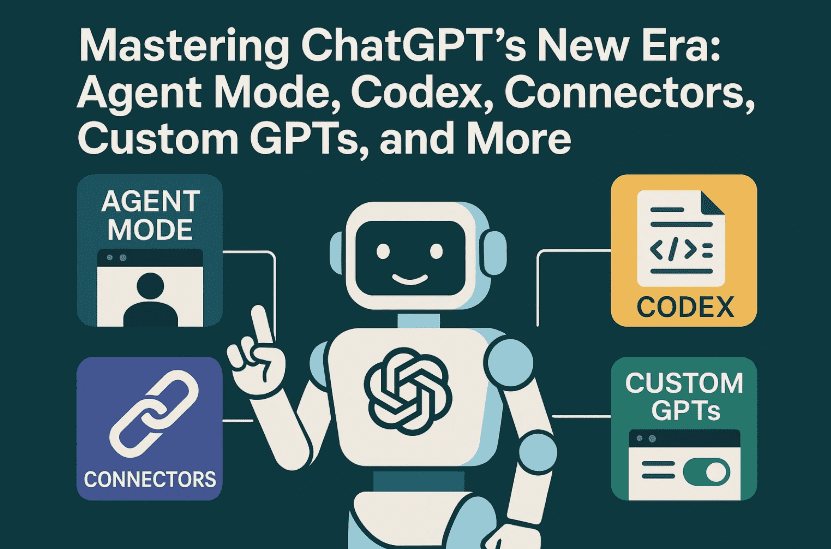
Let’s Start with the Big One: What is Agent Mode?
Imagine telling ChatGPT, “Find me a dentist appointment next week,” and it doesn’t just give you a list — it actually books it. That’s what Agent Mode does.
Unlike the traditional chat experience where you ask a question and get an answer, Agent Mode gives ChatGPT the ability to:
- Navigate websites
- Click buttons
- Fill forms
- Run code
- Manage files
- Use your calendar, email, and drive (if connected)
It’s like a digital personal assistant with a live virtual desktop, and it operates under your supervision. You’re always in control — Agent Mode will pause to ask for confirmations on sensitive tasks and you can interrupt it at any time.
How to Enable Agent Mode in ChatGPT
So far so good? Let’s now dive into how to actually activate this new feature:
Before you begin, note: Agent Mode is available only on Pro, Team, or Enterprise plans. It’s currently unavailable in the EU and Switzerland due to compliance constraints.
Steps to activate Agent Mode:
- Open any ChatGPT conversation.
- Click the dropdown from the message box.
- Select “Agent Mode”.
- You’ll now be in Agent Mode for this chat thread.
Now simply describe the task you want the AI to perform.
Example prompt:
“Find three top-rated Italian restaurants in New York with availability this Friday at 7 p.m., and book one that matches my calendar schedule.”











From there, ChatGPT will:
- Search the web
- Use booking platforms like OpenTable
- Cross-check your calendar (if connected)
- Confirm before taking any action
- Reserve the table and show all steps in real-time
Real-World Use Cases for Agent Mode
Let’s take a moment and explore just how far this capability goes. You can ask ChatGPT to:
- Book Appointments
“Find a dermatologist near me and book the earliest appointment.” - Summarize Emails
“Summarize my last 10 work emails and draft polite replies.”
(Only possible if Gmail is connected via Connectors.) - Schedule Meetings
“Schedule a team meeting for next Wednesday with Alice and Bob.”
(Will check calendar availability and create invites.) - Generate Slide Decks from Spreadsheets
“Create a project timeline slideshow from this spreadsheet.” - Plan Trips Dynamically
“Plan a one-week Tokyo trip under $2,000 with flights, hotel, and itinerary.”
All these tasks are performed in real-time, and you’ll see each click and form-fill happen in the sidebar with confirmation prompts.
A Quick Note on Agent Mode Limits
- Pro users get up to 400 agent messages/month.
- Team users get 40 agent messages/month.
- Each prompt or clarification counts as one message.
- You must manually connect accounts like Gmail, Calendar, or Drive for certain actions.
Privacy Tip: You can clear browsing data or revoke access to connected accounts anytime under ChatGPT settings.
Codex: ChatGPT’s New Autonomous Coding Agent
Let’s shift gears and talk about Codex — a developer’s dream.
Codex is not your regular code-writing AI. It’s a coding agent that:
- Connects directly to your GitHub repo
- Reads your entire codebase
- Makes real-time edits
- Runs and tests code in a sandbox environment
- Proposes commits or pull requests
This means Codex doesn’t hallucinate. It works with actual files and executes them just like a junior developer would.
Here’s what Codex can do:
- Fix bugs
- Refactor code
- Add features
- Write tests
- Update documentation
- Answer questions about your repo
Once connected to a repo, you’ll see “Codex” in the ChatGPT sidebar. Assign a task using natural language like:
“Add a feature to export user data as CSV and write a test for it.”
Codex will complete the task in the background, then return:
- A summary of changes
- Logs and test outputs
- Option to open a GitHub pull request
- Or download and apply a patch locally
It’s powered by the CodeX1 model, optimized for software engineering with up to 192k tokens of context (~3,000 pages). That’s enough to understand even massive monorepos without forgetting file relationships.
New Models: GPT-4.1, GPT-4 Mini, O3, and O3 Pro
If you thought GPT-4 was impressive, welcome GPT-4.1 — and it’s a beast.
Key improvements:
- 1 million token context window
(Yes, nearly 800,000 words) - Enhanced reasoning and coding accuracy
- Built for real-world applications
But that’s not all. There’s also:
- O3 (code name: Octane 3): Optimized for logic-heavy tasks
- O3 Pro: The most powerful OpenAI model for math, science, and research tasks
Note: These models don’t support image generation or canvas mode — they’re laser-focused on text, logic, and reasoning.
So What’s the Deal with Connectors?
Now we’ve done a lot of cool stuff, but you’re probably wondering — how does ChatGPT get access to your Gmail, Drive, or Slack?
That’s where Connectors come in.
Connectors are secure bridges between ChatGPT and your personal/work accounts. Supported platforms include:
- Gmail
- Google Calendar
- Google Drive
- Dropbox
- OneDrive
- SharePoint
- GitHub
- Slack
How to enable a Connector:
- Go to Settings → Connectors in ChatGPT.
- Click Connect next to the service you want.
- A login window will appear; grant permission.
- That’s it — you can now search, summarize, and interact with files from those sources.
Two types of connector use:
- Quick Chat Search: For simple queries like “Search Drive for budget sheet from August.”
- Deep Research Mode: For long-form, multi-source analysis with citations.
Example: “Compare EV sales trends across the US, China, and Europe based on my saved PDFs and Drive files.”
You can even combine connectors. Toggle which services ChatGPT should reference per query.
Custom GPTs: Now with Any Model You Want
Previously, custom GPTs were fun but limited. Now they’re powerful.
You can create personalized AI bots with:
- Unique instructions
- Knowledge files
- Memory
- Model selection (choose from GPT-4.1, 4 Mini, O3, O3 Pro, etc.)
Example Custom GPTs:
- AI Travel Planner: Always uses latest hotel APIs and calendar
- Grammar Coach: Prioritizes clarity and multilingual explanations
- Dungeon Master GPT: For RPG game storytelling
And now you can pick a lightweight or high-power model depending on the task. Great for performance, cost, and responsiveness.
Projects: The AI War Room You Didn’t Know You Needed
Let’s finish strong with one of the most underrated updates — Projects.
Think of a Project as a workspace containing:
- Multiple related chats
- Uploaded files
- Context memory
- Deep research capability
- Voice interaction (yes, you can talk to ChatGPT)
Why projects matter:
- Each project has its own persistent memory
- Great for research papers, business planning, content creation
- Allows multitasking and long-term continuity
To create a project:
- Click “New Project” in the sidebar.
- Add a name and description.
- Upload files, write notes, and start chats that persist context across sessions.
You can even enable Deep Research Mode within a project so ChatGPT pulls from your project files and memory — giving far more accurate, contextual results.
Frequently Asked Questions (FAQs)
Q1: Is Agent Mode safe for handling my email and calendar?
Yes. It requires manual authorization and cannot act without your permission. You can revoke access at any time.
Q2: Is Codex replacing GitHub Copilot?
Not exactly. Copilot works in real time within your IDE. Codex is a more autonomous, task-based tool ideal for larger assignments like bug fixes, documentation, and multi-file edits.
Q3: Which plan is required for Agent Mode and Codex?
You need to be on ChatGPT Pro, Team, or Enterprise. These features are not available on the free tier.
Q4: Can I use voice with Projects?
Yes! Project chats now support voice input, making interaction even smoother.
Q5: What’s the best use case for each model?
- GPT-4.1: Deep reasoning, grammar-heavy tasks, multi-language
- O3 Pro: Advanced research, math, technical writing
- GPT-4 Mini/O3 Mini: Fast responses, lightweight support bots
Final Thoughts
ChatGPT is no longer just a chatbot — it’s evolving into a full AI platform for real-world productivity. Whether it’s planning your vacation, replying to work emails, running code, or managing a business project, the new features like Agent Mode, Codex, Connectors, and Projects are turning ideas into action.
And with every release, it’s getting better, faster, and more intelligent.
So go ahead — build a custom GPT, connect your tools, start a project, and give Agent Mode a spin. The future of intelligent digital assistance has arrived.
Official Links:
- 🔗 ChatGPT (OpenAI)
- 🔗 Codex (OpenAI Dev Docs)
- 🔗 Skillshare (for AI-related courses, optional use)
Tags:
ChatGPT Agent Mode, Codex, OpenAI GPT-4.1, ChatGPT Connectors, Custom GPTs, AI Tools for Developers, ChatGPT Projects, Autonomous Agents, AI for Workflows, ChatGPT Updates
Hashtags:
#ChatGPT #AgentMode #Codex #GPT41 #CustomGPTs #AIWorkflow #OpenAI #Automation #AIProductivity #ArtificialIntelligence #GPTModels #TechGuide








