Apple’s MacBook Air lineup has evolved significantly over the years, from the legendary M1 to the latest M4 model. If you’re confused about which one to buy, this detailed comparison will help you decide based on design, performance, battery life, pricing, and future-proofing.
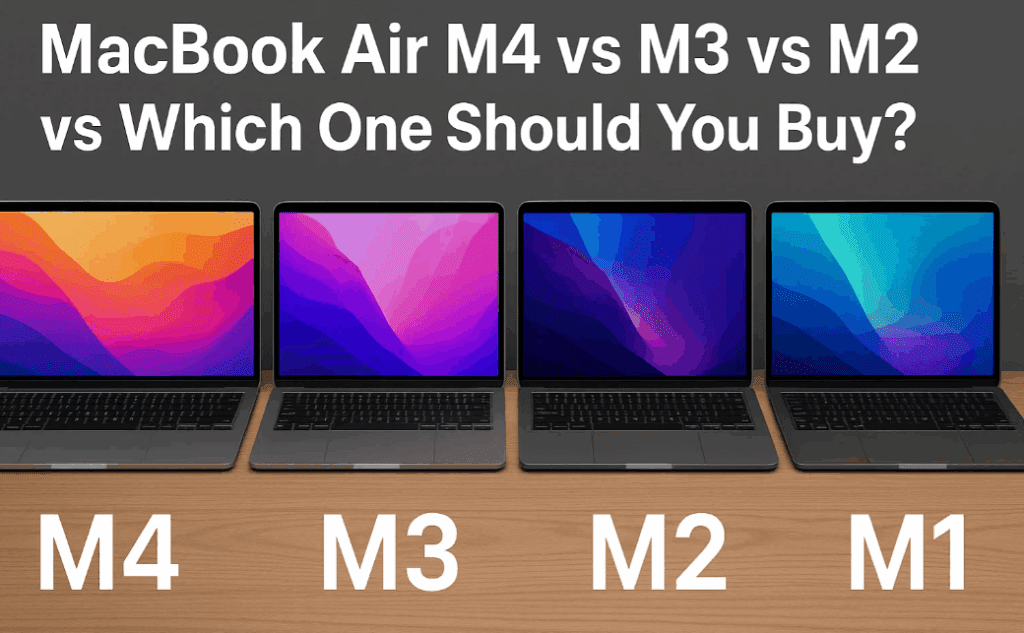
🔍 Quick Overview: MacBook Air Generations
| Model | Chipset | RAM (Base) | Storage (Base) | Battery Life | Price (Approx.) |
|---|---|---|---|---|---|
| M1 (2020) | M1 (5nm) | 8GB | 256GB | 7-8 hours | ₹50,000 – ₹60,000 |
| M2 (2022) | M2 (5nm) | 8GB | 256GB | 8-9 hours | ₹80,000 – ₹85,000 |
| M3 (2023) | M3 (3nm) | 8GB | 256GB | 10-11 hours | ₹95,000 – ₹98,000 |
| M4 (2024) | M4 (3nm) | 16GB | 256GB | 11-12 hours | ₹96,000 – ₹1,00,000 |
🎨 Design & Build Quality
1. M4, M3, M2 – Nearly Identical
- Slim, lightweight (same dimensions & weight).
- Aluminum unibody with a notch for the camera (except M1).
- New color options in M4: Sky Blue (replaces Space Gray).
2. M1 – Slightly Different
- Tapered design (thicker at the hinge).
- No notch (thicker bezels).
- Still solid build, but slightly bulkier.
Winner?
- If you love new colors → M4.
- If you prefer a classic look → M1/M2/M3.
🖥️ Display Comparison
| Model | Size | Brightness | Refresh Rate | Resolution |
|---|---|---|---|---|
| M1 | 13.3″ | 400 nits | 60Hz | 2560×1600 |
| M2/M3/M4 | 13.6″ | 500 nits | 60Hz | 2560×1664 |
Key Takeaways:
- M4, M3, M2 have a slightly larger screen with better brightness.
- All models still stuck at 60Hz (disappointing for this price range).
- M1 has slightly thicker bezels but similar sharpness.
Winner?
- M4/M3/M2 for better brightness & slightly bigger display.
🔊 Speakers & Audio
- M4, M3, M2: Four-speaker setup (Dolby Atmos, Spatial Audio).
- M1: Stereo speakers (still great, but not as immersive).
M4 vs M3?
- M4 has slightly clearer & wider sound (minor but noticeable).
Winner?
- M4 for best audio.
⚡ Performance: M4 vs M3 vs M2 vs M1
Chipset & CPU
| Model | Chipset | CPU Cores | Architecture |
|---|---|---|---|
| M1 | M1 | 8-core | 5nm |
| M2 | M2 | 8-core | 5nm |
| M3 | M3 | 8-core | 3nm |
| M4 | M4 | 10-core | 3nm |
RAM & Storage
- M4 starts with 16GB RAM (M1/M2/M3 start at 8GB).
- M2’s base SSD is slower (due to single NAND chip).
Performance Benchmarks (Geekbench 6)
| Model | Single-Core | Multi-Core |
|---|---|---|
| M1 | ~2,300 | ~8,500 |
| M2 | ~2,600 | ~9,800 |
| M3 | ~3,100 | ~12,000 |
| M4 | ~3,500 | ~14,000 |
Who Should Buy What?
- Basic Use (Web, Docs, Media) → M1 (still great).
- Moderate Work (Coding, Light Editing) → M2/M3.
- Heavy Work (4K Editing, AI Tasks) → M4.
Winner?
- M4 for best performance, M1 for budget buyers.
🔋 Battery Life
| Model | Battery Capacity | Expected Backup |
|---|---|---|
| M1 | 49.9Wh | 7-8 hours |
| M2 | 52.6Wh | 8-9 hours |
| M3 | 52.6Wh | 10-11 hours |
| M4 | 53.8Wh | 11-12 hours |
Winner?
- M4 for longest battery life.
📸 Webcam & Connectivity
| Model | Webcam | Wi-Fi | Bluetooth |
|---|---|---|---|
| M1 | 720p | Wi-Fi 6 | BT 5.0 |
| M2/M3 | 1080p | Wi-Fi 6E | BT 5.3 |
| M4 | 1080p (Center Stage + Desk View) | Wi-Fi 6E | BT 5.3 |
Winner?
- M4 for best webcam features.
💰 Pricing & Value for Money
| Model | Starting Price (India) | Best For |
|---|---|---|
| M1 | ₹50,000 – ₹60,000 | Budget buyers, students. |
| M2 | ₹80,000 – ₹85,000 | Better performance than M1. |
| M3 | ₹95,000 – ₹98,000 | Slightly better than M2. |
| M4 | ₹96,000 – ₹1,00,000 | Best overall (16GB RAM, 10-core CPU). |
Should You Consider Mac Mini M4?
- Mac Mini M4 (₹60,000) is great if you don’t need portability.
- But you’ll need to buy a monitor, keyboard, mouse (extra ₹15,000).
Winner?
- M4 MacBook Air for portability & performance.
- Mac Mini M4 for desk users on a budget.
🏆 Final Verdict: Which MacBook Air Should You Buy?
- Best Overall: MacBook Air M4 (16GB RAM, best performance & battery).
- Budget Pick: MacBook Air M1 (still great for basics).
- Mid-Range: MacBook Air M3 (better than M2, but M4 is close in price).
- Desktop Alternative: Mac Mini M4 (if you don’t need a laptop).
🔥 Latest Deals on MacBooks & Mac Mini
If you’re planning to upgrade your setup or get started with macOS for Hackintosh or native use, here are the best ongoing deals on various MacBook Air models and Mac Mini:
- 💻 MacBook Air M4 (2025) – Check Latest Price & Offers »
- 💻 MacBook Air M3 (2024) – Check Latest Price & Offers »
- 💻 MacBook Air M2 (2023) – Check Latest Price & Offers »
- 💻 MacBook Air M1 (2020) – Check Latest Price & Offers »
- 🖥️ Mac Mini M4 (2025) – Check Latest Price & Offers »
Note: Prices and availability may vary. These are affiliate links — purchasing through them helps support our content at no extra cost to you.









❓ FAQ
Q: Is M4 worth upgrading from M3?
A: Only if you need extra CPU cores & 16GB RAM. Otherwise, M3 is still great.
Q: Can M1 handle 4K video editing?
A: Yes, but not smoothly. M4/M3 are better for pro editing.
Q: Will M1 get future macOS updates?
A: Yes, but support may end sooner than M4.
Q: Why no 120Hz display on MacBook Air?
A: Apple reserves ProMotion for MacBook Pro.
🔖 Tags:
#MacBookAir #Apple #M4 #M3 #M2 #M1 #LaptopComparison #TechReview #BuyingGuide
Got questions? Drop them in the comments! 🚀